

Practical Data Analysis with Excel for Office Workers
 |
Description
Book Introduction
"Practical Data Analysis for Office Workers with Excel" is an optimized tool for data analysis, enabling you to perform everything from data remodeling to management, analysis, and prediction in a single step.
No Python or R data required! This textbook covers the basics and practical application of business data.
No Python or R data required! This textbook covers the basics and practical application of business data.
- You can preview some of the book's contents.
Preview
index
PART 01 Remodeling Data for Easier Management
[Shortcut]
01 Let's take a look at some useful shortcuts.
CASE 01 Learning shortcuts to move cell pointers in one go
CASE 02 Learning shortcuts to select a range at once
CASE 03 Learning Input and Editing Shortcuts
[Display format]
02 Let's specify the correct display format for the data.
CASE 01 Specifying a display format for numeric data
CASE 02 Specifying a display format for date data
CASE 03 Specifying a display format for time data
CASE 04 Specifying a display format for character data
[Basic Structure]
03 Learn the basic structure and writing methods of a database.
CASE 01 Understanding the Basic Structure of a Database
CASE 02: Considerations when Creating Basic Data
[Merge Cells]
04 Minimize cell merging to improve work efficiency.
CASE 01 Centering horizontal area without merging cells
[Core] CASE 02 Unmerge cells and fill vertical areas with the same value
[Core] CASE 03 Hide all but one value from the screen
CASE 04 Combining multiple items into one cell_IF, IFS functions
[Input method]
05 Enter data vertically.
CASE 01 Remove warning icons displayed in cells at once_ISTEXT function
CASE 02 Changing data to vertical orientation
CASE 03 Hide error messages displayed in cells
06 Let's organize the title into one line.
[Core] CASE 01: Consolidating multiple rows of titles into a single row
CASE 02 Deleting duplicate data
[Key] CASE 03 Finding and Displaying Duplicate Data
[Remove blank rows/columns]
07 Eliminate blank rows and columns
CASE 01 Entering a specific value instead of a blank cell
CASE 02 Deleting empty cells using a filter
CASE 03 Find and delete blank rows or columns
CASE 04 Deleting invisible special characters_CLEAN function
[Data Separation]
08 Let's separate the data entered in one cell into multiple cells.
[Core] CASE 01 Separating Data with Quick Fill
CASE 02 Separating date data into year, month, and day_YEAR, MONTH, DAY functions
[Core] CASE 03 Separating Character Data_LEFT, RIGHT, MID, LEN, SEARCH, IF, CHOOSE, IFERROR Functions
CASE 04 Separating Dates and Product Names with Text Splitter_IFERROR, LEFT, LEN Functions
[Key] Separating Region Names Using CASE 05 Replace
[Data Integration]
09 Let's merge data entered in multiple cells into one cell.
[Key] CASE 01 Merging Data with Quick Fill
CASE 02 Entering a combined date as a character value_&, CONCATENATE function
[Core] CASE 03 Entering a date value by combining characters_DATE function
[Save Format]
10 Change the data storage format
[Core] CASE 01 Converting numbers displayed as characters to actual numbers_VALUE, ISTEXT functions
[Core] CASE 02 Converting a date displayed as a string to an actual date_DATE, LEFT, MID functions
[Core] CASE 03 Displaying the Set Format as It Is_TODAY, TEXT, SUMPRODUCT Functions
PART 02 Analyzing Data to Meet Diverse Needs
[Sheet Comparison]
01 Let's compare two sheets and find the same values.
[Core] CASE 01 Finding the same value in another sheet_COUNTIF, IF function
CASE 02 Considering Precautions When Comparing Lists_TRIM, COUNTIF Functions
[Core] CASE 03 Finding identical values and retrieving only the necessary values_VLOOKUP, IFNA functions
CASE 04 COUNTIF function to retrieve only values not in the worksheet
[Data compilation]
Let's create aggregate data by item using function 02.
CASE 01: Preparing statistical data by removing duplicate items
CASE 02 Preparing conditional data with data validation_MONTH function
[Key] Creating aggregate data related to orders using the CASE 03 function_COUNTIFS, SUMIFS, AVERAGEIFS, and IFERROR functions
CASE 04 Formatting Aggregated Data
03 Let's create item-by-item aggregate data using partial sums.
[Key] CASE 01 Displaying the number of monthly orders using partial sums_IF, LEN, MONTH functions
CASE 02: Calculating the average quantity and unit price using multiple items
[Key] CASE 03: Retrieving only the partial sum results_LEFT, VLOOKUP, TRIM functions
CASE 04 Conditional Formatting for Aggregated Data
04 Let's create aggregate data by item using a pivot table.
CASE 01 Applying Various Function Effects with Pivot Tables
CASE 02 Filtering only the desired data using a slicer
CASE 03 Filtering data at once using a timeline
[Data Integration]
05 Let's merge data from multiple sheets into one.
CASE 01 Consolidating data from multiple sheets into the same location_SUM function
CASE 02 Consolidating data by business location into the same value
[Core] CASE 03: Integrating Business-Specific Data with Multiple Items
CASE 04: Consolidating Data by Business Location Using Pivot Tables
06 Let's gather data from multiple sheets into one sheet.
CASE 01: Consolidating data across all sheets using shortcut keys
[Key] CASE 02 Automating the Same Task Using Macros
[Key] CASE 03: Importing Data by Changing Sheets with VBA
[Core] CASE 04 Repeatedly copying data from all sheets using VBA
[Data Extraction]
07 Let's extract only data that satisfies the conditions.
CASE 01 Extracting only product prices exceeding the average using a filter
[Core] CASE 02: Extracting Only Data That Satisfies Conditions Using Advanced Filters
[Key] CASE 03: Extracting Order Counts by Last Name Using a Pivot Table
[Advanced Filter]
08 Automatically extract data with advanced filters
[Key] CASE 01: Define a name and extract only the desired business partners_IF, OFFSET, COUNTA functions
CASE 02 Extracting only data within a specific number of weeks_IF, DATE, YEAR, TODAY functions
[Core] CASE 03 Displaying Conditions with a Double List_INDIRECT Function
[Core] CASE 04 Automating Repetitive Tasks with Macros
[Key] CASE 05: Modifying a Macro Recorded in VBA
[Macro]
09 Let's create VAT data using card sales information.
CASE 01 Organizing downloaded card usage history
[Key] CASE 02 Moving Business Information to a Single Row Using a Macro
[Core] CASE 03: Calculating the number of sales and total sales by store using a pivot table_VLOOKUP function
[Function]
Let's create a form to view 10 order details at once.
CASE 01 Setting conditions to be entered in the form_OFFSET function
CASE 02 Connecting data for which you know the value to look for_VLOOKUP function
[Core] CASE 03 Connecting Data Where You Know Where to Find It_INDEX Function
[chart]
Compare sales data with 11 charts.
CASE 01 Preparing Data for Easy Chart Use
[Key] Automatically Connecting and Displaying Sales Data Using the CASE 02 Function
CASE 03: Decorating the chart with detailed options
[Shortcut]
01 Let's take a look at some useful shortcuts.
CASE 01 Learning shortcuts to move cell pointers in one go
CASE 02 Learning shortcuts to select a range at once
CASE 03 Learning Input and Editing Shortcuts
[Display format]
02 Let's specify the correct display format for the data.
CASE 01 Specifying a display format for numeric data
CASE 02 Specifying a display format for date data
CASE 03 Specifying a display format for time data
CASE 04 Specifying a display format for character data
[Basic Structure]
03 Learn the basic structure and writing methods of a database.
CASE 01 Understanding the Basic Structure of a Database
CASE 02: Considerations when Creating Basic Data
[Merge Cells]
04 Minimize cell merging to improve work efficiency.
CASE 01 Centering horizontal area without merging cells
[Core] CASE 02 Unmerge cells and fill vertical areas with the same value
[Core] CASE 03 Hide all but one value from the screen
CASE 04 Combining multiple items into one cell_IF, IFS functions
[Input method]
05 Enter data vertically.
CASE 01 Remove warning icons displayed in cells at once_ISTEXT function
CASE 02 Changing data to vertical orientation
CASE 03 Hide error messages displayed in cells
06 Let's organize the title into one line.
[Core] CASE 01: Consolidating multiple rows of titles into a single row
CASE 02 Deleting duplicate data
[Key] CASE 03 Finding and Displaying Duplicate Data
[Remove blank rows/columns]
07 Eliminate blank rows and columns
CASE 01 Entering a specific value instead of a blank cell
CASE 02 Deleting empty cells using a filter
CASE 03 Find and delete blank rows or columns
CASE 04 Deleting invisible special characters_CLEAN function
[Data Separation]
08 Let's separate the data entered in one cell into multiple cells.
[Core] CASE 01 Separating Data with Quick Fill
CASE 02 Separating date data into year, month, and day_YEAR, MONTH, DAY functions
[Core] CASE 03 Separating Character Data_LEFT, RIGHT, MID, LEN, SEARCH, IF, CHOOSE, IFERROR Functions
CASE 04 Separating Dates and Product Names with Text Splitter_IFERROR, LEFT, LEN Functions
[Key] Separating Region Names Using CASE 05 Replace
[Data Integration]
09 Let's merge data entered in multiple cells into one cell.
[Key] CASE 01 Merging Data with Quick Fill
CASE 02 Entering a combined date as a character value_&, CONCATENATE function
[Core] CASE 03 Entering a date value by combining characters_DATE function
[Save Format]
10 Change the data storage format
[Core] CASE 01 Converting numbers displayed as characters to actual numbers_VALUE, ISTEXT functions
[Core] CASE 02 Converting a date displayed as a string to an actual date_DATE, LEFT, MID functions
[Core] CASE 03 Displaying the Set Format as It Is_TODAY, TEXT, SUMPRODUCT Functions
PART 02 Analyzing Data to Meet Diverse Needs
[Sheet Comparison]
01 Let's compare two sheets and find the same values.
[Core] CASE 01 Finding the same value in another sheet_COUNTIF, IF function
CASE 02 Considering Precautions When Comparing Lists_TRIM, COUNTIF Functions
[Core] CASE 03 Finding identical values and retrieving only the necessary values_VLOOKUP, IFNA functions
CASE 04 COUNTIF function to retrieve only values not in the worksheet
[Data compilation]
Let's create aggregate data by item using function 02.
CASE 01: Preparing statistical data by removing duplicate items
CASE 02 Preparing conditional data with data validation_MONTH function
[Key] Creating aggregate data related to orders using the CASE 03 function_COUNTIFS, SUMIFS, AVERAGEIFS, and IFERROR functions
CASE 04 Formatting Aggregated Data
03 Let's create item-by-item aggregate data using partial sums.
[Key] CASE 01 Displaying the number of monthly orders using partial sums_IF, LEN, MONTH functions
CASE 02: Calculating the average quantity and unit price using multiple items
[Key] CASE 03: Retrieving only the partial sum results_LEFT, VLOOKUP, TRIM functions
CASE 04 Conditional Formatting for Aggregated Data
04 Let's create aggregate data by item using a pivot table.
CASE 01 Applying Various Function Effects with Pivot Tables
CASE 02 Filtering only the desired data using a slicer
CASE 03 Filtering data at once using a timeline
[Data Integration]
05 Let's merge data from multiple sheets into one.
CASE 01 Consolidating data from multiple sheets into the same location_SUM function
CASE 02 Consolidating data by business location into the same value
[Core] CASE 03: Integrating Business-Specific Data with Multiple Items
CASE 04: Consolidating Data by Business Location Using Pivot Tables
06 Let's gather data from multiple sheets into one sheet.
CASE 01: Consolidating data across all sheets using shortcut keys
[Key] CASE 02 Automating the Same Task Using Macros
[Key] CASE 03: Importing Data by Changing Sheets with VBA
[Core] CASE 04 Repeatedly copying data from all sheets using VBA
[Data Extraction]
07 Let's extract only data that satisfies the conditions.
CASE 01 Extracting only product prices exceeding the average using a filter
[Core] CASE 02: Extracting Only Data That Satisfies Conditions Using Advanced Filters
[Key] CASE 03: Extracting Order Counts by Last Name Using a Pivot Table
[Advanced Filter]
08 Automatically extract data with advanced filters
[Key] CASE 01: Define a name and extract only the desired business partners_IF, OFFSET, COUNTA functions
CASE 02 Extracting only data within a specific number of weeks_IF, DATE, YEAR, TODAY functions
[Core] CASE 03 Displaying Conditions with a Double List_INDIRECT Function
[Core] CASE 04 Automating Repetitive Tasks with Macros
[Key] CASE 05: Modifying a Macro Recorded in VBA
[Macro]
09 Let's create VAT data using card sales information.
CASE 01 Organizing downloaded card usage history
[Key] CASE 02 Moving Business Information to a Single Row Using a Macro
[Core] CASE 03: Calculating the number of sales and total sales by store using a pivot table_VLOOKUP function
[Function]
Let's create a form to view 10 order details at once.
CASE 01 Setting conditions to be entered in the form_OFFSET function
CASE 02 Connecting data for which you know the value to look for_VLOOKUP function
[Core] CASE 03 Connecting Data Where You Know Where to Find It_INDEX Function
[chart]
Compare sales data with 11 charts.
CASE 01 Preparing Data for Easy Chart Use
[Key] Automatically Connecting and Displaying Sales Data Using the CASE 02 Function
CASE 03: Decorating the chart with detailed options
Detailed image
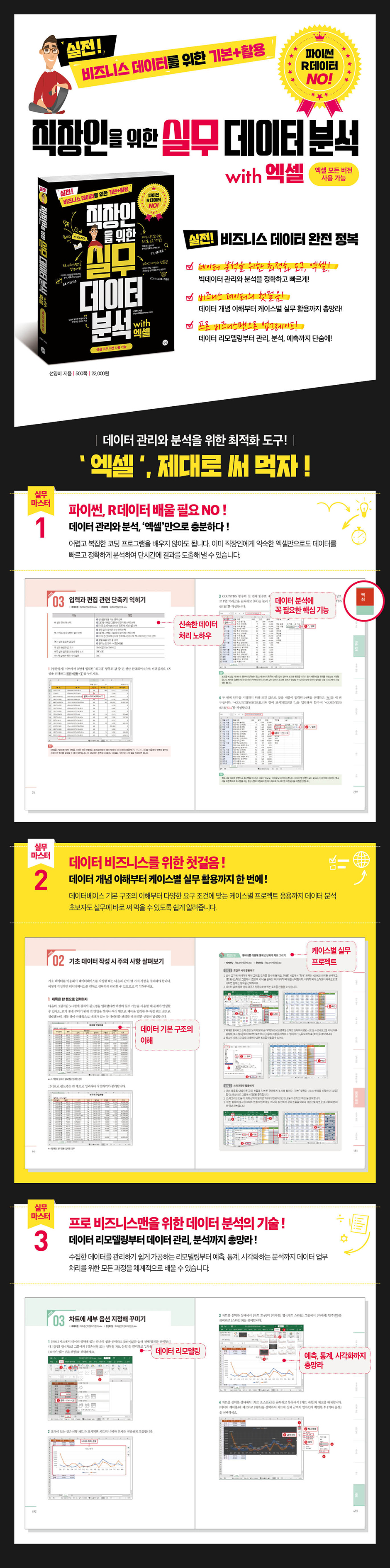
Publisher's Review
▷Excel, the optimal tool for data analysis!
_Big data management and analysis, accurately and quickly!
▷The first step to business data!
_Comprehensive coverage, from understanding data concepts to practical application in each case!
▷Upgrade to a professional businessman!
_From data remodeling to management, analysis, and prediction, all in one go!
Real-world! Master business data!
Let's use Excel, the optimal tool for data management and analysis, properly!
[Practical Master 1]
No need to learn Python or R data!
Data management and analysis, just with Excel!
You don't need to learn difficult and complex coding programs.
Only Excel, which is already familiar to office workers
It can also analyze data quickly and accurately to produce results in a short period of time.
[Practical Master 2]
The first step toward a data business!
From understanding data concepts to practical application in each case, all in one place!
From understanding the basic structure of a database to case-specific projects tailored to various requirements
We teach data analysis in an easy-to-understand way so that even beginners can immediately apply it to their work.
[Practical Master 3]
Data analysis skills for professional business people!
Everything from data remodeling to data management and analysis!
From remodeling to easily manage collected data, to analysis for prediction, statistics, and visualization.
You can systematically learn all the processes for data processing.
_Big data management and analysis, accurately and quickly!
▷The first step to business data!
_Comprehensive coverage, from understanding data concepts to practical application in each case!
▷Upgrade to a professional businessman!
_From data remodeling to management, analysis, and prediction, all in one go!
Real-world! Master business data!
Let's use Excel, the optimal tool for data management and analysis, properly!
[Practical Master 1]
No need to learn Python or R data!
Data management and analysis, just with Excel!
You don't need to learn difficult and complex coding programs.
Only Excel, which is already familiar to office workers
It can also analyze data quickly and accurately to produce results in a short period of time.
[Practical Master 2]
The first step toward a data business!
From understanding data concepts to practical application in each case, all in one place!
From understanding the basic structure of a database to case-specific projects tailored to various requirements
We teach data analysis in an easy-to-understand way so that even beginners can immediately apply it to their work.
[Practical Master 3]
Data analysis skills for professional business people!
Everything from data remodeling to data management and analysis!
From remodeling to easily manage collected data, to analysis for prediction, statistics, and visualization.
You can systematically learn all the processes for data processing.
GOODS SPECIFICS
- Date of issue: August 17, 2020
- Page count, weight, size: 500 pages | 188*257*21mm
- ISBN13: 9791165212490
- ISBN10: 1165212498
You may also like
카테고리
korean


korean

![GQ KOREA Mark (Monthly): December [2025]](http://librairie.coreenne.fr/cdn/shop/files/8ef265dbbfbf186523ed75ba7319009d.jpg?v=1765340328&width=3840)


