

iPad Drawing & Painting with Procreate
 |
Description
Book Introduction
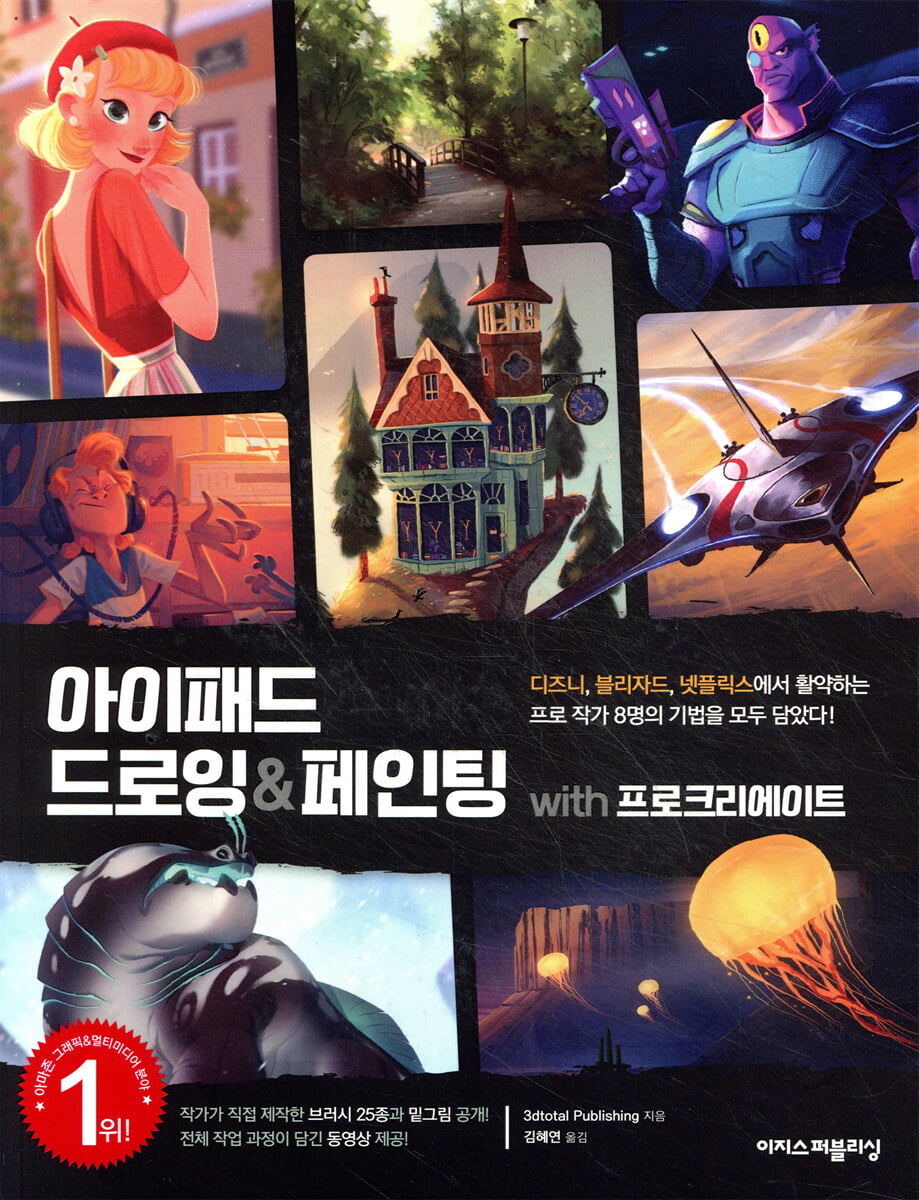
#1 on Amazon's 'Graphics & Multimedia' category, a global bestseller! “There’s no need to look at anything else. “I only read 20 pages and I learned more than I ever did from all the lectures and online videos I’ve ever seen or heard.” - From an Amazon reader review From basic Procreate tutorials to drawing from the works of professional artists around the world, this book, which has garnered rave reviews on Amazon from beginners to professionals in digital drawing and painting, has finally been published in Korea. From the basics of using Procreate, the #1 iPad graphics app. You can quickly learn the gestures you need to know! In the first yard, you can quickly learn the functions of 'Procreate', the number one iPad graphics app. Everything from basic usage to gestures that enhance the usability of the iPad, brushes used by professional artists, and various tips are revealed. Disney, Netflix, Blizzard, etc. Learn by following the work of eight professional artists active around the world! In the second section, we present eight projects that you can practice right away in Procreate. By following the work process step by step from conception to completion, you will soon become proficient in Procreate and have the experience of completing eight works with your own hands. Thanks to this, it provides a higher level of insight and inspiration to not only beginners but also intermediate and experienced writers who dream of becoming professional writers. |
- You can preview some of the book's contents.
Preview
index
Entering
Participating Artist Introduction & Gallery
Structure and Use of This Book
[First Yard] Basic Usage Guide - Getting Started with Procreate
01 Getting familiar with the first screen
02 Creating Basic Settings and Canvas
03 Gesture_Free your hands
04 Brush_The Magician of Drawing & Painting
05 Color_Using the Five Modes
06 Layer_Learning how to manage
07 Select_Only the parts I want!
08 Transformation_Shape as you like!
09 Adjustment_Various effects
10 Actions_Useful Options to Know
[Second Yard] Project Challenge - Copy 8 Completed Works from Professional Artists
11 [Fairy Tale] The Red Roof Bookstore in a Fairy Tale
12 [Character] Cute and lovely character
13 [Fantasy] A desert on a planet with a dreamy atmosphere
14 [Animation] Imaginary animals appearing in fantasy comics
15 [2D Art] Illustrations that look like they were drawn with gouache paints
16 [Concept Art] A sci-fi spaceship with a sense of dynamism and speed.
17 [Landscape] A forest landscape you'd want to walk through
18 [Movie Characters] Alien Characters in Science Fiction Movies
Glossary & Tooltips
Search
Participating Artist Introduction & Gallery
Structure and Use of This Book
[First Yard] Basic Usage Guide - Getting Started with Procreate
01 Getting familiar with the first screen
02 Creating Basic Settings and Canvas
03 Gesture_Free your hands
04 Brush_The Magician of Drawing & Painting
05 Color_Using the Five Modes
06 Layer_Learning how to manage
07 Select_Only the parts I want!
08 Transformation_Shape as you like!
09 Adjustment_Various effects
10 Actions_Useful Options to Know
[Second Yard] Project Challenge - Copy 8 Completed Works from Professional Artists
11 [Fairy Tale] The Red Roof Bookstore in a Fairy Tale
12 [Character] Cute and lovely character
13 [Fantasy] A desert on a planet with a dreamy atmosphere
14 [Animation] Imaginary animals appearing in fantasy comics
15 [2D Art] Illustrations that look like they were drawn with gouache paints
16 [Concept Art] A sci-fi spaceship with a sense of dynamism and speed.
17 [Landscape] A forest landscape you'd want to walk through
18 [Movie Characters] Alien Characters in Science Fiction Movies
Glossary & Tooltips
Search
Detailed image

Publisher's Review
Amazon's #1 book in the "Graphics & Multimedia" category, for beginners and experts alike!
The #1 graphic design book on Amazon, which has captivated everyone from beginners to professional illustrators, is now available in Korea.
This book will show you how to use Procreate, the powerhouse digital drawing and painting app, and the project processes of professional artists active in various fields such as games, movies, and comic books.
Reflecting the latest Procreate 5.0 version, go from basics to completion quickly!
It's okay if this is your first time with digital drawing & painting.
This book covers every step of the way, from creating your first canvas to exporting your finished work, using the latest Procreate 5.0 version, so you can build a solid foundation.
Start sketching your own colors with your iPad and the Procreate app.
From cute and adorable character portraits to landscapes, sci-fi spaceships, and fantasy animation background images!
Let's recreate the works of eight professional artists active around the world with our own hands!
Eight professional writers who have collaborated with leading studios around the world, including Disney, Netflix, and Blizzard, have rolled up their sleeves and gathered together.
This book contains eight eye-catching completed projects, along with detailed instructions on how to conceptualize your work, tips on using Procreate to bring your style to life, and how to enhance the details.
Improve your drawing skills and get inspired by following the steps of professional artists.
25 brushes created by the artist and sketches provided so even beginners can practice right away.
Just as the quality of a painting depends on the type of brush and how it is used, the brush plays a significant role in Procreate.
In particular, Procreate allows you to create your own brushes, so brushes made by professional artists are very useful.
We'll provide 25 brushes used by eight artists, along with sketches for each project so even beginners can jump right in.
You can thoroughly check the artist's techniques with a video that covers the entire work process!
If you are new to drawing, check out this time-lapse video of the entire process, along with the sketch.
You can see at a glance the process of enhancing the details of the work through the meticulous touch of professional writers.
Download data: Aegis website (www.easyspub.co.kr) -〉 [Data Room]
[This book's target audience]
- People who want to start a new hobby with their iPad
- Beginners who have started digital drawing
- Intermediate digital drawing student who dreams of becoming a professional
- Computer illustrators in need of new inspiration
The #1 graphic design book on Amazon, which has captivated everyone from beginners to professional illustrators, is now available in Korea.
This book will show you how to use Procreate, the powerhouse digital drawing and painting app, and the project processes of professional artists active in various fields such as games, movies, and comic books.
Reflecting the latest Procreate 5.0 version, go from basics to completion quickly!
It's okay if this is your first time with digital drawing & painting.
This book covers every step of the way, from creating your first canvas to exporting your finished work, using the latest Procreate 5.0 version, so you can build a solid foundation.
Start sketching your own colors with your iPad and the Procreate app.
From cute and adorable character portraits to landscapes, sci-fi spaceships, and fantasy animation background images!
Let's recreate the works of eight professional artists active around the world with our own hands!
Eight professional writers who have collaborated with leading studios around the world, including Disney, Netflix, and Blizzard, have rolled up their sleeves and gathered together.
This book contains eight eye-catching completed projects, along with detailed instructions on how to conceptualize your work, tips on using Procreate to bring your style to life, and how to enhance the details.
Improve your drawing skills and get inspired by following the steps of professional artists.
25 brushes created by the artist and sketches provided so even beginners can practice right away.
Just as the quality of a painting depends on the type of brush and how it is used, the brush plays a significant role in Procreate.
In particular, Procreate allows you to create your own brushes, so brushes made by professional artists are very useful.
We'll provide 25 brushes used by eight artists, along with sketches for each project so even beginners can jump right in.
You can thoroughly check the artist's techniques with a video that covers the entire work process!
If you are new to drawing, check out this time-lapse video of the entire process, along with the sketch.
You can see at a glance the process of enhancing the details of the work through the meticulous touch of professional writers.
Download data: Aegis website (www.easyspub.co.kr) -〉 [Data Room]
[This book's target audience]
- People who want to start a new hobby with their iPad
- Beginners who have started digital drawing
- Intermediate digital drawing student who dreams of becoming a professional
- Computer illustrators in need of new inspiration
GOODS SPECIFICS
- Date of issue: September 8, 2020
- Page count, weight, size: 216 pages | 215*280*20mm
- ISBN13: 9791163031840
- ISBN10: 1163031844
You may also like
카테고리
korean


korean

![GQ KOREA Mark (Monthly): December [2025]](http://librairie.coreenne.fr/cdn/shop/files/8ef265dbbfbf186523ed75ba7319009d.jpg?v=1765340328&width=3840)


