

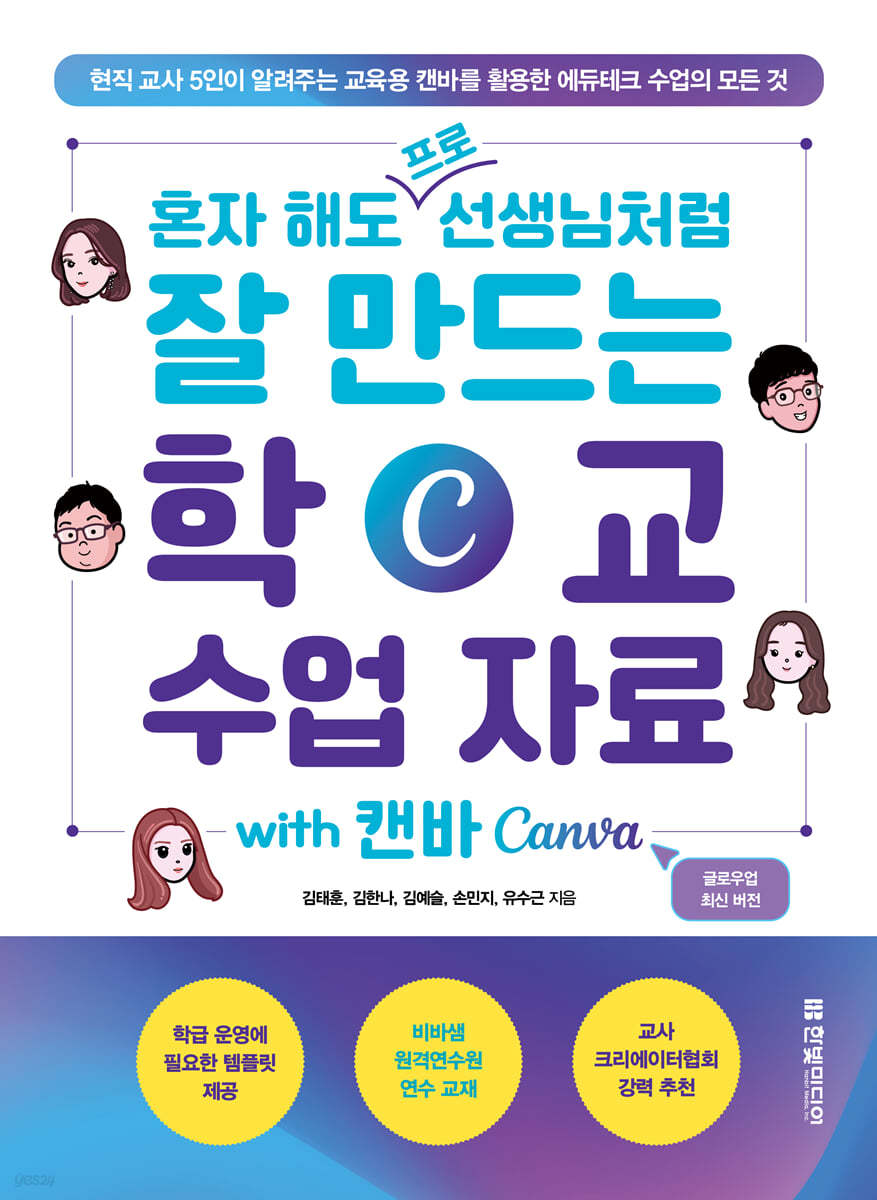
Create school materials like a professional teacher, even on your own with Canva.
 |
Description
Book Introduction
A guide to using EdTech Canvas, written by teachers for teachers.
Teaching with Canva kills two birds with one stone: student engagement and learning effectiveness!
Until now, there has been no book that teaches teachers how to use Canvas for educational purposes.
So, five current teachers working in kindergartens, elementary schools, middle schools, and high schools joined forces to publish this book.
This is not a manual that simply explains the functions of Canvas.
This is a guidebook for creating teaching materials exclusively for ‘teachers.’
It's okay even if you don't have any experience in the educational field or are not good at using design tools.
Each chapter includes "Teacher's Tips," which contain detailed explanations and field know-how from five current teachers, so you can enjoy creating teaching materials with Canva on your own.
You can also see the limitless possibilities of edutech through the 'Teacher's Special Lecture' at the end of the chapter.
If you follow the educational know-how of current teachers step by step, you will be surprised to find yourself creating teaching materials like a professional teacher, even on your own.
Instead of just thinking, "How should I teach today?", why not start dreaming of a classroom revolution with Canva right now?
Teaching with Canva kills two birds with one stone: student engagement and learning effectiveness!
Until now, there has been no book that teaches teachers how to use Canvas for educational purposes.
So, five current teachers working in kindergartens, elementary schools, middle schools, and high schools joined forces to publish this book.
This is not a manual that simply explains the functions of Canvas.
This is a guidebook for creating teaching materials exclusively for ‘teachers.’
It's okay even if you don't have any experience in the educational field or are not good at using design tools.
Each chapter includes "Teacher's Tips," which contain detailed explanations and field know-how from five current teachers, so you can enjoy creating teaching materials with Canva on your own.
You can also see the limitless possibilities of edutech through the 'Teacher's Special Lecture' at the end of the chapter.
If you follow the educational know-how of current teachers step by step, you will be surprised to find yourself creating teaching materials like a professional teacher, even on your own.
Instead of just thinking, "How should I teach today?", why not start dreaming of a classroom revolution with Canva right now?
- You can preview some of the book's contents.
Preview
index
preface
Recommendation
Structure of this book
Learn more
CHAPTER 01.
The basics of Canvas introduced by the teacher
LESSON 01.
Nice to meet you, Canva
It's the Era of EdTech | Canva Shines in Education | Three Things to Remember Before Getting Started with Canva
LESSON 02.
Create a Canva account and verify your educational credentials.
LESSON 03.
Invite students to Canva
LESSON 04.
Explore the Canva menu, focusing on the essentials.
The Canva home screen's main menu | A quick look at the simple editor screen | Setting up a work environment that makes working more comfortable
LESSON 05.
Using Canva in the classroom
New semester, introduce yourself!
LESSON 06.
Understanding Canvas Layers
The concept of layers
LESSON 07.
Decorate your pages using elements
LESSON 08.
Design a template with your own personality
LESSON 09.
Designing templates by applying effects to text
LESSON 10.
Animations that enrich your presentations
Create dynamic presentations with animation effects
[Professor Kim Tae-hoon's Special Lecture] Create a QR Code in 5 Seconds with Canva
CHAPTER 02.
Canva's AI features recommended by teachers
LESSON 01.
Write for me! Magic Write
Canva's Various AI Features | What Credits Mean in Canva
LESSON 02.
I added text and got pictures and videos? Magic Media
LESSON 03.
Edit images as you like, Magic Edit
LESSON 04.
Magic Expand to expand images
LESSON 05.
Extracting Objects from Images, Magic Grab
LESSON 06.
Recognize text in images, extract text
LESSON 07.
Erase the parts you want! Magic Eraser & Background Removal Tool
LESSON 08.
How to unify the background of all photos, Product Photos
LESSON 09.
Beat Sync, a Canvas that knows how to beat
LESSON 10.
Images Speak! D-ID AI Presenters
LESSON 11.
Expressing the desired texture, Magic Morph
LESSON 12.
Various apps that convert images
LESSON 13.
Turning sketches into images, Sketch To Life
[Special Lecture by Professor Kim Hanna] Creating Goods with Canvas Design
CHAPTER 03.
Get the most out of your teacher and Canva design
LESSON 01.
Create your own palette before designing
LESSON 02.
Design realistically using photos
LESSON 03.
Create high-quality teaching materials with special images
Teachers who know Bing Image Creator
LESSON 04.
Create a vivid fairy tale video using animation effects
LESSON 05.
Create videos from pictures, add music/audio, and share them.
LESSON 06.
Canva, of course! Also available on mobile
Canva makes working on mobile easy
[Special Lecture by Professor Kim Ye-seul] Turning Photos into Moving Pictures
CHAPTER 04.
More engaging class and promotional materials created by teachers
LESSON 01.
Creating a PPT linked to a class lesson
PPT on the topic of creating your own app
LESSON 02.
Create a self-introduction poster
Self-introduction poster starting with the teacher
LESSON 03.
Create a promotional poster
Promotional poster inviting you to the school graduation ceremony
LESSON 04.
Making a class newspaper for our class
A class newspaper that reflects our class's individuality
LESSON 05.
Making an easy music video together
LESSON 06.
Our school newsletter delivered through card news
Delivering AI Science Day news through card news
LESSON 07.
Creating a homepage for our class
What if you could create complex websites all in one place with Canva?
[Professor Minji Son's Special Lecture] Improving Work Efficiency with ChatGPT
CHAPTER 05.
Real-life learning examples using Canva by teachers and students
LESSON 01.
Creating a Self-Directed Learning Reward Chart
Self-directed learning reward table that gives you a sense of accomplishment for achieving your goals
LESSON 02.
Automatically send listing templates via email using Google tools
LESSON 03.
Project class conducted by group - Public Design
The significance of project-based learning
LESSON 04.
Creating a YouTube logo/channel art: A popular platform for promoting yourself
Kids these days who dream of becoming creators
LESSON 05.
Create a graduation PPT using the mass production feature.
LESSON 06.
Canva x Google Classroom: Blended Learning in Practice
What is Blended Learning? | Creating an Online Learning Hub: Google Classroom
[Professor Yoo Soo-geun's Special Lecture] Why You Should Use Google Classroom Together
Search
Recommendation
Structure of this book
Learn more
CHAPTER 01.
The basics of Canvas introduced by the teacher
LESSON 01.
Nice to meet you, Canva
It's the Era of EdTech | Canva Shines in Education | Three Things to Remember Before Getting Started with Canva
LESSON 02.
Create a Canva account and verify your educational credentials.
LESSON 03.
Invite students to Canva
LESSON 04.
Explore the Canva menu, focusing on the essentials.
The Canva home screen's main menu | A quick look at the simple editor screen | Setting up a work environment that makes working more comfortable
LESSON 05.
Using Canva in the classroom
New semester, introduce yourself!
LESSON 06.
Understanding Canvas Layers
The concept of layers
LESSON 07.
Decorate your pages using elements
LESSON 08.
Design a template with your own personality
LESSON 09.
Designing templates by applying effects to text
LESSON 10.
Animations that enrich your presentations
Create dynamic presentations with animation effects
[Professor Kim Tae-hoon's Special Lecture] Create a QR Code in 5 Seconds with Canva
CHAPTER 02.
Canva's AI features recommended by teachers
LESSON 01.
Write for me! Magic Write
Canva's Various AI Features | What Credits Mean in Canva
LESSON 02.
I added text and got pictures and videos? Magic Media
LESSON 03.
Edit images as you like, Magic Edit
LESSON 04.
Magic Expand to expand images
LESSON 05.
Extracting Objects from Images, Magic Grab
LESSON 06.
Recognize text in images, extract text
LESSON 07.
Erase the parts you want! Magic Eraser & Background Removal Tool
LESSON 08.
How to unify the background of all photos, Product Photos
LESSON 09.
Beat Sync, a Canvas that knows how to beat
LESSON 10.
Images Speak! D-ID AI Presenters
LESSON 11.
Expressing the desired texture, Magic Morph
LESSON 12.
Various apps that convert images
LESSON 13.
Turning sketches into images, Sketch To Life
[Special Lecture by Professor Kim Hanna] Creating Goods with Canvas Design
CHAPTER 03.
Get the most out of your teacher and Canva design
LESSON 01.
Create your own palette before designing
LESSON 02.
Design realistically using photos
LESSON 03.
Create high-quality teaching materials with special images
Teachers who know Bing Image Creator
LESSON 04.
Create a vivid fairy tale video using animation effects
LESSON 05.
Create videos from pictures, add music/audio, and share them.
LESSON 06.
Canva, of course! Also available on mobile
Canva makes working on mobile easy
[Special Lecture by Professor Kim Ye-seul] Turning Photos into Moving Pictures
CHAPTER 04.
More engaging class and promotional materials created by teachers
LESSON 01.
Creating a PPT linked to a class lesson
PPT on the topic of creating your own app
LESSON 02.
Create a self-introduction poster
Self-introduction poster starting with the teacher
LESSON 03.
Create a promotional poster
Promotional poster inviting you to the school graduation ceremony
LESSON 04.
Making a class newspaper for our class
A class newspaper that reflects our class's individuality
LESSON 05.
Making an easy music video together
LESSON 06.
Our school newsletter delivered through card news
Delivering AI Science Day news through card news
LESSON 07.
Creating a homepage for our class
What if you could create complex websites all in one place with Canva?
[Professor Minji Son's Special Lecture] Improving Work Efficiency with ChatGPT
CHAPTER 05.
Real-life learning examples using Canva by teachers and students
LESSON 01.
Creating a Self-Directed Learning Reward Chart
Self-directed learning reward table that gives you a sense of accomplishment for achieving your goals
LESSON 02.
Automatically send listing templates via email using Google tools
LESSON 03.
Project class conducted by group - Public Design
The significance of project-based learning
LESSON 04.
Creating a YouTube logo/channel art: A popular platform for promoting yourself
Kids these days who dream of becoming creators
LESSON 05.
Create a graduation PPT using the mass production feature.
LESSON 06.
Canva x Google Classroom: Blended Learning in Practice
What is Blended Learning? | Creating an Online Learning Hub: Google Classroom
[Professor Yoo Soo-geun's Special Lecture] Why You Should Use Google Classroom Together
Search
Detailed image

Publisher's Review
ㆍ It's really easy to do alone!
Even if you're not familiar with Canva or know how to design, you can create colorful teaching materials and conduct creative classes.
For teachers new to Canva, we'll show you how to upgrade to Canva for Education and how to integrate Canva into your classroom.
Even teachers with experience using Canva can gain new teaching methods and design know-how.
ㆍ Can be used in all educational settings from kindergarten to high school!
Five current teachers working in various educational settings share their vivid field experiences.
Create fun, independent teaching materials using Canva templates, and transform students' drawings into videos with generative AI.
Furthermore, we create high-quality educational content such as card news, websites, videos, presentations, and posters in a snap.
If you follow along step by step, you will become a “professional teacher” and be able to create teaching materials that will captivate the eyes and ears of your students.
ㆍ Reduce class preparation time and improve material quality with the teacher's tips and special lectures!
It's okay if you're not familiar with Canvas features.
For teachers, the canvas taught by teachers is more friendly and thorough.
'Teacher's Tips' contains real-life experiences from teaching and creating materials using Canva.
Aren't you curious about how to integrate various edtech tools, focusing on Canva, into your classes? "Teacher's Special Lecture" shares case studies utilizing various edtech tools, including ChatGPT, Animated Drawing, and Google Classroom.
This allows us to carry out school work creatively and efficiently.
Try it out in your class right now!
ㆍ Take online training and study with fellow teachers!
In March 2025, VivaSam's online job training program, based on the content of this book, is scheduled to open.
By studying Canva while taking VivaSam's online distance education training with this book, you too can become an edutech expert.
For more information, please visit the VivaSam Distance Education Training Center website.
What kind of readers is this book for?
ㆍ Daycare/kindergarten, elementary/middle/high school teachers and academy instructors who are new to Canva
Teachers and academy instructors who want to easily create educational content using only templates
ㆍEducation professionals interested in teaching methods that encourage student participation through Canva
Teachers and academy instructors who want to conduct school classes using edutech
ㆍ People who are curious about how to use Canva's AI features
ㆍ Prospective and current teachers interested in designing learning and teaching materials
Even if you're not familiar with Canva or know how to design, you can create colorful teaching materials and conduct creative classes.
For teachers new to Canva, we'll show you how to upgrade to Canva for Education and how to integrate Canva into your classroom.
Even teachers with experience using Canva can gain new teaching methods and design know-how.
ㆍ Can be used in all educational settings from kindergarten to high school!
Five current teachers working in various educational settings share their vivid field experiences.
Create fun, independent teaching materials using Canva templates, and transform students' drawings into videos with generative AI.
Furthermore, we create high-quality educational content such as card news, websites, videos, presentations, and posters in a snap.
If you follow along step by step, you will become a “professional teacher” and be able to create teaching materials that will captivate the eyes and ears of your students.
ㆍ Reduce class preparation time and improve material quality with the teacher's tips and special lectures!
It's okay if you're not familiar with Canvas features.
For teachers, the canvas taught by teachers is more friendly and thorough.
'Teacher's Tips' contains real-life experiences from teaching and creating materials using Canva.
Aren't you curious about how to integrate various edtech tools, focusing on Canva, into your classes? "Teacher's Special Lecture" shares case studies utilizing various edtech tools, including ChatGPT, Animated Drawing, and Google Classroom.
This allows us to carry out school work creatively and efficiently.
Try it out in your class right now!
ㆍ Take online training and study with fellow teachers!
In March 2025, VivaSam's online job training program, based on the content of this book, is scheduled to open.
By studying Canva while taking VivaSam's online distance education training with this book, you too can become an edutech expert.
For more information, please visit the VivaSam Distance Education Training Center website.
What kind of readers is this book for?
ㆍ Daycare/kindergarten, elementary/middle/high school teachers and academy instructors who are new to Canva
Teachers and academy instructors who want to easily create educational content using only templates
ㆍEducation professionals interested in teaching methods that encourage student participation through Canva
Teachers and academy instructors who want to conduct school classes using edutech
ㆍ People who are curious about how to use Canva's AI features
ㆍ Prospective and current teachers interested in designing learning and teaching materials
GOODS SPECIFICS
- Date of issue: October 31, 2024
- Page count, weight, size: 312 pages | 674g | 188*257*14mm
- ISBN13: 9791169212663
- ISBN10: 1169212662
You may also like
카테고리
korean


korean

![ELLE 엘르 스페셜 에디션 A형 : 12월 [2025]](http://librairie.coreenne.fr/cdn/shop/files/b8e27a3de6c9538896439686c6b0e8fb.jpg?v=1766436872&width=3840)


