

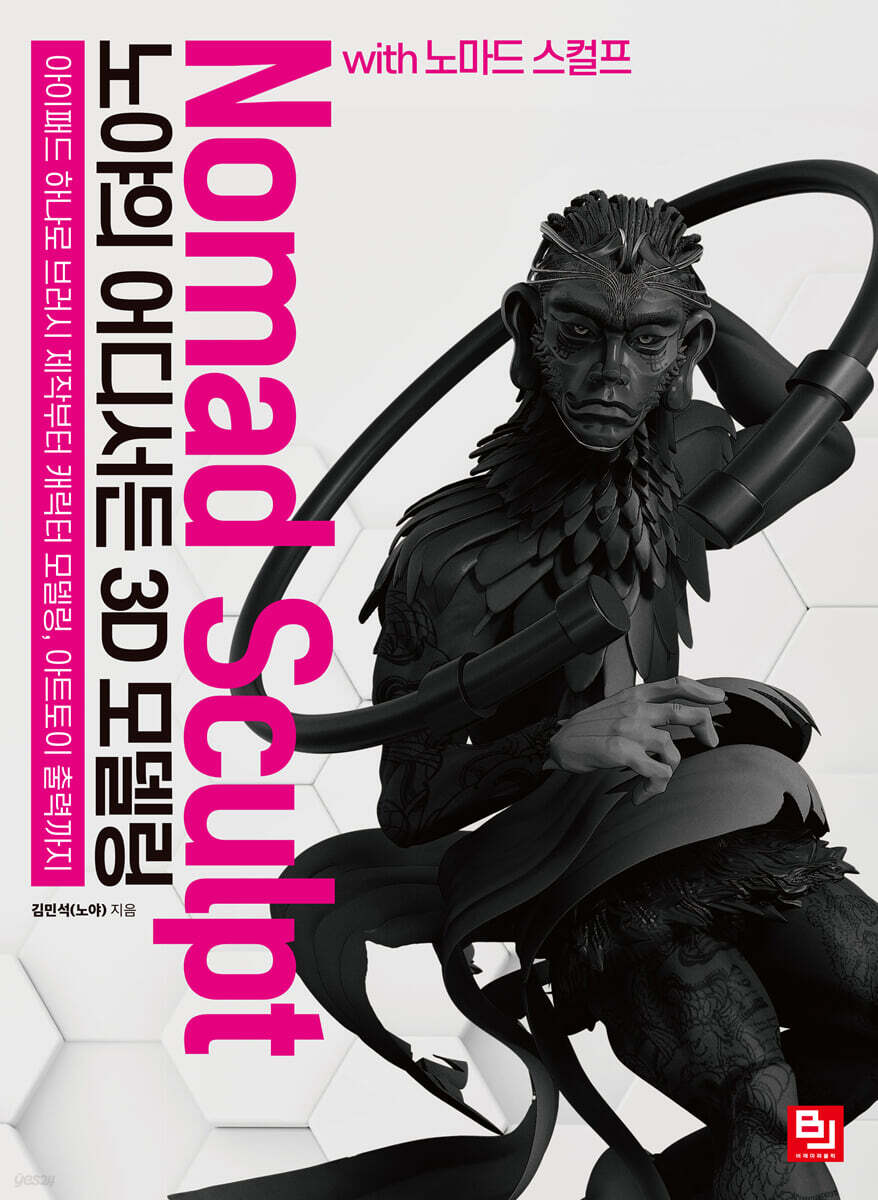
Noya's Anywhere 3D Modeling with Nomad Sculpt
 |
Description
Book Introduction
The easiest way to do 3D modeling, Nomad Sculpt
Anyone can learn it easily, so let's make creation a hobby!
Can you 3D model anywhere, anytime? Unlike the desktop era, Nomad Sculpt now makes it possible.
Nomad Sculpt is an app that lets you easily create 3D models using a tablet.
You can start working in 3D without any burden because it is a one-time purchase with a low cost and can be used for a lifetime.
Additionally, since the operation is intuitive, existing ZBrush users can quickly adapt to Nomad Sculpt, and because it is a touch-based interface, even beginners to 3D modeling can complete their creations as if they were playing with clay.
The amazing use of Nomad Sculpt allows for a variety of hobbies.
You can create characters using 3D creations and submit them to related contests, or create and sell stickers and emoticons.
You can also experience the expanded world of creation through 3D printing, such as art toys and figures.
『Noya and 3D Modeling Anywhere with Nomad Sculpt』 is packed with practical examples of seven props, animals, and people after learning how to use various tools, as well as tips that are rarely known, such as how to prepare and set up materials before work, how to manage files, how to manage capacity, how to make brushes, and how to integrate with Procreate.
Lastly, you can even experience making art toys, so you can experience the joy of seeing and touching the 3D creations on the screen as real objects.
Above all, the core of this book is that it focuses on explaining the essential parts of modeling and rendering.
Of course, the content is structured appropriately to help you learn the basics, so you can learn Nomad Sculpt in a solid manner.
If you frequently work on Nomad Sculpt based on what you've learned and review it when you get stuck, your skills will improve significantly.
Anyone can learn it easily, so let's make creation a hobby!
Can you 3D model anywhere, anytime? Unlike the desktop era, Nomad Sculpt now makes it possible.
Nomad Sculpt is an app that lets you easily create 3D models using a tablet.
You can start working in 3D without any burden because it is a one-time purchase with a low cost and can be used for a lifetime.
Additionally, since the operation is intuitive, existing ZBrush users can quickly adapt to Nomad Sculpt, and because it is a touch-based interface, even beginners to 3D modeling can complete their creations as if they were playing with clay.
The amazing use of Nomad Sculpt allows for a variety of hobbies.
You can create characters using 3D creations and submit them to related contests, or create and sell stickers and emoticons.
You can also experience the expanded world of creation through 3D printing, such as art toys and figures.
『Noya and 3D Modeling Anywhere with Nomad Sculpt』 is packed with practical examples of seven props, animals, and people after learning how to use various tools, as well as tips that are rarely known, such as how to prepare and set up materials before work, how to manage files, how to manage capacity, how to make brushes, and how to integrate with Procreate.
Lastly, you can even experience making art toys, so you can experience the joy of seeing and touching the 3D creations on the screen as real objects.
Above all, the core of this book is that it focuses on explaining the essential parts of modeling and rendering.
Of course, the content is structured appropriately to help you learn the basics, so you can learn Nomad Sculpt in a solid manner.
If you frequently work on Nomad Sculpt based on what you've learned and review it when you get stuck, your skills will improve significantly.
- You can preview some of the book's contents.
Preview
index
introduction
Recommendation
How to read this book
Part 01 What is Nomad Sculpt?
Chapter 01 Introduction to the app and how to use it
Section 1 What is Nomad Sculpt?
Section 2 Where can I use the Nomad Sculpt?
Chapter 02 Preparation and Setting
Section 1 Tablet Performance for Nomad Sculpt
Section 2 What to prepare for Nomad Sculpt
Section 3 Nomad Sculpt App Basic Settings
Chapter 03 Interface Basics and File Management
Section 1 Basic Screen Operation Methods
Section 2 Usage and Name by Interface Location
Section 3 File Types
Section 4 How to Organize Files
Section 5 How to Export Files
Part 02 Voxel and capacity management and basic shapes
Chapter 01 What is a scene (servable tool)?
Section 1: Learn about the scene
Section 2 Adding and Deleting Shapes
Section 3 Repeating Functions of Shapes (Repeaters)
Section 4 Individual Functions of Shapes
Section 5 Organizing with the Shape Group Tool
Section 6 Subtractive Modeling with Voxel Remeshing and Boolean
Chapter 02 Gizmo, Understanding Basic Shapes
Section 1 Frequently used shapes (spheres, boxes, cylinders)
Section 2 Shapes that do not require much space (torus, cone, icosahedron, UV sphere, plane, triplanar, head)
Section 3: Learn about the Tube Tool
Section 4: Learning About Gizmos
Chapter 03 Symmetry Functions
Section 1 Basics of Symmetry X-axis, Y-axis, Z-axis
Section 2 What is radioactivity?
Section 3 Mirroring Function
Section 4: Understanding Initialization Settings
Chapter 04 Capacity Management and Surface Cleaning
Section 1: Learning About Messaging
Section 2 What is multi-resolution?
Section 3 What is Voxel Remeshing?
Section 4 Differences between Multiresolution and Voxel Remeshing
Section 5 Surface Preparation and Finding the Appropriate Capacity
Section 6: Understanding Decimation
PART 03 Brushes in Detail
Chapter 01 Nomad Brush Types
Section 1 Brushes for Shape
Section 2 Brushes for Details
Section 3 Additional Brushes
Chapter 02 My Own Brush
Section 1 How to Make a Brush
Section 2: My own brush used by artist Kim Noya
Part 04: Painting and Texture
Chapter 01 Painting and Material Settings
Section 1 How to Use Painting Brushes
Section 2: Learning Various Painting Methods
Section 3 Expressing texture through roughness and metallicity
Section 4: Expressing various textures through material settings
Chapter 02 Understanding Shading
Section 1 Basic Shading Changes
Section 2 Changing the surrounding environment image and rotating the environment
Part 05: Understanding Lighting and Rendering
Chapter 01 Lighting Settings
Section 1 Types of Lighting
Section 2 How to Use Lighting Effectively
Chapter 02 Post-processing related settings
Section 1 Understanding the Basic Settings of Post-Processing
Section 2 Saving Your Own Post-Processing Settings
Section 3: Causal Relationships Between Lighting, Materials, and Post-Processing
Section 4 Rendering and Extracting Images
Part 06 Making Various Props
Chapter 01: Making a Cup Using Subtraction Modeling
Chapter 02 Making Ceramics Using Lathe Tools and Tube Tools
Chapter 03 Creating various props with additional features
Section 1: Creating Plants
Section 2: Making a Nostalgic Phone
Section 3: Building a Retro Telephone
Section 4 Building a Shelf
Part 07 Creating Cute Animal Characters
Chapter 01 Basic Modeling
Section 1 Basic Facial Modeling
Section 2: Creating the torso and limbs and adjusting proportions
Chapter 02 Detailed Area Adjustment
Section 1: Creating Cute Feet Using the Masking Enhancement Feature
Section 2 Creating a Tail Using the Tube Tool
Chapter 03 Texture and Lighting Effects
Section 1 Color and Material Settings
Section 2 Lighting, Shading, and Post-Processing Settings
Chapter 04 Finishing and Rendering
Section 1: Placement after Decimation
Section 2 Post-editing and Applications in Procreate
Part 08 Understanding the Human Body, Creating Intermediate Characters
Chapter 01 Face and Hair Modeling
Section 1: Creating facial expressions using layer functions
Section 2: Creating Hair Using the Tube Tool and Masking Extraction
Chapter 02 Body Modeling and Posing Adjustments
Section 1 Understanding the Muscles of Characters 5 Heads or More
Section 2: Modeling Deformable Hands and Feet (Creating Your Own Assets)
Section 3 Moving the Gizmo and Posing Through Tubes
Chapter 03 Modeling of various props
Section 1: Modeling and Wrinkling Clothes
Section 2 Shoe Modeling Using the Masking Function
Section 3 Making Accessories
Chapter 04 Finishing and Rendering
Section 1 Setting Up Lighting and Post-Processing
Section 2: Placement after Decimation
Section 3 Post-editing and Applications in Procreate
Part 09 Making Art Toys
Chapter 01 Parting Art Toys
Section 1 Creating Joints Using Subtractive Modeling
Section 2 Organizing files by completed shape
Chapter 02 Completing the Art Toy
Section 1 3D Printing
Section 2 Materials for Making Toys
Section 3 Coloring with Various Materials
Conclusion
Recommendation
How to read this book
Part 01 What is Nomad Sculpt?
Chapter 01 Introduction to the app and how to use it
Section 1 What is Nomad Sculpt?
Section 2 Where can I use the Nomad Sculpt?
Chapter 02 Preparation and Setting
Section 1 Tablet Performance for Nomad Sculpt
Section 2 What to prepare for Nomad Sculpt
Section 3 Nomad Sculpt App Basic Settings
Chapter 03 Interface Basics and File Management
Section 1 Basic Screen Operation Methods
Section 2 Usage and Name by Interface Location
Section 3 File Types
Section 4 How to Organize Files
Section 5 How to Export Files
Part 02 Voxel and capacity management and basic shapes
Chapter 01 What is a scene (servable tool)?
Section 1: Learn about the scene
Section 2 Adding and Deleting Shapes
Section 3 Repeating Functions of Shapes (Repeaters)
Section 4 Individual Functions of Shapes
Section 5 Organizing with the Shape Group Tool
Section 6 Subtractive Modeling with Voxel Remeshing and Boolean
Chapter 02 Gizmo, Understanding Basic Shapes
Section 1 Frequently used shapes (spheres, boxes, cylinders)
Section 2 Shapes that do not require much space (torus, cone, icosahedron, UV sphere, plane, triplanar, head)
Section 3: Learn about the Tube Tool
Section 4: Learning About Gizmos
Chapter 03 Symmetry Functions
Section 1 Basics of Symmetry X-axis, Y-axis, Z-axis
Section 2 What is radioactivity?
Section 3 Mirroring Function
Section 4: Understanding Initialization Settings
Chapter 04 Capacity Management and Surface Cleaning
Section 1: Learning About Messaging
Section 2 What is multi-resolution?
Section 3 What is Voxel Remeshing?
Section 4 Differences between Multiresolution and Voxel Remeshing
Section 5 Surface Preparation and Finding the Appropriate Capacity
Section 6: Understanding Decimation
PART 03 Brushes in Detail
Chapter 01 Nomad Brush Types
Section 1 Brushes for Shape
Section 2 Brushes for Details
Section 3 Additional Brushes
Chapter 02 My Own Brush
Section 1 How to Make a Brush
Section 2: My own brush used by artist Kim Noya
Part 04: Painting and Texture
Chapter 01 Painting and Material Settings
Section 1 How to Use Painting Brushes
Section 2: Learning Various Painting Methods
Section 3 Expressing texture through roughness and metallicity
Section 4: Expressing various textures through material settings
Chapter 02 Understanding Shading
Section 1 Basic Shading Changes
Section 2 Changing the surrounding environment image and rotating the environment
Part 05: Understanding Lighting and Rendering
Chapter 01 Lighting Settings
Section 1 Types of Lighting
Section 2 How to Use Lighting Effectively
Chapter 02 Post-processing related settings
Section 1 Understanding the Basic Settings of Post-Processing
Section 2 Saving Your Own Post-Processing Settings
Section 3: Causal Relationships Between Lighting, Materials, and Post-Processing
Section 4 Rendering and Extracting Images
Part 06 Making Various Props
Chapter 01: Making a Cup Using Subtraction Modeling
Chapter 02 Making Ceramics Using Lathe Tools and Tube Tools
Chapter 03 Creating various props with additional features
Section 1: Creating Plants
Section 2: Making a Nostalgic Phone
Section 3: Building a Retro Telephone
Section 4 Building a Shelf
Part 07 Creating Cute Animal Characters
Chapter 01 Basic Modeling
Section 1 Basic Facial Modeling
Section 2: Creating the torso and limbs and adjusting proportions
Chapter 02 Detailed Area Adjustment
Section 1: Creating Cute Feet Using the Masking Enhancement Feature
Section 2 Creating a Tail Using the Tube Tool
Chapter 03 Texture and Lighting Effects
Section 1 Color and Material Settings
Section 2 Lighting, Shading, and Post-Processing Settings
Chapter 04 Finishing and Rendering
Section 1: Placement after Decimation
Section 2 Post-editing and Applications in Procreate
Part 08 Understanding the Human Body, Creating Intermediate Characters
Chapter 01 Face and Hair Modeling
Section 1: Creating facial expressions using layer functions
Section 2: Creating Hair Using the Tube Tool and Masking Extraction
Chapter 02 Body Modeling and Posing Adjustments
Section 1 Understanding the Muscles of Characters 5 Heads or More
Section 2: Modeling Deformable Hands and Feet (Creating Your Own Assets)
Section 3 Moving the Gizmo and Posing Through Tubes
Chapter 03 Modeling of various props
Section 1: Modeling and Wrinkling Clothes
Section 2 Shoe Modeling Using the Masking Function
Section 3 Making Accessories
Chapter 04 Finishing and Rendering
Section 1 Setting Up Lighting and Post-Processing
Section 2: Placement after Decimation
Section 3 Post-editing and Applications in Procreate
Part 09 Making Art Toys
Chapter 01 Parting Art Toys
Section 1 Creating Joints Using Subtractive Modeling
Section 2 Organizing files by completed shape
Chapter 02 Completing the Art Toy
Section 1 3D Printing
Section 2 Materials for Making Toys
Section 3 Coloring with Various Materials
Conclusion
Detailed image

Publisher's Review
Readers who need this book
- Anyone who wants to get started with 3D modeling using a tablet
- A 3D modeler who wants to break free from the constraints of space and time.
- Anyone who wants to learn the core of creating 3D creations with Nomad Sculpt
- Aspiring writers who want to develop unique work skills
- Anyone who wants to make an art toy with Nomad Sculpt
- People who want to pursue creative work as a hobby
- Anyone who wants to get started with 3D modeling using a tablet
- A 3D modeler who wants to break free from the constraints of space and time.
- Anyone who wants to learn the core of creating 3D creations with Nomad Sculpt
- Aspiring writers who want to develop unique work skills
- Anyone who wants to make an art toy with Nomad Sculpt
- People who want to pursue creative work as a hobby
GOODS SPECIFICS
- Date of issue: June 10, 2025
- Page count, weight, size: 264 pages | 188*257*20mm
- ISBN13: 9791165923242
- ISBN10: 1165923246
You may also like
카테고리
korean


korean

![ELLE 엘르 스페셜 에디션 A형 : 12월 [2025]](http://librairie.coreenne.fr/cdn/shop/files/b8e27a3de6c9538896439686c6b0e8fb.jpg?v=1766436872&width=3840)


