

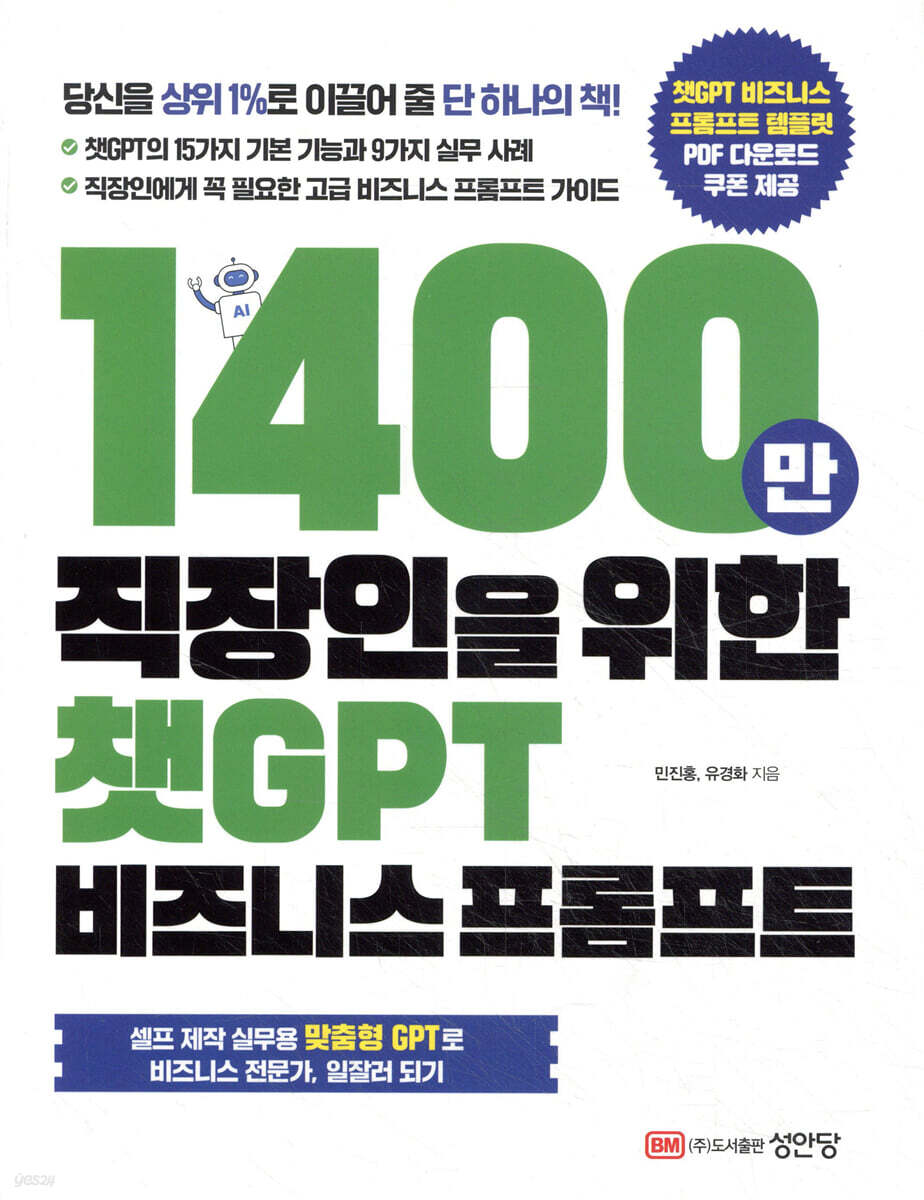
ChatGPT Business Prompt for 14 Million Office Workers
 |
Description
Book Introduction
15 Basic Functions and 9 Practical Use Cases of ChatGPT
Introducing customized GPT, the advanced business prompt essential for office workers!
A competent secretary who enables one person to do the work of ten people.
AI Prompt 107 All Guide!
This is a prompt guide that allows you to use ChatGPT as a capable AI secretary, enabling one person to complete in a week the work that used to take an office worker a month, in 30 minutes the 2-hour report that used to take a day, and in just one person the work of 10 people.
For all business professionals who want to maximize work efficiency by utilizing ChatGPT in their business practices, it consists of prompt templates, actual examples, and output examples along with explanations corresponding to standard grammar.
All 107 business prompt templates in the text are also provided as PDFs so that anyone can easily apply them to the ChatGPT prompt window.
We present specific ChatGPT usage methods for each practical work situation so that anyone, from AI beginners to experts, can easily utilize them.
Part 1 covers 15 basic functions of ChatGPT, 9 practical cases, and things to keep in mind when introducing ChatGPT to work. Part 2 covers all the necessary aspects of office work, including how to use ChatGPT across businesses, planning proposals, information organization, presentations, marketing/PR, job changes/interviews, human resources/education, IT work, image video production, and communication.
In particular, we will introduce GPTs, a personalized AI tool provided by OpenAI, which can be usefully utilized in practice.
Introducing customized GPT, the advanced business prompt essential for office workers!
A competent secretary who enables one person to do the work of ten people.
AI Prompt 107 All Guide!
This is a prompt guide that allows you to use ChatGPT as a capable AI secretary, enabling one person to complete in a week the work that used to take an office worker a month, in 30 minutes the 2-hour report that used to take a day, and in just one person the work of 10 people.
For all business professionals who want to maximize work efficiency by utilizing ChatGPT in their business practices, it consists of prompt templates, actual examples, and output examples along with explanations corresponding to standard grammar.
All 107 business prompt templates in the text are also provided as PDFs so that anyone can easily apply them to the ChatGPT prompt window.
We present specific ChatGPT usage methods for each practical work situation so that anyone, from AI beginners to experts, can easily utilize them.
Part 1 covers 15 basic functions of ChatGPT, 9 practical cases, and things to keep in mind when introducing ChatGPT to work. Part 2 covers all the necessary aspects of office work, including how to use ChatGPT across businesses, planning proposals, information organization, presentations, marketing/PR, job changes/interviews, human resources/education, IT work, image video production, and communication.
In particular, we will introduce GPTs, a personalized AI tool provided by OpenAI, which can be usefully utilized in practice.
- You can preview some of the book's contents.
Preview
index
Part 1.
ChatGPT's core features and practical application know-how
Chapter 1: 15 Core Features of ChatGPT
1.1 Document Summarization: Extracting Key Content from Long Text
1.2 Sentiment Analysis: Identifying the emotional tone of a text
1.3 Data Analysis: Interpreting Numerical Data and Deriving Insights
1.4 Keyphrase extraction: Identifying important words or phrases
1.5 Needs Exploration: Uncovering Hidden Requirements
1.6 Error Checking: Checking your documentation for errors and inconsistencies.
1.7 Editing and Evaluation: Improve and evaluate the quality of your document.
1.8 Translation: Translation between different languages
1.9 Text Classification: Assigning Categories Based on Content
1.10 Expanding Your Thinking: Presenting New Perspectives and Ideas
1.11 Documentation: Creating different types of documents
1.12 Create a question: Create a quiz or test question.
1.13 Idea Generation: Supporting Creative Thinking
1.14 Coding: Writing and Debugging Programming Code
1.15 Information Retrieval: Providing information on a specific topic
Chapter 2: Practical Applications of ChatGPT - 9 Key Methods
Before entering 2.0
2.1 Writing Emails: Effective Business Communication
2.2 Creating a Mail Magazine (Newsletter): Creating Information-Rich Content
2.3 Creating Product/Service Manuals: Creating User-Friendly Guides
2.4 Writing Ad Copy: Developing Attention-Grabbing Phrases
2.5 Information Gathering: Comprehensive Research on a Specific Topic
2.6 Creating a Presentation Template: Designing an Effective Presentation Structure
2.7 Speech Writing: Creating Persuasive Speeches
2.8 Market Research and Marketing: Trend Analysis and Strategy Development
2.9 Creating Comparison Tables: Organizing Complex Information Clearly
Chapter 3: Precautions when Introducing ChatGPT to Work
3.1 Three key elements
Part 2.P Real-World! Business Prompt Course
Chapter 4: Using it Cleverly Across Your Business
4.1 Writing an Email
4.2 Sentence Correction 1
4.3 Sentence Correction 2
4.4 Minutes from the text records
4.5 Schedule Management
4.6 Consultation on how to proceed
4.7 Report Writing
4.8 Creating a Payment Document
4.9 Writing a Speech Manuscript
4.10 Establishment of internal regulations
4.11 Writing FAQs
4.12 Translation Request
4.13 Create a meeting agenda
4.14 Output the document to Word
4.15 Recommended Font Suggestions
4.16 Numbering the list
4.17 Summary of key points of difficult sentences
4.18 Explaining difficult concepts easily
4.19 How to acquire basic business knowledge
Chapter 5: Using it for Planning Proposals
5.0 Before entering
5.1 Deriving arguments and perspectives
5.2 Identifying Customers' Potential Needs
5.3 Filling out the questionnaire
5.4 Idea Generation
5.5 How to combine ideas
5.6 Brainstorming
5.7 Presenting the pros and cons
5.8 Presentation of opinions for and against
5.9 Similarity Diagram
5.10 Setting evaluation items
5.11 Comparison and Scoring
5.12 Event Planning
5.13 Planning
5.14 Proposal Writing
Chapter 6: Seven Ways to Organize Information
6.0 Before entering
6.1 Information Collection
6.2 Classification and Tagging
6.3 Summary (Site) + Using GPTs in WebPilot
6.4 Summary (PDF)*Using GPTs in PDF AI PDF
6.5 Summary (Video)*Using GPTs in Voxscript
6.6 Using GPTs in Whimsical Diagrams
6.7 Mind Map Creation*Using GPTs from Whimsical Diagrams
Chapter 7 Using it in Presentations
7.1 Documenting presentation materials
7.2 Writing a Script for Your Presentation
7.3.
Prepare presentation questions and answers
Chapter 8: Using it for Marketing and PR
8.1 Creating promotional materials
8.2 Marketing Analysis
8.3 Creating a Persona
8.4 Creating Hearing Items
8.5 User Interviews
8.6 Writing a press release
8.7 Writing a Catchphrase
8.8 Blog/Column Idea Generation
8.9 Web Writing
8.10 Writing SNS Post Ideas
8.11 Create a SNS post
8.12 Risk Management (SNS Problem Risk Check)
8.13 Website Structure and Content Creation
8.14 Creating website documents using keywords
Chapter 9: Using it to Prepare for Job Changes and Interviews
9.1 Writing a job experience report
9.2 Writing an English Resume
9.3 Interview Practice
Chapter 10: Using it for Human Resources and Training
10.1 Writing a Job Advertisement
10.2 Writing Performance Evaluation Feedback
10.3 Establishment of a training system
10.4 Training Planning
10.5 Workshop Conduct Methods and Tips
10.6 Icebreaker provided
Chapter 11: Using IT-related Work
11.1 Troubleshooting
11.2 Excel Function Description
11.3 Excel Macro (VBA) Description
11.4 Suggesting an appropriate graph format
11.5 Suggestions for available IT tools
11.6 Comparing Various IT Tools
Chapter 12 Using Image Video Production
12.1 Creating an Image
12.2 Writing prompts for image generation AI
12.3 Video Title Suggestions
12.4 Creating a Video Composition Plan
12.5 Writing a Video Script
12.6 Automatic video generation
Chapter 13: Using it for Communication
13.1 Career Counseling
13.2 One-on-one meeting with your boss
13.3 Consult with a mentor
13.4 Request for Encouragement and Praise
13.5 Failure and Complaints Counseling
13.6 Becoming Friends with ChatGPT
Comparison of Appendix A Generation
Guide to the Advertising AI Prompt Engineer Qualification Course
ChatGPT's core features and practical application know-how
Chapter 1: 15 Core Features of ChatGPT
1.1 Document Summarization: Extracting Key Content from Long Text
1.2 Sentiment Analysis: Identifying the emotional tone of a text
1.3 Data Analysis: Interpreting Numerical Data and Deriving Insights
1.4 Keyphrase extraction: Identifying important words or phrases
1.5 Needs Exploration: Uncovering Hidden Requirements
1.6 Error Checking: Checking your documentation for errors and inconsistencies.
1.7 Editing and Evaluation: Improve and evaluate the quality of your document.
1.8 Translation: Translation between different languages
1.9 Text Classification: Assigning Categories Based on Content
1.10 Expanding Your Thinking: Presenting New Perspectives and Ideas
1.11 Documentation: Creating different types of documents
1.12 Create a question: Create a quiz or test question.
1.13 Idea Generation: Supporting Creative Thinking
1.14 Coding: Writing and Debugging Programming Code
1.15 Information Retrieval: Providing information on a specific topic
Chapter 2: Practical Applications of ChatGPT - 9 Key Methods
Before entering 2.0
2.1 Writing Emails: Effective Business Communication
2.2 Creating a Mail Magazine (Newsletter): Creating Information-Rich Content
2.3 Creating Product/Service Manuals: Creating User-Friendly Guides
2.4 Writing Ad Copy: Developing Attention-Grabbing Phrases
2.5 Information Gathering: Comprehensive Research on a Specific Topic
2.6 Creating a Presentation Template: Designing an Effective Presentation Structure
2.7 Speech Writing: Creating Persuasive Speeches
2.8 Market Research and Marketing: Trend Analysis and Strategy Development
2.9 Creating Comparison Tables: Organizing Complex Information Clearly
Chapter 3: Precautions when Introducing ChatGPT to Work
3.1 Three key elements
Part 2.P Real-World! Business Prompt Course
Chapter 4: Using it Cleverly Across Your Business
4.1 Writing an Email
4.2 Sentence Correction 1
4.3 Sentence Correction 2
4.4 Minutes from the text records
4.5 Schedule Management
4.6 Consultation on how to proceed
4.7 Report Writing
4.8 Creating a Payment Document
4.9 Writing a Speech Manuscript
4.10 Establishment of internal regulations
4.11 Writing FAQs
4.12 Translation Request
4.13 Create a meeting agenda
4.14 Output the document to Word
4.15 Recommended Font Suggestions
4.16 Numbering the list
4.17 Summary of key points of difficult sentences
4.18 Explaining difficult concepts easily
4.19 How to acquire basic business knowledge
Chapter 5: Using it for Planning Proposals
5.0 Before entering
5.1 Deriving arguments and perspectives
5.2 Identifying Customers' Potential Needs
5.3 Filling out the questionnaire
5.4 Idea Generation
5.5 How to combine ideas
5.6 Brainstorming
5.7 Presenting the pros and cons
5.8 Presentation of opinions for and against
5.9 Similarity Diagram
5.10 Setting evaluation items
5.11 Comparison and Scoring
5.12 Event Planning
5.13 Planning
5.14 Proposal Writing
Chapter 6: Seven Ways to Organize Information
6.0 Before entering
6.1 Information Collection
6.2 Classification and Tagging
6.3 Summary (Site) + Using GPTs in WebPilot
6.4 Summary (PDF)*Using GPTs in PDF AI PDF
6.5 Summary (Video)*Using GPTs in Voxscript
6.6 Using GPTs in Whimsical Diagrams
6.7 Mind Map Creation*Using GPTs from Whimsical Diagrams
Chapter 7 Using it in Presentations
7.1 Documenting presentation materials
7.2 Writing a Script for Your Presentation
7.3.
Prepare presentation questions and answers
Chapter 8: Using it for Marketing and PR
8.1 Creating promotional materials
8.2 Marketing Analysis
8.3 Creating a Persona
8.4 Creating Hearing Items
8.5 User Interviews
8.6 Writing a press release
8.7 Writing a Catchphrase
8.8 Blog/Column Idea Generation
8.9 Web Writing
8.10 Writing SNS Post Ideas
8.11 Create a SNS post
8.12 Risk Management (SNS Problem Risk Check)
8.13 Website Structure and Content Creation
8.14 Creating website documents using keywords
Chapter 9: Using it to Prepare for Job Changes and Interviews
9.1 Writing a job experience report
9.2 Writing an English Resume
9.3 Interview Practice
Chapter 10: Using it for Human Resources and Training
10.1 Writing a Job Advertisement
10.2 Writing Performance Evaluation Feedback
10.3 Establishment of a training system
10.4 Training Planning
10.5 Workshop Conduct Methods and Tips
10.6 Icebreaker provided
Chapter 11: Using IT-related Work
11.1 Troubleshooting
11.2 Excel Function Description
11.3 Excel Macro (VBA) Description
11.4 Suggesting an appropriate graph format
11.5 Suggestions for available IT tools
11.6 Comparing Various IT Tools
Chapter 12 Using Image Video Production
12.1 Creating an Image
12.2 Writing prompts for image generation AI
12.3 Video Title Suggestions
12.4 Creating a Video Composition Plan
12.5 Writing a Video Script
12.6 Automatic video generation
Chapter 13: Using it for Communication
13.1 Career Counseling
13.2 One-on-one meeting with your boss
13.3 Consult with a mentor
13.4 Request for Encouragement and Praise
13.5 Failure and Complaints Counseling
13.6 Becoming Friends with ChatGPT
Comparison of Appendix A Generation
Guide to the Advertising AI Prompt Engineer Qualification Course
Detailed image

GOODS SPECIFICS
- Date of issue: February 12, 2025
- Page count, weight, size: 320 pages | 180*235*30mm
- ISBN13: 9788931535372
- ISBN10: 8931535376
You may also like
카테고리
korean


korean

![GQ KOREA Mark (Monthly): December [2025]](http://librairie.coreenne.fr/cdn/shop/files/8ef265dbbfbf186523ed75ba7319009d.jpg?v=1765340328&width=3840)


