

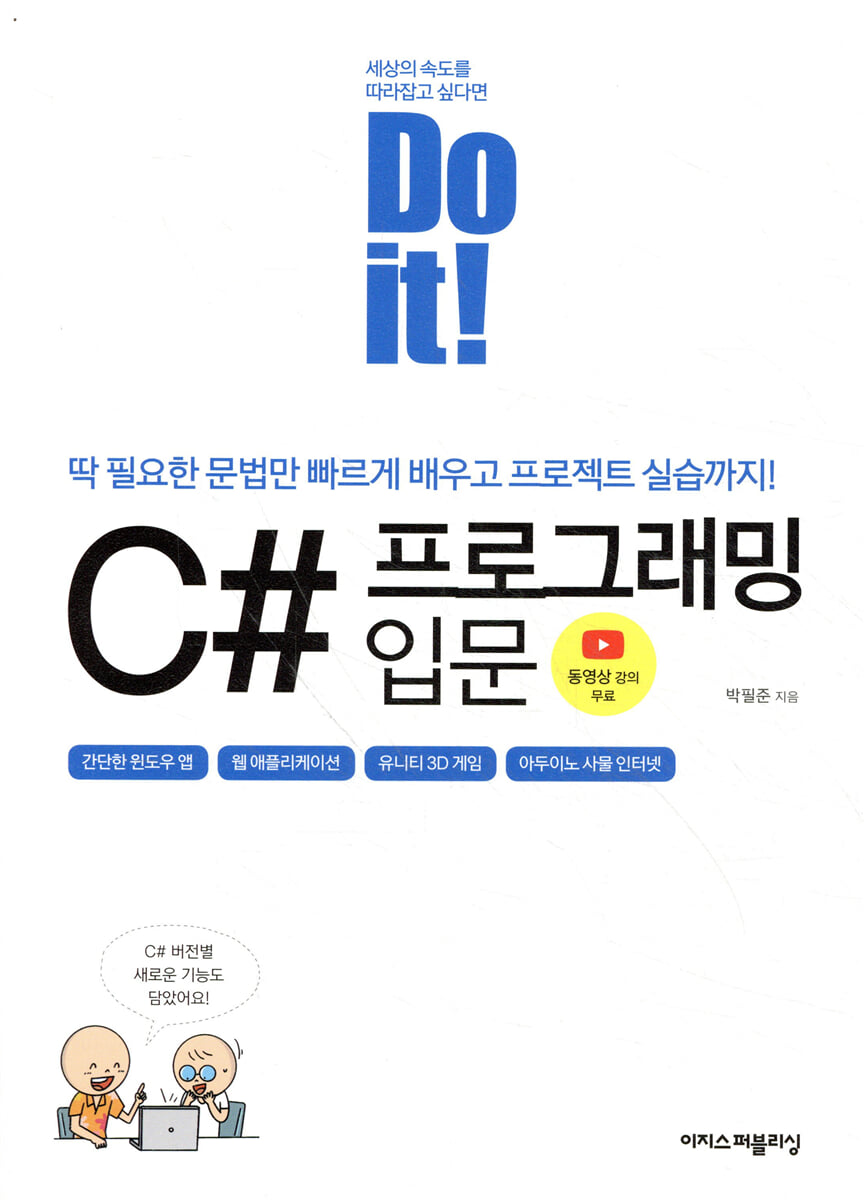
Do it! Introduction to C# Programming
 |
Description
Book Introduction
A quick shortcut to getting started with C#
From basic grammar to Unity games and Arduino applications!
This book is an introductory book to C# that covers the basics while also providing practical project practice.
It is structured so that you can quickly get started with C# and utilize it.
To avoid being bogged down in extensive and difficult grammar, we've focused on frequently used core functions, and we'll practice how to utilize C# in various fields, from Windows apps and web services to games and even the Internet of Things, through four projects.
Additionally, video lectures detailing the entire book's process are provided to assist learning, and the author-run community provides readers with a variety of content that complements the book.
From basic grammar to Unity games and Arduino applications!
This book is an introductory book to C# that covers the basics while also providing practical project practice.
It is structured so that you can quickly get started with C# and utilize it.
To avoid being bogged down in extensive and difficult grammar, we've focused on frequently used core functions, and we'll practice how to utilize C# in various fields, from Windows apps and web services to games and even the Internet of Things, through four projects.
Additionally, video lectures detailing the entire book's process are provided to assist learning, and the author-run community provides readers with a variety of content that complements the book.
- You can preview some of the book's contents.
Preview
index
==============
01 Learn C#
==============
01-1 Programming Language and C#
01-2 The Home of C#: The .NET Framework
01-3 Procedural vs. Object-Oriented Programming
01-4 What to make with C#?
===============
02 Getting Started with C#
===============
02-1 Installing Visual Studio
02-2 Creating Your First C# Program
02-3 Web Integrated Development Environment
================
03 Building C# Basics
================
03-1 Variables that store data
03-2 Control statements that determine the flow of the program
03-3 Cooking Data with Operators
03-4 Transferring data
Coding Challenge! Converting Celsius to Fahrenheit
====================
Learn about Class 04
====================
04-1 Classes and Instances
04-2 Beginning and End of Class
04-3 Class Inheritance and Reuse
Data transfer in class 04-4
Coding Challenge! Abstracting Cars
===============
05 Building C# Skills
===============
05-1 Using MSDN, the C# Knowledge Base
05-2 Handling Bundle Data
05-3 Handling Exceptions
Coding Challenge! Verifying if a Text is a Palindrome
=======================
06 Creating a Windows Program
=======================
06-1 Creating a WinForm
06-2 Creating a login window
06-3 Creating a Number Guessing Game
06-4 Creating a Calculator
Coding Challenge! Adding Real Number Calculation to Your Calculator
==================
07 Creating a Web Service
==================
07-1 Server and Client Environment
07-2 Creating an ASP.NET Web Service
Coding Challenge! Create a Web Service That Prints the Day of the Week
=======================
08 Creating 3D Games with Unity
=======================
08-1 Creating a Project with Unity
08-2 Moving Game Objects with C#
08-3 Creating a First-Person Jump Game
08-4 Adding collision and sound effects
08-5 Applying animation to characters
Coding Challenge! Creating a Unity Game
============================
09 Creating the Internet of Things with Arduino
============================
09-1 C# Program and Arduino
09-2 Installing the Arduino Integrated Development Environment
09-3 C# program and sketch program
09-4 Controlling Arduino LEDs with C#
Coding Challenge! Controlling LED Blinking
==================
10 New Features in C#
==================
10-1 History of C#
10-2 Key Features of C# 1.0
10-3 Key Features of C# 2.0
10-4 Key Features of C# 3.0
10-5 Key Features of C# 4.0
10-6 Key Features of C# 5.0
10-7 Key Features of C# 6.0
10-8 Key Features of C# 7.0
10-9 Key Features of C# 8.0, 9.0, and 10.0
Coding Challenge! Generalized Programming
Search
01 Learn C#
==============
01-1 Programming Language and C#
01-2 The Home of C#: The .NET Framework
01-3 Procedural vs. Object-Oriented Programming
01-4 What to make with C#?
===============
02 Getting Started with C#
===============
02-1 Installing Visual Studio
02-2 Creating Your First C# Program
02-3 Web Integrated Development Environment
================
03 Building C# Basics
================
03-1 Variables that store data
03-2 Control statements that determine the flow of the program
03-3 Cooking Data with Operators
03-4 Transferring data
Coding Challenge! Converting Celsius to Fahrenheit
====================
Learn about Class 04
====================
04-1 Classes and Instances
04-2 Beginning and End of Class
04-3 Class Inheritance and Reuse
Data transfer in class 04-4
Coding Challenge! Abstracting Cars
===============
05 Building C# Skills
===============
05-1 Using MSDN, the C# Knowledge Base
05-2 Handling Bundle Data
05-3 Handling Exceptions
Coding Challenge! Verifying if a Text is a Palindrome
=======================
06 Creating a Windows Program
=======================
06-1 Creating a WinForm
06-2 Creating a login window
06-3 Creating a Number Guessing Game
06-4 Creating a Calculator
Coding Challenge! Adding Real Number Calculation to Your Calculator
==================
07 Creating a Web Service
==================
07-1 Server and Client Environment
07-2 Creating an ASP.NET Web Service
Coding Challenge! Create a Web Service That Prints the Day of the Week
=======================
08 Creating 3D Games with Unity
=======================
08-1 Creating a Project with Unity
08-2 Moving Game Objects with C#
08-3 Creating a First-Person Jump Game
08-4 Adding collision and sound effects
08-5 Applying animation to characters
Coding Challenge! Creating a Unity Game
============================
09 Creating the Internet of Things with Arduino
============================
09-1 C# Program and Arduino
09-2 Installing the Arduino Integrated Development Environment
09-3 C# program and sketch program
09-4 Controlling Arduino LEDs with C#
Coding Challenge! Controlling LED Blinking
==================
10 New Features in C#
==================
10-1 History of C#
10-2 Key Features of C# 1.0
10-3 Key Features of C# 2.0
10-4 Key Features of C# 3.0
10-5 Key Features of C# 4.0
10-6 Key Features of C# 5.0
10-7 Key Features of C# 6.0
10-8 Key Features of C# 7.0
10-9 Key Features of C# 8.0, 9.0, and 10.0
Coding Challenge! Generalized Programming
Search
Detailed image

Publisher's Review
==========
Features of this book
==========
- Build a solid foundation from basic grammar to object-oriented programming.
- We will conduct practical project training in the four fields where C# is most frequently used.
- Covers new features from C# 1.0 to 10.0.
- The entire contents of the book are provided as video lectures.
- We provide a progress chart for the 15th lecture.
- The entire training process and source code have been verified with the latest version of the development tools.
- No installation issues as web-based development tools are provided as an auxiliary means.
(However, project practice in chapters 06-09 is excluded)
▶ You can create most programs just by learning basic grammar!
If you learn the basics of any development language, you will not only be able to create a variety of programs, but you will also be able to easily learn new languages.
This book provides a solid foundation by explaining in detail the grammar common to most languages and the core of object-oriented programming.
We will also supplement our grammar studies by looking at new features added in each C# version.
▶ Is this your first time programming?
If you are new to programming, focus on learning the basic C# grammar from Chapters 3 to 5.
Rather than focusing on studying difficult grammar at first, it is better to focus on frequently used grammar to build a solid foundation.
Then, by completing the practical projects from Chapters 6 to 9, you will learn how to utilize C# in each field.
▶ Do you have any programming experience?
When learning a new language, it can be faster to learn it by creating programs yourself rather than learning the grammar itself.
If you have programming experience, quickly review the basic grammar and focus on learning through project practice.
You can further upgrade your programming skills by moving beyond code fragments to working on complete projects.
▶ Develop your skills through 4 practical projects!
In Chapter 6, we will create an application that runs on Windows using C#.
You can learn the basics of creating Windows applications with WinForms by creating a login window, a number guessing game, and a calculator.
Learning C# will allow you to create applications that run in web browsers using ASP.NET, a web development framework.
In Chapter 7, we'll create an ASP.NET project and build a simple application that retrieves and displays the server time.
Chapter 8: Create and control games, 3D, AR, and VR content with C# scripts in Unity.
Learn how to use Unity by going through the entire process of creating a jumping game, and experience its various uses, from collisions and sound effects to animations.
In Chapter 9, you will learn how to connect various components to Arduino to build a circuit and control the device by writing sketches and C# programs.
Even if you don't have an Arduino, you can practice the entire process using Circuit, an online simulator.
▶ Anyone can easily try it out!
This book provides a detailed introduction to installing and using Visual Studio, which is readily available to anyone for free.
Most of the training is done in Visual Studio, but when making games, we use Unity, and when making Internet of Things, we use Circuits in TinkerCAD, an online authoring tool.
Additionally, when studying C# grammar, we lowered the barrier to entry by introducing an online integrated development environment that allows you to practice right in a web browser without having to install development tools.
▶ Learn 'thoroughly' with an easy-to-read book!
Each major code in the book is explained in the form of comments or speech bubbles to help with analysis and to provide friendly explanations of execution results.
You can also check what you have learned by solving the “Mini Quiz” and “Challenge Coding.”
==============
Target audience for this book
==============
- Are you a student or job seeker learning C# for the first time? Want to start with the basics?
Are you a developer in another language? Want to quickly learn the essentials and apply them to your projects?
- Unity content creator? Want to write C# scripts freely?
- Arduino Maker? Want to control your device with a C# program?
=====================
Aegis Publishing Reader Learning Support
=====================
※ Free video lecture directly from the author: bit.ly/3Dw2L6F
※ Source file: Easy Publishing website (easyspub.co.kr) → Search by book name in [Data Room]
※ Author's GitHub: github.com/yulian/csharp
※ Author-run communities: Cafe (cafe.naver.com/toymakers), Post (post.naver.com/yulian)
※ Author email for Q&A: yulian@naver.com
※ Join the [Do it! Study Group] operated by 'Do it! Study Room (cafe.naver.com/doitstudyroom)'.
If you study with this book and write your own study notes, you can receive other books published by Aegis Publishing as a gift.
Features of this book
==========
- Build a solid foundation from basic grammar to object-oriented programming.
- We will conduct practical project training in the four fields where C# is most frequently used.
- Covers new features from C# 1.0 to 10.0.
- The entire contents of the book are provided as video lectures.
- We provide a progress chart for the 15th lecture.
- The entire training process and source code have been verified with the latest version of the development tools.
- No installation issues as web-based development tools are provided as an auxiliary means.
(However, project practice in chapters 06-09 is excluded)
▶ You can create most programs just by learning basic grammar!
If you learn the basics of any development language, you will not only be able to create a variety of programs, but you will also be able to easily learn new languages.
This book provides a solid foundation by explaining in detail the grammar common to most languages and the core of object-oriented programming.
We will also supplement our grammar studies by looking at new features added in each C# version.
▶ Is this your first time programming?
If you are new to programming, focus on learning the basic C# grammar from Chapters 3 to 5.
Rather than focusing on studying difficult grammar at first, it is better to focus on frequently used grammar to build a solid foundation.
Then, by completing the practical projects from Chapters 6 to 9, you will learn how to utilize C# in each field.
▶ Do you have any programming experience?
When learning a new language, it can be faster to learn it by creating programs yourself rather than learning the grammar itself.
If you have programming experience, quickly review the basic grammar and focus on learning through project practice.
You can further upgrade your programming skills by moving beyond code fragments to working on complete projects.
▶ Develop your skills through 4 practical projects!
In Chapter 6, we will create an application that runs on Windows using C#.
You can learn the basics of creating Windows applications with WinForms by creating a login window, a number guessing game, and a calculator.
Learning C# will allow you to create applications that run in web browsers using ASP.NET, a web development framework.
In Chapter 7, we'll create an ASP.NET project and build a simple application that retrieves and displays the server time.
Chapter 8: Create and control games, 3D, AR, and VR content with C# scripts in Unity.
Learn how to use Unity by going through the entire process of creating a jumping game, and experience its various uses, from collisions and sound effects to animations.
In Chapter 9, you will learn how to connect various components to Arduino to build a circuit and control the device by writing sketches and C# programs.
Even if you don't have an Arduino, you can practice the entire process using Circuit, an online simulator.
▶ Anyone can easily try it out!
This book provides a detailed introduction to installing and using Visual Studio, which is readily available to anyone for free.
Most of the training is done in Visual Studio, but when making games, we use Unity, and when making Internet of Things, we use Circuits in TinkerCAD, an online authoring tool.
Additionally, when studying C# grammar, we lowered the barrier to entry by introducing an online integrated development environment that allows you to practice right in a web browser without having to install development tools.
▶ Learn 'thoroughly' with an easy-to-read book!
Each major code in the book is explained in the form of comments or speech bubbles to help with analysis and to provide friendly explanations of execution results.
You can also check what you have learned by solving the “Mini Quiz” and “Challenge Coding.”
==============
Target audience for this book
==============
- Are you a student or job seeker learning C# for the first time? Want to start with the basics?
Are you a developer in another language? Want to quickly learn the essentials and apply them to your projects?
- Unity content creator? Want to write C# scripts freely?
- Arduino Maker? Want to control your device with a C# program?
=====================
Aegis Publishing Reader Learning Support
=====================
※ Free video lecture directly from the author: bit.ly/3Dw2L6F
※ Source file: Easy Publishing website (easyspub.co.kr) → Search by book name in [Data Room]
※ Author's GitHub: github.com/yulian/csharp
※ Author-run communities: Cafe (cafe.naver.com/toymakers), Post (post.naver.com/yulian)
※ Author email for Q&A: yulian@naver.com
※ Join the [Do it! Study Group] operated by 'Do it! Study Room (cafe.naver.com/doitstudyroom)'.
If you study with this book and write your own study notes, you can receive other books published by Aegis Publishing as a gift.
GOODS SPECIFICS
- Publication date: October 13, 2022
- Page count, weight, size: 296 pages | 632g | 188*257*13mm
- ISBN13: 9791163034087
You may also like
카테고리
korean


korean

![GQ KOREA Mark (Monthly): December [2025]](http://librairie.coreenne.fr/cdn/shop/files/8ef265dbbfbf186523ed75ba7319009d.jpg?v=1765340328&width=3840)


