

Introduction to Network Protocols: Learn through hands-on practice in a Docker-built lab.
 |
Description
Book Introduction
From setup to packet analysis, let's turn knowledge into skill by following along with your own hands!
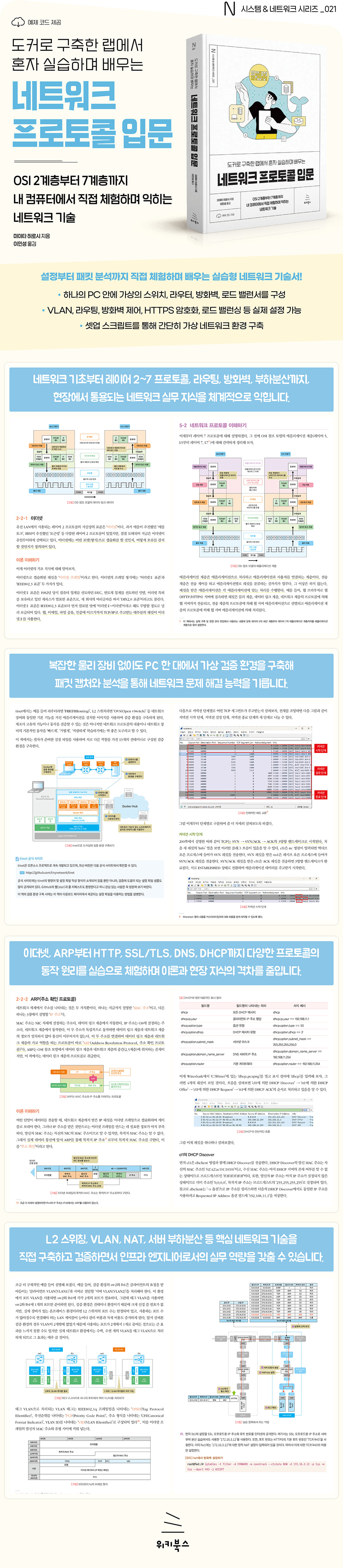
"Introduction to Network Protocols: Learn by Docker-Building Labs" is a network technology book that allows you to experience the entire process, from configuration to packet analysis, rather than simply reading and learning knowledge.
You can create a virtual network environment with a switch, router, firewall, and load balancer on a single PC, and log in to each device to actually configure and check the operation of VLAN, routing, firewall communication control, HTTPS encryption, load balancing, etc.
By setting up network equipment and analyzing packets through this book and building a network verification environment, you will naturally gain and experience experiences similar to actual construction or operation sites.
The virtual network environment can be easily built using a setup script, and is recommended for anyone who wants to build solid networking skills that can be used in the field.
"Introduction to Network Protocols: Learn by Docker-Building Labs" is a network technology book that allows you to experience the entire process, from configuration to packet analysis, rather than simply reading and learning knowledge.
You can create a virtual network environment with a switch, router, firewall, and load balancer on a single PC, and log in to each device to actually configure and check the operation of VLAN, routing, firewall communication control, HTTPS encryption, load balancing, etc.
By setting up network equipment and analyzing packets through this book and building a network verification environment, you will naturally gain and experience experiences similar to actual construction or operation sites.
The virtual network environment can be easily built using a setup script, and is recommended for anyone who wants to build solid networking skills that can be used in the field.
- You can preview some of the book's contents.
Preview
index
▣ Chapter 1: Building a Verification Environment
1-1 Understanding the Tools You Use
__1-1-1 WSL2
__1-1-2 Docker
__1-1-3 tinet
Installing the tool on 1-2 PCs
__1-2-1 PC specification requirements
__1-2-2 Installing WSL2
____Enable virtualization support
____WSL2 Installation
____Create an Ubuntu username and password
____root user settings
Check the ____instance version
__1-2-3 Run setup script
__1-2-4 Run check script
1-3 Understanding how to use tools
__1-3-1 How to use WSL2
____Options of the wsl command related to this book
____How to run a WSL instance
How to stop a ____WSL instance
____Exchanging files with WSL instances
__1-3-2 How to use Docker
____Docker commands related to this book
____Container Login
Check the status of ____container
____Check the image
____Images used in this book
How to use __1-3-3 tinet
____tinet commands related to this book
____Network environment construction
____Container Settings
____Run test command
____Delete verification environment
____Network Configuration Visualization
1-4 Building a Verification Environment
__1-4-1 Building a verification environment
__1-4-2 Configuration Overview
____Home LAN
____Internet
____server site
__1-4-3 Check operation
1-5 How to use the settings file
▣ 2-1 Understanding the Verification Environment
____sw1(L2 switch)
____sw2(L2 switch)
2-2 Understanding Network Protocols
__2-2-1 Ethernet
____Ethernet II Frame Format
____MAC address
____tcpdump
____Wireshark
Capture ____packets
Analyzing ____packets
__2-2-2 ARP (Address Resolution Protocol)
____ARP frame format
____Address resolution flow through ARP
____ARP's cache function
Capture ____packets
Analyzing ____packets
2-3 Understanding Network Technology
__2-3-1 L2 switching
____Behavior when MAC address overlaps
__2-3-2 VLAN (virtual LAN)
____port VLAN
____Tag VLAN
____port VLAN
____Tag VLAN
▣ Chapter 3: Understanding Layer 3 Protocols
3-1 Understanding the Verification Environment
____rt1 (broadband router)
____rt2, rt3 (Internet router)
____fw1 (firewall)
3-2 Understanding Network Protocols
__3-2-1 IP (Internet Protocol)
____IP packet format
____IP address and subnet mask
____Various IP addresses
Capture ____packets
Analyzing ____packets
__3-2-2 ICMP (Internet Control Message Protocol)
____ICMP packet format
____Various ICMP types and codes
Capture ____packets
Analyzing ____packets
3-3 Understanding Network Technology
__3-3-1 routing
____Routing Action
____routing table
____Static Routing
____Dynamic Routing
__3-3-2 NAT (Network Address Translation)
____Static NAT
____NAPT
____Static NAT
____NAPT
▣ Chapter 4: Understanding Layer 4 Protocols
4-1 Understanding the Verification Environment
____fw1 (firewall)
4-2 Understanding Network Protocols
__4-2-1 UDP (User Datagram Protocol)
____UDP packet format
____port number
Capture ____packets
Analyzing ____packets
__4-2-2 TCP (Transmission Control Protocol)
____TCP packet format
____TCP state transitions
____Try it out
4-3 Understanding Network Technology
__4-3-1 UDP Firewall
____Try it out
__4-3-2 TCP Firewall
____Try it out
▣ Chapter 5: Understanding Layer 7 Protocols
5-1 Understanding the Verification Environment
5-2 Understanding Network Protocols
__5-2-1 HTTP (Hyper Text Transfer Protocol)
____HTTP message format
____HTTP/2 connection pattern
____Try it out
__5-2-2 SSL/TLS (Secure Socket Layer/Transport Layer Security)
Technology used by ____SSL
____SSL record format
____Flow from SSL connection to disconnection
____Try it out
Analyzing ____packets ① (SSL/TLS)
Analyzing ____packets ② (HTTP/2)
__5-2-3 DNS (Domain Name System)
____domain name
____Name interpretation
____DNS message format
Capture ____packets
Analyzing ____packets
__5-2-4 DHCP (Dynamic Host Configuration Protocol)
____Static and dynamic allocation
____DHCP message format
____DHCP processing flow
Capture ____packets
Analyzing ____packets
5-3 Understanding Network Technology
__5-3-1 Server Load Balancing
____Functions used for server load balancing
____Server Load Balancing Flow
____Simple server load balancing
____Server load balancing using cookie persistence
__5-3-2 SSL Offload
▣ Chapter 6: General Conclusion
6-1 Summary of Protocol Description Sections
6-2 Network Technology Section Summary
Step 1 (NIC setup step)
Step 2 (Address Verification Step)
Step 3 (Name interpretation step)
Step 4 (3-way handshake step)
Step 5 (SSL handshake step)
Step 6 (SSL offload + load balancing step)
1-1 Understanding the Tools You Use
__1-1-1 WSL2
__1-1-2 Docker
__1-1-3 tinet
Installing the tool on 1-2 PCs
__1-2-1 PC specification requirements
__1-2-2 Installing WSL2
____Enable virtualization support
____WSL2 Installation
____Create an Ubuntu username and password
____root user settings
Check the ____instance version
__1-2-3 Run setup script
__1-2-4 Run check script
1-3 Understanding how to use tools
__1-3-1 How to use WSL2
____Options of the wsl command related to this book
____How to run a WSL instance
How to stop a ____WSL instance
____Exchanging files with WSL instances
__1-3-2 How to use Docker
____Docker commands related to this book
____Container Login
Check the status of ____container
____Check the image
____Images used in this book
How to use __1-3-3 tinet
____tinet commands related to this book
____Network environment construction
____Container Settings
____Run test command
____Delete verification environment
____Network Configuration Visualization
1-4 Building a Verification Environment
__1-4-1 Building a verification environment
__1-4-2 Configuration Overview
____Home LAN
____Internet
____server site
__1-4-3 Check operation
1-5 How to use the settings file
▣ 2-1 Understanding the Verification Environment
____sw1(L2 switch)
____sw2(L2 switch)
2-2 Understanding Network Protocols
__2-2-1 Ethernet
____Ethernet II Frame Format
____MAC address
____tcpdump
____Wireshark
Capture ____packets
Analyzing ____packets
__2-2-2 ARP (Address Resolution Protocol)
____ARP frame format
____Address resolution flow through ARP
____ARP's cache function
Capture ____packets
Analyzing ____packets
2-3 Understanding Network Technology
__2-3-1 L2 switching
____Behavior when MAC address overlaps
__2-3-2 VLAN (virtual LAN)
____port VLAN
____Tag VLAN
____port VLAN
____Tag VLAN
▣ Chapter 3: Understanding Layer 3 Protocols
3-1 Understanding the Verification Environment
____rt1 (broadband router)
____rt2, rt3 (Internet router)
____fw1 (firewall)
3-2 Understanding Network Protocols
__3-2-1 IP (Internet Protocol)
____IP packet format
____IP address and subnet mask
____Various IP addresses
Capture ____packets
Analyzing ____packets
__3-2-2 ICMP (Internet Control Message Protocol)
____ICMP packet format
____Various ICMP types and codes
Capture ____packets
Analyzing ____packets
3-3 Understanding Network Technology
__3-3-1 routing
____Routing Action
____routing table
____Static Routing
____Dynamic Routing
__3-3-2 NAT (Network Address Translation)
____Static NAT
____NAPT
____Static NAT
____NAPT
▣ Chapter 4: Understanding Layer 4 Protocols
4-1 Understanding the Verification Environment
____fw1 (firewall)
4-2 Understanding Network Protocols
__4-2-1 UDP (User Datagram Protocol)
____UDP packet format
____port number
Capture ____packets
Analyzing ____packets
__4-2-2 TCP (Transmission Control Protocol)
____TCP packet format
____TCP state transitions
____Try it out
4-3 Understanding Network Technology
__4-3-1 UDP Firewall
____Try it out
__4-3-2 TCP Firewall
____Try it out
▣ Chapter 5: Understanding Layer 7 Protocols
5-1 Understanding the Verification Environment
5-2 Understanding Network Protocols
__5-2-1 HTTP (Hyper Text Transfer Protocol)
____HTTP message format
____HTTP/2 connection pattern
____Try it out
__5-2-2 SSL/TLS (Secure Socket Layer/Transport Layer Security)
Technology used by ____SSL
____SSL record format
____Flow from SSL connection to disconnection
____Try it out
Analyzing ____packets ① (SSL/TLS)
Analyzing ____packets ② (HTTP/2)
__5-2-3 DNS (Domain Name System)
____domain name
____Name interpretation
____DNS message format
Capture ____packets
Analyzing ____packets
__5-2-4 DHCP (Dynamic Host Configuration Protocol)
____Static and dynamic allocation
____DHCP message format
____DHCP processing flow
Capture ____packets
Analyzing ____packets
5-3 Understanding Network Technology
__5-3-1 Server Load Balancing
____Functions used for server load balancing
____Server Load Balancing Flow
____Simple server load balancing
____Server load balancing using cookie persistence
__5-3-2 SSL Offload
▣ Chapter 6: General Conclusion
6-1 Summary of Protocol Description Sections
6-2 Network Technology Section Summary
Step 1 (NIC setup step)
Step 2 (Address Verification Step)
Step 3 (Name interpretation step)
Step 4 (3-way handshake step)
Step 5 (SSL handshake step)
Step 6 (SSL offload + load balancing step)
Detailed image
Publisher's Review
★ What this book covers ★
◎ Establishing a network verification environment within a PC using virtualization technology
◎ Layer 2 protocols: Ethernet, ARP, L2 switching, VLAN
◎ Layer 3 protocols: IP, ICMP, routing, NAT
◎ Layer 4 protocols: UDP, TCP, UDP firewall, TCP firewall
◎ Layer 7 protocols: HTTP, SSL/TLS, DNS, DHCP, server load balancing, SSL offload
◎ Accumulate practical experience through network equipment setup and packet capture
◎ Implementation of network functions using Linux applications
◎ Helpful commands and troubleshooting tips when problems occur
◎ Actual packet analysis and network operation verification in a verification environment
◎ Acquire practical knowledge based on experience and experience in preparation for the AI era.
◎ Establishing a network verification environment within a PC using virtualization technology
◎ Layer 2 protocols: Ethernet, ARP, L2 switching, VLAN
◎ Layer 3 protocols: IP, ICMP, routing, NAT
◎ Layer 4 protocols: UDP, TCP, UDP firewall, TCP firewall
◎ Layer 7 protocols: HTTP, SSL/TLS, DNS, DHCP, server load balancing, SSL offload
◎ Accumulate practical experience through network equipment setup and packet capture
◎ Implementation of network functions using Linux applications
◎ Helpful commands and troubleshooting tips when problems occur
◎ Actual packet analysis and network operation verification in a verification environment
◎ Acquire practical knowledge based on experience and experience in preparation for the AI era.
GOODS SPECIFICS
- Date of issue: August 4, 2025
- Page count, weight, size: 420 pages | 188*240*17mm
- ISBN13: 9791158396244
You may also like
카테고리
korean


korean

![GQ KOREA Mark (Monthly): December [2025]](http://librairie.coreenne.fr/cdn/shop/files/8ef265dbbfbf186523ed75ba7319009d.jpg?v=1765340328&width=3840)


