

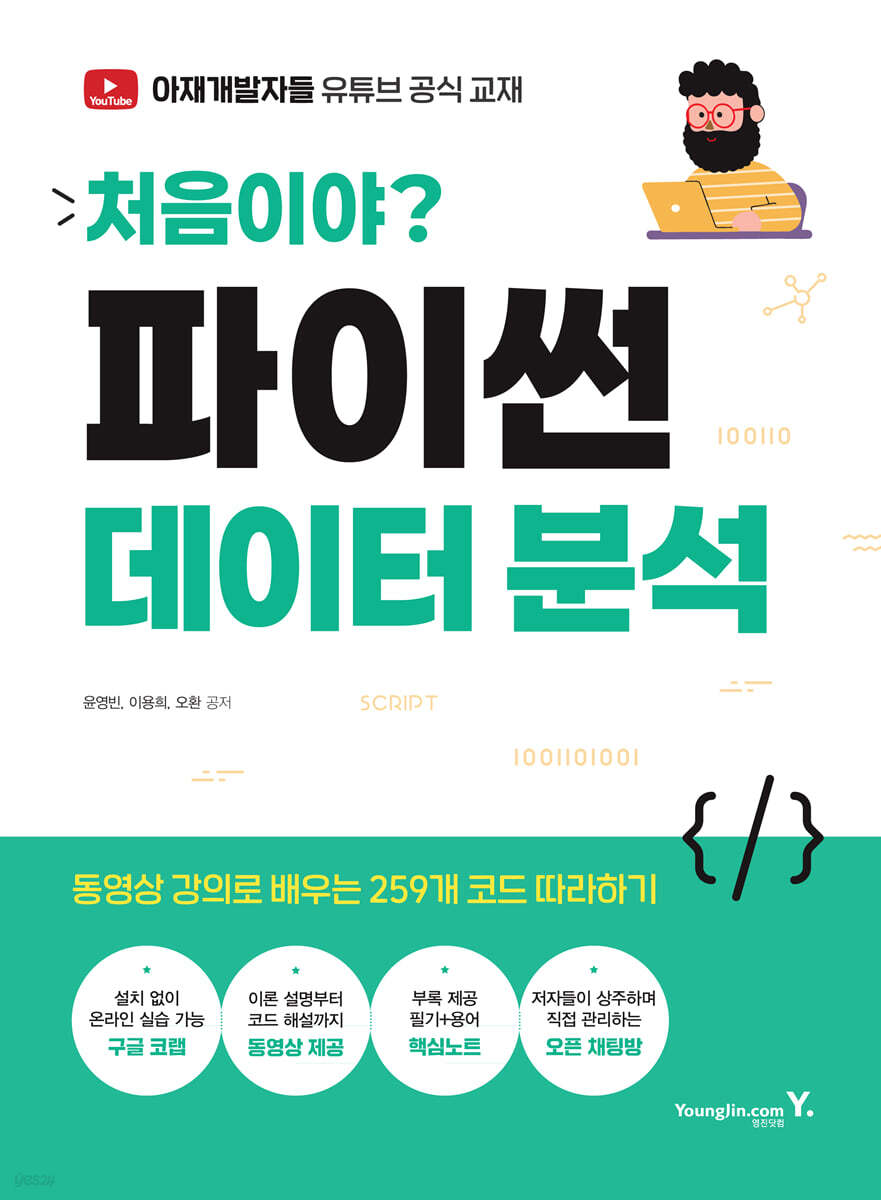
First time? Python data analysis
 |
Description
Book Introduction
An introductory book on Python data analysis that even beginners can quickly follow and master.
"First Time, Python Data Analysis" is an introductory book on data analysis designed so that even beginners to Python can start practicing right away.
Rather than complex theories, it is structured to be hands-on and utilizes the Google Colab environment, allowing you to learn functions such as array calculations, data preprocessing, statistical summarization, and eigenvalue analysis using NumPy and Pandas one by one.
In particular, we provide guidance on the Google Colab environment that allows practice on the web without installation, so even beginners who have difficulty installing programs can get started without burden.
Each chapter links key theories with practical code, provides examples on a file-by-file basis, and provides tips and comments to help you connect directly to practice.
Even readers new to data analysis or office workers accustomed to Excel can understand the core flow of Python-based data analysis and apply it to their work with this one book.
This book is the most user-friendly data analysis guide for beginners.
"First Time, Python Data Analysis" is an introductory book on data analysis designed so that even beginners to Python can start practicing right away.
Rather than complex theories, it is structured to be hands-on and utilizes the Google Colab environment, allowing you to learn functions such as array calculations, data preprocessing, statistical summarization, and eigenvalue analysis using NumPy and Pandas one by one.
In particular, we provide guidance on the Google Colab environment that allows practice on the web without installation, so even beginners who have difficulty installing programs can get started without burden.
Each chapter links key theories with practical code, provides examples on a file-by-file basis, and provides tips and comments to help you connect directly to practice.
Even readers new to data analysis or office workers accustomed to Excel can understand the core flow of Python-based data analysis and apply it to their work with this one book.
This book is the most user-friendly data analysis guide for beginners.
- You can preview some of the book's contents.
Preview
index
Chapter 1: Getting Started with Data Analysis
1.1 Data Analysis
1.2 Setting up a development environment (Google Colab)
Google Colab Overview
Google Colab Key Features
Launch Google Colab
Google Colab Environment Setup
Loading data
Write and run code
Fix broken errors
Final practice problems
Final practice problem answers
Chapter 2 NumPy
2.1 NumPy Overview
NumPy concepts
NumPy Features
Check NumPy
Differences between NumPy and lists
2.2 Creating an array
np.array( ) function
np.zeros( ) function
np.ones( ) function
np.full( ) function
np.empty( ) function
np.arange( ) function
np.linspace( ) function
2.3 Key properties of arrays
shape property
dtype attribute
size attribute
ndim attribute
flat property
2.4 Array data types
Basic data types
Data type conversion - astype( ) function
2.5 Indexing Arrays
Basic indexing
Multidimensional array indexing
Negative indexing
Negative indexing in multidimensional arrays
Boolean indexing
Fancy Indexing
Multi-Fancy Indexing
2.6 Slicing an array
Basic slicing
Multidimensional array slicing
Selecting rows/columns using slicing
Negative slicing
Slicing using Boolean arrays
Slicing using arrays
2.7 Array Operations
arithmetic operations
exponentiation
Comparison operations on arrays
Arrays and Scalar Operations
logical operations
square root
2.8 Array Comparison
Element-by-element comparison
Comparison between arrays
np.all( )
np.any( )
np.array_equal( )
2.9 Array Merging
2.10 Array Sorting
Sorting a one-dimensional array
Multidimensional array sorting
Sort descending
Sort the original array - ndarray.sort( )
Multi-condition sorting - np.lexsort( )
2.11 Array Filtering
Basic filtering
Multidimensional array filtering
Filtering using np.where( )
Filtering using a mask array - ma.array( )
Filtering using compound conditions
Condition-based extraction using np.extract( )
2.12 Array Statistics
Minimum - np.min( )
Maximum value - np.max( )
Data range - np.ptp( )
Sum - np.sum( )
Mean - np.mean( )
Median - np.median( )
Variance - np.var( )
Standard Deviation - np.std( )
Quantiles - np.percentile( )
Final practice problems
Final practice problem answers
Chapter 3 Pandas
3.1 Pandas Overview
Pandas concepts
Pandas Features
Check Pandas
NumPy and Pandas
3.2 Series
Series concept
Series Features
Difference between Series and List
How to create a Series
Check the Series Structure
Data query
Indexing and slicing
Add data
Modify Series Value
Rename an index - rename( )
Data Statistics and Summary
Check eigenvalues
Data filtering and condition selection
Concatenating data in a Series - concat( )
Data sorting
Data grouping and aggregation
3.3 DataFrame
DataFrame concept
Differences between DataFrames and Lists
How to create a DataFrame
Check the DataFrame structure
Data query
Indexing and slicing
Add data
Modifying DataFrame values
Change column names
Data Statistics and Summary
Check eigenvalues
Data Filtering and Condition Selection - Multi-Condition Filtering
Merge and combine data
Data sorting
Data grouping and aggregation
3.4 Series and DataFrame
Differences between Series and DataFrame
Final practice problems
Final practice problem answers
Chapter 4 matplotlib
4.1 Matplotlib Overview
matplotlib concepts
Install matplotlib
4.2 matplotlib functions
Plot
Line Plot
Bar Chart
Pie Chart
Scatter Plot
Histogram
subplot
Plot image
4.3 Seaborn Overview and Features
seaborn concept
Install seaborn
Heatmap
Clustermap
Boxplot
Countplot
Final practice problems
Final practice problem answers
Chapter 5 Data Preprocessing
5.1 Preparing and Loading Data
Import CSV file
Import Excel file
Importing JSON files
5.2 Data Exploration
Understanding data structures
Statistical Summary
5.3 Data Preprocessing
Handling missing data values
Remove duplicate data
5.4 Data Conversion
Data format conversion
Categorical data encoding
Data normalization and standardization
Data Indexing
Data Slicing
Data sorting
5.5 Data Storage
Save in CSV format
Save in Excel format
Save in JSON format
Final practice problems
Final practice problem answers
Chapter 6 Data Analysis
6.1 Marketing and Customer Analysis
6.2 Finance and Risk Management
6.3 Medical and Healthcare
6.4 Manufacturing and Quality Control
6.5 Public Policy and Social Problem Solving
Chapter 7: Kaggle Practice
7.1 Kaggle Overview
Kaggle concept
Kaggle Features
Prepare for Kaggle
7.2 Kaggle Practice
Titanic Survivor Prediction Problem (Titanic - Machine Learning from Disaster)
House Prices - Advanced Regression Techniques
Credit Card Fraud Detection Problem
Chapter 8 Public Data Practice
8.1 Overview of Public Data
Public data concept
Public data features
8.2 Public Data Practice
Air pollution data analysis
Analysis of Seoul City Bicycle Rental Data
Analysis of demographic data by region
Special Appendix Key Notes
Key Notes
Key Terms Note
1.1 Data Analysis
1.2 Setting up a development environment (Google Colab)
Google Colab Overview
Google Colab Key Features
Launch Google Colab
Google Colab Environment Setup
Loading data
Write and run code
Fix broken errors
Final practice problems
Final practice problem answers
Chapter 2 NumPy
2.1 NumPy Overview
NumPy concepts
NumPy Features
Check NumPy
Differences between NumPy and lists
2.2 Creating an array
np.array( ) function
np.zeros( ) function
np.ones( ) function
np.full( ) function
np.empty( ) function
np.arange( ) function
np.linspace( ) function
2.3 Key properties of arrays
shape property
dtype attribute
size attribute
ndim attribute
flat property
2.4 Array data types
Basic data types
Data type conversion - astype( ) function
2.5 Indexing Arrays
Basic indexing
Multidimensional array indexing
Negative indexing
Negative indexing in multidimensional arrays
Boolean indexing
Fancy Indexing
Multi-Fancy Indexing
2.6 Slicing an array
Basic slicing
Multidimensional array slicing
Selecting rows/columns using slicing
Negative slicing
Slicing using Boolean arrays
Slicing using arrays
2.7 Array Operations
arithmetic operations
exponentiation
Comparison operations on arrays
Arrays and Scalar Operations
logical operations
square root
2.8 Array Comparison
Element-by-element comparison
Comparison between arrays
np.all( )
np.any( )
np.array_equal( )
2.9 Array Merging
2.10 Array Sorting
Sorting a one-dimensional array
Multidimensional array sorting
Sort descending
Sort the original array - ndarray.sort( )
Multi-condition sorting - np.lexsort( )
2.11 Array Filtering
Basic filtering
Multidimensional array filtering
Filtering using np.where( )
Filtering using a mask array - ma.array( )
Filtering using compound conditions
Condition-based extraction using np.extract( )
2.12 Array Statistics
Minimum - np.min( )
Maximum value - np.max( )
Data range - np.ptp( )
Sum - np.sum( )
Mean - np.mean( )
Median - np.median( )
Variance - np.var( )
Standard Deviation - np.std( )
Quantiles - np.percentile( )
Final practice problems
Final practice problem answers
Chapter 3 Pandas
3.1 Pandas Overview
Pandas concepts
Pandas Features
Check Pandas
NumPy and Pandas
3.2 Series
Series concept
Series Features
Difference between Series and List
How to create a Series
Check the Series Structure
Data query
Indexing and slicing
Add data
Modify Series Value
Rename an index - rename( )
Data Statistics and Summary
Check eigenvalues
Data filtering and condition selection
Concatenating data in a Series - concat( )
Data sorting
Data grouping and aggregation
3.3 DataFrame
DataFrame concept
Differences between DataFrames and Lists
How to create a DataFrame
Check the DataFrame structure
Data query
Indexing and slicing
Add data
Modifying DataFrame values
Change column names
Data Statistics and Summary
Check eigenvalues
Data Filtering and Condition Selection - Multi-Condition Filtering
Merge and combine data
Data sorting
Data grouping and aggregation
3.4 Series and DataFrame
Differences between Series and DataFrame
Final practice problems
Final practice problem answers
Chapter 4 matplotlib
4.1 Matplotlib Overview
matplotlib concepts
Install matplotlib
4.2 matplotlib functions
Plot
Line Plot
Bar Chart
Pie Chart
Scatter Plot
Histogram
subplot
Plot image
4.3 Seaborn Overview and Features
seaborn concept
Install seaborn
Heatmap
Clustermap
Boxplot
Countplot
Final practice problems
Final practice problem answers
Chapter 5 Data Preprocessing
5.1 Preparing and Loading Data
Import CSV file
Import Excel file
Importing JSON files
5.2 Data Exploration
Understanding data structures
Statistical Summary
5.3 Data Preprocessing
Handling missing data values
Remove duplicate data
5.4 Data Conversion
Data format conversion
Categorical data encoding
Data normalization and standardization
Data Indexing
Data Slicing
Data sorting
5.5 Data Storage
Save in CSV format
Save in Excel format
Save in JSON format
Final practice problems
Final practice problem answers
Chapter 6 Data Analysis
6.1 Marketing and Customer Analysis
6.2 Finance and Risk Management
6.3 Medical and Healthcare
6.4 Manufacturing and Quality Control
6.5 Public Policy and Social Problem Solving
Chapter 7: Kaggle Practice
7.1 Kaggle Overview
Kaggle concept
Kaggle Features
Prepare for Kaggle
7.2 Kaggle Practice
Titanic Survivor Prediction Problem (Titanic - Machine Learning from Disaster)
House Prices - Advanced Regression Techniques
Credit Card Fraud Detection Problem
Chapter 8 Public Data Practice
8.1 Overview of Public Data
Public data concept
Public data features
8.2 Public Data Practice
Air pollution data analysis
Analysis of Seoul City Bicycle Rental Data
Analysis of demographic data by region
Special Appendix Key Notes
Key Notes
Key Terms Note
Detailed image
.jpg)
Publisher's Review
An Introduction to Data Analysis from a Non-Developer's Perspective
Rather than complex terminology or theory-based explanations, we introduce Python analysis in an easy-to-understand and realistic way, focusing on practical problem solving and understanding workflows.
Providing a hands-on environment without installation based on Google Colab
We've increased accessibility by focusing on a cloud-based practice environment (Colab) so that even beginners can get started without the burden of setting up the environment.
Step-by-step practice problems and code files provided
Each chapter provides practice problems and explanatory code to help you check your learning progress and develop practical application skills.
Learning support linked to video lectures
All practice codes are organized so that you can learn by following the video, so even those who find it difficult to learn on their own can learn by watching and doing.
If you're new to Python data analysis, this book is a great place to start.
"First Time, Python Data Analysis" is a book based on the author's expertise accumulated through actual lectures and practical training. It goes beyond simple grammar explanations and teaches through videos and study materials.
Based on the Google Colab environment, you can start practicing right away without any installation burden, and it is structured so that you can follow along step by step from the basics of NumPy and Pandas to statistical analysis and practical application, so you can naturally learn the flow of data analysis.
We've included plenty of examples, explanations, and tips so that even those unfamiliar with numbers and code can get started with confidence.
Recommended for anyone who wants to read, understand, and explain data.
What you will learn in this book
Basic concepts and environment construction for data analysis
Understand what data analysis is and set up a practice environment without separate installation through Google Colab.
Even beginners can start analyzing Python right away in a cloud-based environment.
Using NumPy for High-Performance Numerical Computing
You will learn about NumPy's key functions and properties for efficiently handling multidimensional arrays, indexing and slicing techniques, broadcasting, statistical calculations, and other features, and lay the foundation for array-based operations.
Practical Pandas Analysis Techniques Using Series and DataFrame
Using Pandas' core structures, Series and DataFrame, you will learn essential functions for data analysis, such as data retrieval, sorting, filtering, statistics, grouping, and combining, through hands-on practice.
Deriving data insights based on statistics and visualization
Learn how to summarize data using various statistical functions such as value_counts, describe, mean, std, groupby, and apply, and gain insights through visualization.
We also provide practical examples tailored to the analysis flow.
Rather than complex terminology or theory-based explanations, we introduce Python analysis in an easy-to-understand and realistic way, focusing on practical problem solving and understanding workflows.
Providing a hands-on environment without installation based on Google Colab
We've increased accessibility by focusing on a cloud-based practice environment (Colab) so that even beginners can get started without the burden of setting up the environment.
Step-by-step practice problems and code files provided
Each chapter provides practice problems and explanatory code to help you check your learning progress and develop practical application skills.
Learning support linked to video lectures
All practice codes are organized so that you can learn by following the video, so even those who find it difficult to learn on their own can learn by watching and doing.
If you're new to Python data analysis, this book is a great place to start.
"First Time, Python Data Analysis" is a book based on the author's expertise accumulated through actual lectures and practical training. It goes beyond simple grammar explanations and teaches through videos and study materials.
Based on the Google Colab environment, you can start practicing right away without any installation burden, and it is structured so that you can follow along step by step from the basics of NumPy and Pandas to statistical analysis and practical application, so you can naturally learn the flow of data analysis.
We've included plenty of examples, explanations, and tips so that even those unfamiliar with numbers and code can get started with confidence.
Recommended for anyone who wants to read, understand, and explain data.
What you will learn in this book
Basic concepts and environment construction for data analysis
Understand what data analysis is and set up a practice environment without separate installation through Google Colab.
Even beginners can start analyzing Python right away in a cloud-based environment.
Using NumPy for High-Performance Numerical Computing
You will learn about NumPy's key functions and properties for efficiently handling multidimensional arrays, indexing and slicing techniques, broadcasting, statistical calculations, and other features, and lay the foundation for array-based operations.
Practical Pandas Analysis Techniques Using Series and DataFrame
Using Pandas' core structures, Series and DataFrame, you will learn essential functions for data analysis, such as data retrieval, sorting, filtering, statistics, grouping, and combining, through hands-on practice.
Deriving data insights based on statistics and visualization
Learn how to summarize data using various statistical functions such as value_counts, describe, mean, std, groupby, and apply, and gain insights through visualization.
We also provide practical examples tailored to the analysis flow.
GOODS SPECIFICS
- Date of issue: June 20, 2025
- Page count, weight, size: 424 pages | 1,094g | 190*257*21mm
- ISBN13: 9788931478013
- ISBN10: 8931478011
You may also like
카테고리
korean


korean

![GQ KOREA Mark (Monthly): December [2025]](http://librairie.coreenne.fr/cdn/shop/files/8ef265dbbfbf186523ed75ba7319009d.jpg?v=1765340328&width=3840)


