

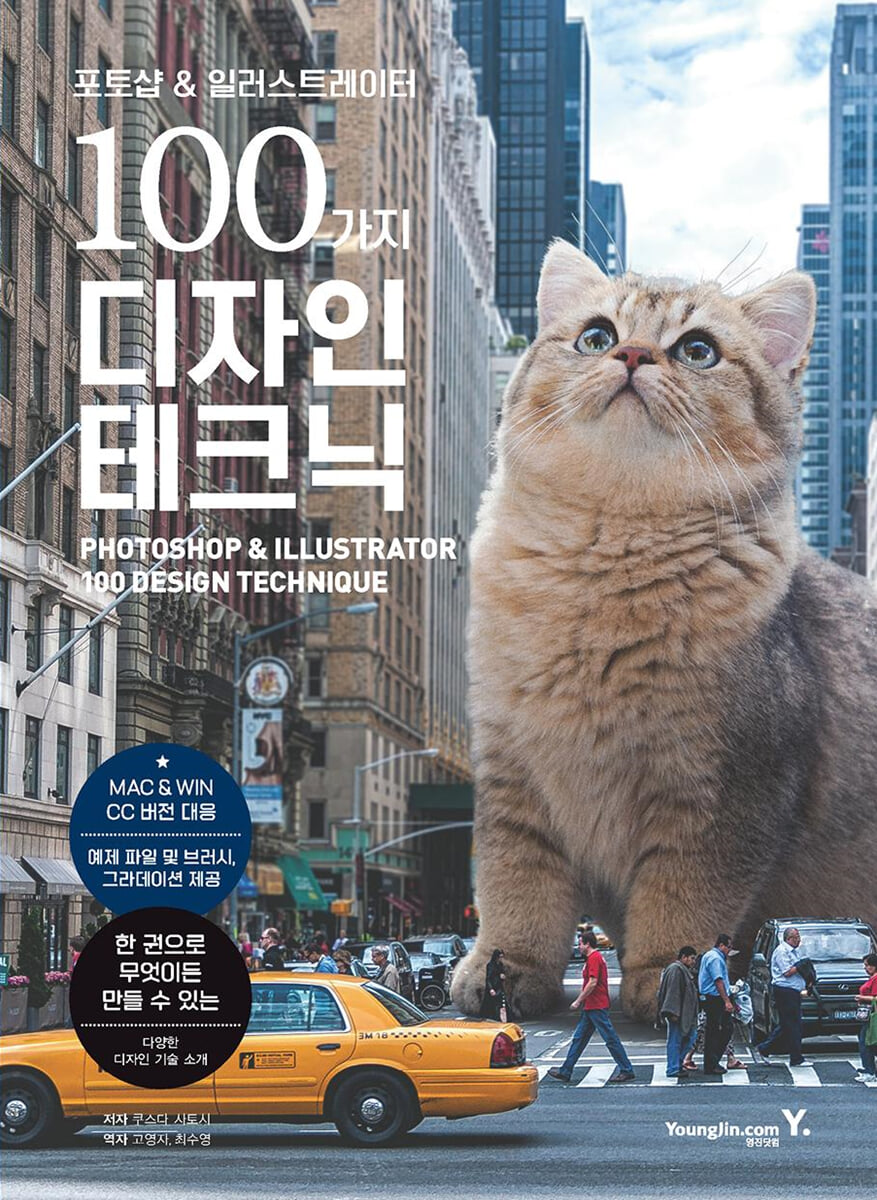
100 Design Techniques for Photoshop & Illustrator
 |
Description
Book Introduction
With this one book, you can learn a variety of design techniques to create anything you can imagine!
"100 Design Techniques for Photoshop & Illustrator" introduces 100 design techniques for Photoshop & Illustrator, representative graphic programs used for graphics, web, illustration, image retouching, and compositing work.
From examples of beautiful, easy-to-make artwork to realistic textures, hand-processing, analog processing, light processing, texture creation, illustration production, text and line arrangement, and manipulation techniques, this one book will help you create anything.
All of these design techniques are compatible with Mac & Win Photoshop CC & Illustrator CC versions, so you can learn them without difficulty. The book also provides example files, brushes, and gradients so you can apply them to create your own designs.
In addition, for Photoshop, a completed PSD file is also provided.
"100 Design Techniques for Photoshop & Illustrator" introduces 100 design techniques for Photoshop & Illustrator, representative graphic programs used for graphics, web, illustration, image retouching, and compositing work.
From examples of beautiful, easy-to-make artwork to realistic textures, hand-processing, analog processing, light processing, texture creation, illustration production, text and line arrangement, and manipulation techniques, this one book will help you create anything.
All of these design techniques are compatible with Mac & Win Photoshop CC & Illustrator CC versions, so you can learn them without difficulty. The book also provides example files, brushes, and gradients so you can apply them to create your own designs.
In addition, for Photoshop, a completed PSD file is also provided.
- You can preview some of the book's contents.
Preview
index
CHAPTER 01 Design Techniques for New Features and Ideas
No.001 Change the sky using the image you want
No.002 Expressing part of an image as text
No.003 Creating a layout that effectively uses shapes
No.004 Creating a layout using silhouettes
No.005 Creating a Glitch Effect
No.006 Creating a line drawing like a banknote
No.007 Landscape with a giant cat
Column.
How to Create Simple Letter Designs and Lines Using Photoshop
CHAPTER 02 Design Techniques for Realistic Textures
No.008 Creating a Flame Image
No.009 Designing a Water Spray
No.010 Creating an eye image
No.011 Ice Design
No.012 Drawing clouds or smoke
No.013 Making Silver Shine
No.014 Making Gold Shine
No.015 Creating a Metal Hairline
No.016 Making Glass Beads
No.017 Making a round glass
No.018 Creating a Lightning Design
Column.
Adding a Gradient
CHAPTER 03 Design Techniques for Hand-Drawn Effects
No.019 Oil Painting Design
No.020 Ink Design
No.021 Watercolor Design
No.022 Ukiyo-e style design
No.023 Pencil drawing design
No.024 Realistically drawn colored pencil design
No.025 Paint Design
No.026 A gorgeous design with mixed paints
No.027 Crayon Design
No.028 Creating ink-like lines that permeate the background
No.029 Creating calligraphy that looks like it was written in ink
No.030 Creating a spray-painted design
Column.
Soft sumi-e brush and rough sumi-e brush
Column.
How to Use Neural Filters
Column.
How to Use the Eyedropper Tool
Column.
What is Adobe Fonts?
CHAPTER 04 Design Techniques for Analog Effects
No.031 Creating a Puzzle Effect
No.032 Making Masking Tape Letters
No.033 Making Metal Like Water
No.034 Making Broken Glass
No.035 Marble Design
No.036 Making Torn Paper
No.037 Creating Paper Texture
No.038 Creating a Label
No.039 Creating a Stamp Texture
No.040 Creating a 3D stamp
Column.
How to create a selection range by specifying pixel size
Column.
Techniques for creating water-like expressions
Column.
Screen enlargement
CHAPTER 05 Design Techniques for Lighting Effects
No.041 Creating a Sparkling Light
No.042 Creating Light from Smoke
No.043 Creating light effects
No.044 Creating radial light
No.045 Creating a Fiery Light
No.046 Making a Neon Tube
No.047 Creating Soft Light
No.048 Expressing an impressive cityscape with backlighting
No.049 Turning a daytime scene into a night scene
No.050 Creating the Sparkle of a Diamond
Column.
Filter Gallery
CHAPTER 06 Design Techniques for Creating Textures
No.051 Creating a fur texture
No.052 Creating a fabric texture
No.053 Creating the texture of Korean paper
No.054 Creating Texture on Canvas
No.055 Creating Screen Tone
No.056 Creating a texture with overlapping gradients
No.057 Creating lace texture
No.058 Creating a Water Drop Pattern
No.059 Creating a Seamless Pattern
No.060 Inserting an image to fit the folds
Column.
Rotate and zoom in and out of the pattern
CHAPTER 07 Design Techniques for Creating Illustrations
No.061 Creating Pencil Illustrations
No.062 Creating Pen Illustrations
No.063 Creating Plant Illustrations
No.064 Creating Flower Illustrations
No.065 Making a Ribbon
No.066 Creating an illustration that looks like a cropped image
No.067 Designing a Realistic Cell Phone
No.068 Creating Realistic Illustrations Using Image Trace
Column.
Dynamic Symbol and Static Symbol
Column.
Differences between Blend Tool's Blend and Edit Colors' Blend
Column.
Image Trace Preset
CHAPTER 08 Design Techniques for Processing Letters and Lines
No.069 Creating text with flowing water images
No.070 Creating letters that look like water drops falling
No.071 Creating Ketchup Characters
No.072 Creating cut-out characters
No.073 Creating Letters Buried in the Landscape
No.074 Creating Baseball-Like Letters
No.075 Creating zipper-like characters
No.076 Creating Handwritten Characters
No.077 Creating letters like colored pencils
No.078 Creating Sliced Characters
No.079 Placing text in three dimensions
Using No.080 Match Font
No.081 Creating a Focus Line
Column.
Tips for Making a Zipper Brush
Column.
How to Create Focus Lines Using Illustrator
CHAPTER 09 Design Techniques for Various Expressions
No.082 Making a Collage
No.083 Naturally compositing multiple photos
No.084 Creating an Animation Background (Daytime)
No.085 Creating an Animation Background (Sunset)
No.086 Creating an Anaglyph Effect
No.087 Applying multiple exposures using multiple photos
No.088 Creating graphics that blend in with the smoke
No.089 Creating a Beautiful, Matte Texture
No.090 A magnificent landscape with floating whales
Column.
If you don't check Auto Select of Move Tool,
Column.
Adobe Color
CHAPTER 10 Manipulation Techniques
No.091 Layer Style
No.092 Brush Settings
No.093 Texture · Pattern
No.094 Grids, Guides, and Alignment
No.095 Light Direction
No.096 Original Brush
No.097 Brush
No.098 Light Processing
No.099 Analog Effects
No.100 Object Recoloring
No.001 Change the sky using the image you want
No.002 Expressing part of an image as text
No.003 Creating a layout that effectively uses shapes
No.004 Creating a layout using silhouettes
No.005 Creating a Glitch Effect
No.006 Creating a line drawing like a banknote
No.007 Landscape with a giant cat
Column.
How to Create Simple Letter Designs and Lines Using Photoshop
CHAPTER 02 Design Techniques for Realistic Textures
No.008 Creating a Flame Image
No.009 Designing a Water Spray
No.010 Creating an eye image
No.011 Ice Design
No.012 Drawing clouds or smoke
No.013 Making Silver Shine
No.014 Making Gold Shine
No.015 Creating a Metal Hairline
No.016 Making Glass Beads
No.017 Making a round glass
No.018 Creating a Lightning Design
Column.
Adding a Gradient
CHAPTER 03 Design Techniques for Hand-Drawn Effects
No.019 Oil Painting Design
No.020 Ink Design
No.021 Watercolor Design
No.022 Ukiyo-e style design
No.023 Pencil drawing design
No.024 Realistically drawn colored pencil design
No.025 Paint Design
No.026 A gorgeous design with mixed paints
No.027 Crayon Design
No.028 Creating ink-like lines that permeate the background
No.029 Creating calligraphy that looks like it was written in ink
No.030 Creating a spray-painted design
Column.
Soft sumi-e brush and rough sumi-e brush
Column.
How to Use Neural Filters
Column.
How to Use the Eyedropper Tool
Column.
What is Adobe Fonts?
CHAPTER 04 Design Techniques for Analog Effects
No.031 Creating a Puzzle Effect
No.032 Making Masking Tape Letters
No.033 Making Metal Like Water
No.034 Making Broken Glass
No.035 Marble Design
No.036 Making Torn Paper
No.037 Creating Paper Texture
No.038 Creating a Label
No.039 Creating a Stamp Texture
No.040 Creating a 3D stamp
Column.
How to create a selection range by specifying pixel size
Column.
Techniques for creating water-like expressions
Column.
Screen enlargement
CHAPTER 05 Design Techniques for Lighting Effects
No.041 Creating a Sparkling Light
No.042 Creating Light from Smoke
No.043 Creating light effects
No.044 Creating radial light
No.045 Creating a Fiery Light
No.046 Making a Neon Tube
No.047 Creating Soft Light
No.048 Expressing an impressive cityscape with backlighting
No.049 Turning a daytime scene into a night scene
No.050 Creating the Sparkle of a Diamond
Column.
Filter Gallery
CHAPTER 06 Design Techniques for Creating Textures
No.051 Creating a fur texture
No.052 Creating a fabric texture
No.053 Creating the texture of Korean paper
No.054 Creating Texture on Canvas
No.055 Creating Screen Tone
No.056 Creating a texture with overlapping gradients
No.057 Creating lace texture
No.058 Creating a Water Drop Pattern
No.059 Creating a Seamless Pattern
No.060 Inserting an image to fit the folds
Column.
Rotate and zoom in and out of the pattern
CHAPTER 07 Design Techniques for Creating Illustrations
No.061 Creating Pencil Illustrations
No.062 Creating Pen Illustrations
No.063 Creating Plant Illustrations
No.064 Creating Flower Illustrations
No.065 Making a Ribbon
No.066 Creating an illustration that looks like a cropped image
No.067 Designing a Realistic Cell Phone
No.068 Creating Realistic Illustrations Using Image Trace
Column.
Dynamic Symbol and Static Symbol
Column.
Differences between Blend Tool's Blend and Edit Colors' Blend
Column.
Image Trace Preset
CHAPTER 08 Design Techniques for Processing Letters and Lines
No.069 Creating text with flowing water images
No.070 Creating letters that look like water drops falling
No.071 Creating Ketchup Characters
No.072 Creating cut-out characters
No.073 Creating Letters Buried in the Landscape
No.074 Creating Baseball-Like Letters
No.075 Creating zipper-like characters
No.076 Creating Handwritten Characters
No.077 Creating letters like colored pencils
No.078 Creating Sliced Characters
No.079 Placing text in three dimensions
Using No.080 Match Font
No.081 Creating a Focus Line
Column.
Tips for Making a Zipper Brush
Column.
How to Create Focus Lines Using Illustrator
CHAPTER 09 Design Techniques for Various Expressions
No.082 Making a Collage
No.083 Naturally compositing multiple photos
No.084 Creating an Animation Background (Daytime)
No.085 Creating an Animation Background (Sunset)
No.086 Creating an Anaglyph Effect
No.087 Applying multiple exposures using multiple photos
No.088 Creating graphics that blend in with the smoke
No.089 Creating a Beautiful, Matte Texture
No.090 A magnificent landscape with floating whales
Column.
If you don't check Auto Select of Move Tool,
Column.
Adobe Color
CHAPTER 10 Manipulation Techniques
No.091 Layer Style
No.092 Brush Settings
No.093 Texture · Pattern
No.094 Grids, Guides, and Alignment
No.095 Light Direction
No.096 Original Brush
No.097 Brush
No.098 Light Processing
No.099 Analog Effects
No.100 Object Recoloring
Detailed image

GOODS SPECIFICS
- Date of issue: April 8, 2024
- Page count, weight, size: 344 pages | 188*257*30mm
- ISBN13: 9788931474664
- ISBN10: 8931474660
You may also like
카테고리
korean


korean

![GQ KOREA Mark (Monthly): December [2025]](http://librairie.coreenne.fr/cdn/shop/files/8ef265dbbfbf186523ed75ba7319009d.jpg?v=1765340328&width=3840)


