

Creating Webtoon Comics with Generative AI
 |
Description
Book Introduction
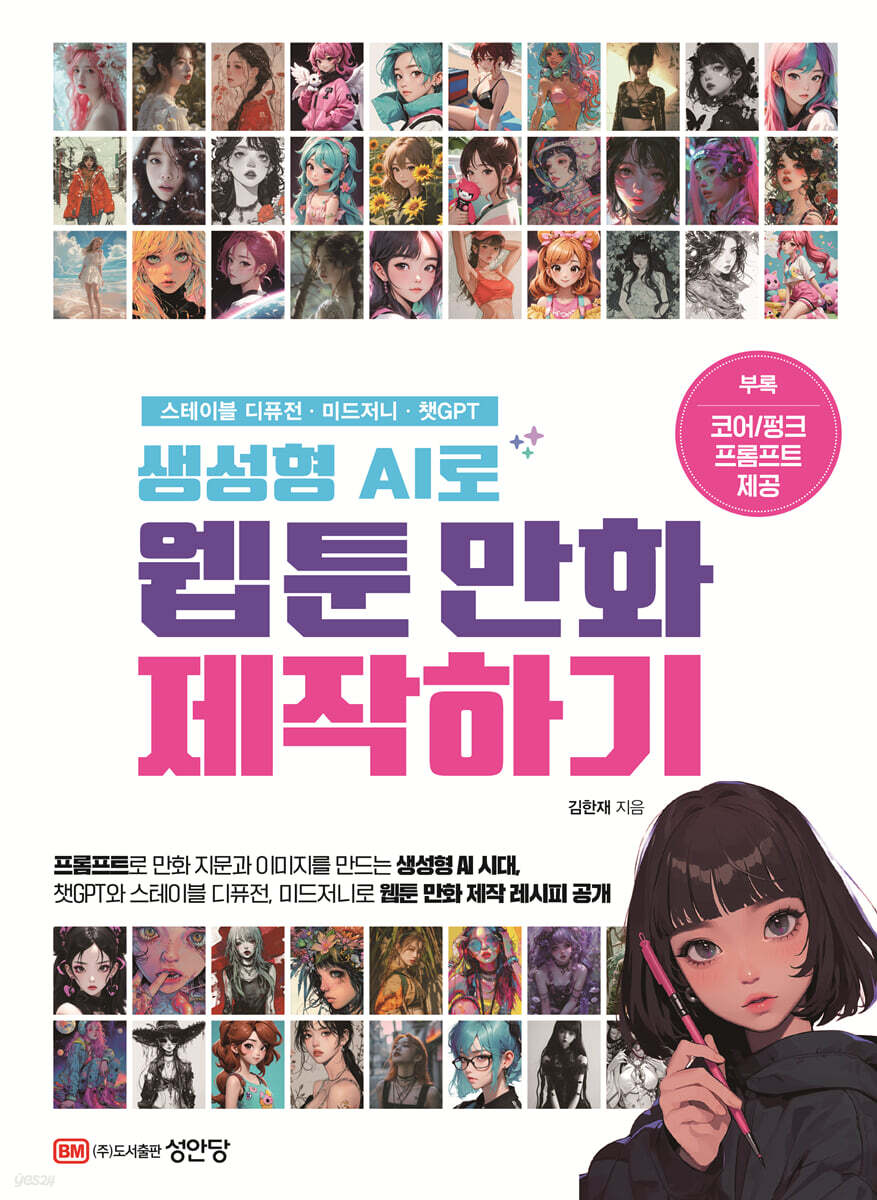
Stable Diffusion and Midjourney, Chat GPT Create characters, write storyboards, and make a proper webtoon. "A Proposal for a Diverse Webtoon Production Process with AI" What if generative AI could inspire and empower the creation of webtoon comics, a form of digital emotional content? By utilizing generative AI as an assistant to creators, acting as a multi-talented story planner, storyboard writer, cartoonist, background and prop designer, and colorist, creators could focus on their core values and produce even better works. Professor Kim Han-jae's book, "Creating Webtoon Comics with Generative AI," proposes various webtoon production processes and detailed prompt application methods that can be used to create webtoon comics using Stable Diffusion and Midjourney as image generation AI and ChatGPT as text generation AI. Anyone, from working professional writers to students just starting out in manga and animation, can utilize it appropriately. The author systematically teaches the know-how accumulated through various lecture experiences, such as how to quickly create images with detailed English words like emotion prompts, how to utilize images from images with LoRA (Low-Rank Adaptation) of Stable Diffusion, and how to use powerful and efficient prompts in ChatGPT and Midjourney. It also provides detailed prompts and explanations on how to create various image and text elements such as overall webtoon story planning, character creation, backgrounds, props, and facial expressions. |
- You can preview some of the book's contents.
Preview
index
Introduction / Artificial Intelligence is Coming
Recommendation
Chapter 1: What Does Artificial Intelligence Mean to Writers?
Increased productivity
1.
Draft writing assistance
2.
Proofreading and editing
3.
Automated Research
4.
Feedback and Improvement
5.
Secure creative time
Expanding creativity
1.
Character Development
2.
Plot structure
3.
Visual inspiration
4.
Genre Mix
5.
Creation of dialogue and narrative
Interactive Storytelling
1.
Seasonal storylines
2.
Reader voting system and reader-driven story development
3.
Character customization
4.
Interactive Mystery
Overcoming Language Barriers: Leveraging AI Translation and AI Voice Dubbing
1. AI translation
2. AI voice actor dubbing
OST: Theme song production
1.
Use high-quality music
2.
Generate music that matches your emotions
3.
Creating unique content
4.
Focus on the author's original creative activities
5.
Improved accessibility
6.
Customizable
Moving Toon: A variety of interactive webtoons
1.
Improving the reader experience
2.
A new way of storytelling
3.
Changes in the production process
4.
Increased interaction
5.
technological barriers to entry
Covers of web novels, etc.
1.
Cost savings
2.
Time efficiency
3.
Increased independence for creators
4.
Attracting public visual attention
5.
Strengthening competitiveness
6.
Ease of feedback and improvement
Data-Driven Insights: AI-Powered Reader Preference Analysis and Secondary Content Expansion
1.
Reader Behavior Analysis
2.
Comment and Review Analysis
3.
Goods and merchandising planning
Chapter 2 Don't be afraid to try
Mage Space
Stable Diffusion v1-5 Demo
Playground AI
hotpot.ai
DreamStudio
Dezgo
Neural.love
You.com
Stable Horde
Night Cafe
Craiyon
Chapter 3 Setting Up the Environment
Getting Started with Stable Diffusion
What is stable diffusion?
Software Installation
1.
Stable Diffusion
2.
Download files from the website
3.
Using stable diffusion
4.
What you can do with stable diffusion
Chapter 4: Creating Images Using Prompts
Rules for Creating a Good Prompt
Things to keep in mind when creating prompts
1.
Let's use clean, simple directives.
2.
Let's use technical terms
3.
Let's use Korean like English
Anatomy of a Good Prompt
1.
Target
2.
Additional details
3.
ingredient
4.
style
5.
Works and Artists
6.
Resolution, quality
7.
color
8.
lighting
Prompts that suggest styles based on art history
1.
youth of the world
2.
5th to 15th centuries
3.
14th-16th centuries
4.
17th-18th century
5.
19th century
6.
20th century
Prompts to express personality and emotions
1.
personality
2.
emotion
Negative prompt
1.
Improved image quality (quality-related negative prompts)
2.
Anatomical accuracy (anatomical inaccuracy prompt)
3.
Remove unwanted text (text-related negative prompts)
4.
Remove unnecessary elements (other negative prompts)
5.
Using embeddings (Badhandv4, FASTNEGATIVEv4, Easynegative)
Comparison of prompt application
Chapter 5: Planning a Work with ChatGPT
Worldview setting
plot
Episode Summary
Storyboard for one episode of a webtoon
Character settings
Enter prompts according to character settings and create a Midjourney character image.
Create a character customization chart with ChatGPT
Write a character-focused story with ChatGPT
1.
Character Basics
2.
Final goal and step-by-step goals
3.
obstacle
4.
Growth of the protagonist (conflict resolution)
Summarize the entire plot with ChatGPT
Chapter 6: Designing Concept Art, Background Design, and Props
The most important 'atmosphere' in concept design
1.
Concept design stage
2.
Step-by-step application example
3.
Try using Stable Diffusion
A summary of character-specific speech patterns for use in ChatGPT.
Chapter 7: Creating a Character Sheet and Laura
Creating a character sheet
1.
Character Sheet, Turn Around, White Background
2.
Various Expressions, Happy, Sad, Angry, Smile, Multiple Pose and Expressions, Various Facial Expressions and Movements
3.
Extracting character images from 5 character setting sheets
Change character expressions and movements while maintaining style
1.
Clear styling
2.
Add details
3.
Express emotions and poses
4.
See the work
5.
Repetition and revision
6.
Leverage community feedback
--Use sref to change a character's expression and movements.
Making Laura
1.
The difference between Laura and Dreambooth
2.
The Complexity of Laura Training
3.
Number of training images
4.
Image caption
5.
Image Format Recommendations
6.
Image specifications
7.
Image types to exclude
8.
Image placement
Insert image tags
Laura Learning UI
Basic settings
Chapter 8 Editing with Midjourney and Stable Diffusion
Midjourney production process
1.
Writing a storyboard
2.
Image creation
3.
Photoshop work
4.
Final completion in Illustrator
Casting a short-haired female lead
1.
Storyboard Creation: A Guide to Using Adobe Illustrator AI
2.
Image creation
3.
Photoshop work
4.
Editing and completing the final manuscript in Illustrator
Stable Diffusion Artwork Creation Process
Chapter 9: Application Examples
Cherry Blossom Carbonated
Ham's Great Hamburger Adventure
Kenneth and the Spring
Tasha's Mysterious Christmas
Luca and the Magic Stone
Chosen by God
Appendix Core/Punk Prompts
Conclusion / “The writer’s only goal is to create an interesting work.”
Reference
Recommendation
Chapter 1: What Does Artificial Intelligence Mean to Writers?
Increased productivity
1.
Draft writing assistance
2.
Proofreading and editing
3.
Automated Research
4.
Feedback and Improvement
5.
Secure creative time
Expanding creativity
1.
Character Development
2.
Plot structure
3.
Visual inspiration
4.
Genre Mix
5.
Creation of dialogue and narrative
Interactive Storytelling
1.
Seasonal storylines
2.
Reader voting system and reader-driven story development
3.
Character customization
4.
Interactive Mystery
Overcoming Language Barriers: Leveraging AI Translation and AI Voice Dubbing
1. AI translation
2. AI voice actor dubbing
OST: Theme song production
1.
Use high-quality music
2.
Generate music that matches your emotions
3.
Creating unique content
4.
Focus on the author's original creative activities
5.
Improved accessibility
6.
Customizable
Moving Toon: A variety of interactive webtoons
1.
Improving the reader experience
2.
A new way of storytelling
3.
Changes in the production process
4.
Increased interaction
5.
technological barriers to entry
Covers of web novels, etc.
1.
Cost savings
2.
Time efficiency
3.
Increased independence for creators
4.
Attracting public visual attention
5.
Strengthening competitiveness
6.
Ease of feedback and improvement
Data-Driven Insights: AI-Powered Reader Preference Analysis and Secondary Content Expansion
1.
Reader Behavior Analysis
2.
Comment and Review Analysis
3.
Goods and merchandising planning
Chapter 2 Don't be afraid to try
Mage Space
Stable Diffusion v1-5 Demo
Playground AI
hotpot.ai
DreamStudio
Dezgo
Neural.love
You.com
Stable Horde
Night Cafe
Craiyon
Chapter 3 Setting Up the Environment
Getting Started with Stable Diffusion
What is stable diffusion?
Software Installation
1.
Stable Diffusion
2.
Download files from the website
3.
Using stable diffusion
4.
What you can do with stable diffusion
Chapter 4: Creating Images Using Prompts
Rules for Creating a Good Prompt
Things to keep in mind when creating prompts
1.
Let's use clean, simple directives.
2.
Let's use technical terms
3.
Let's use Korean like English
Anatomy of a Good Prompt
1.
Target
2.
Additional details
3.
ingredient
4.
style
5.
Works and Artists
6.
Resolution, quality
7.
color
8.
lighting
Prompts that suggest styles based on art history
1.
youth of the world
2.
5th to 15th centuries
3.
14th-16th centuries
4.
17th-18th century
5.
19th century
6.
20th century
Prompts to express personality and emotions
1.
personality
2.
emotion
Negative prompt
1.
Improved image quality (quality-related negative prompts)
2.
Anatomical accuracy (anatomical inaccuracy prompt)
3.
Remove unwanted text (text-related negative prompts)
4.
Remove unnecessary elements (other negative prompts)
5.
Using embeddings (Badhandv4, FASTNEGATIVEv4, Easynegative)
Comparison of prompt application
Chapter 5: Planning a Work with ChatGPT
Worldview setting
plot
Episode Summary
Storyboard for one episode of a webtoon
Character settings
Enter prompts according to character settings and create a Midjourney character image.
Create a character customization chart with ChatGPT
Write a character-focused story with ChatGPT
1.
Character Basics
2.
Final goal and step-by-step goals
3.
obstacle
4.
Growth of the protagonist (conflict resolution)
Summarize the entire plot with ChatGPT
Chapter 6: Designing Concept Art, Background Design, and Props
The most important 'atmosphere' in concept design
1.
Concept design stage
2.
Step-by-step application example
3.
Try using Stable Diffusion
A summary of character-specific speech patterns for use in ChatGPT.
Chapter 7: Creating a Character Sheet and Laura
Creating a character sheet
1.
Character Sheet, Turn Around, White Background
2.
Various Expressions, Happy, Sad, Angry, Smile, Multiple Pose and Expressions, Various Facial Expressions and Movements
3.
Extracting character images from 5 character setting sheets
Change character expressions and movements while maintaining style
1.
Clear styling
2.
Add details
3.
Express emotions and poses
4.
See the work
5.
Repetition and revision
6.
Leverage community feedback
--Use sref to change a character's expression and movements.
Making Laura
1.
The difference between Laura and Dreambooth
2.
The Complexity of Laura Training
3.
Number of training images
4.
Image caption
5.
Image Format Recommendations
6.
Image specifications
7.
Image types to exclude
8.
Image placement
Insert image tags
Laura Learning UI
Basic settings
Chapter 8 Editing with Midjourney and Stable Diffusion
Midjourney production process
1.
Writing a storyboard
2.
Image creation
3.
Photoshop work
4.
Final completion in Illustrator
Casting a short-haired female lead
1.
Storyboard Creation: A Guide to Using Adobe Illustrator AI
2.
Image creation
3.
Photoshop work
4.
Editing and completing the final manuscript in Illustrator
Stable Diffusion Artwork Creation Process
Chapter 9: Application Examples
Cherry Blossom Carbonated
Ham's Great Hamburger Adventure
Kenneth and the Spring
Tasha's Mysterious Christmas
Luca and the Magic Stone
Chosen by God
Appendix Core/Punk Prompts
Conclusion / “The writer’s only goal is to create an interesting work.”
Reference
Detailed image

GOODS SPECIFICS
- Date of issue: April 3, 2024
- Page count, weight, size: 232 pages | 606g | 188*257*14mm
- ISBN13: 9788931571264
- ISBN10: 8931571267
You may also like
카테고리
korean


korean

![GQ KOREA Mark (Monthly): December [2025]](http://librairie.coreenne.fr/cdn/shop/files/8ef265dbbfbf186523ed75ba7319009d.jpg?v=1765340328&width=3840)


