

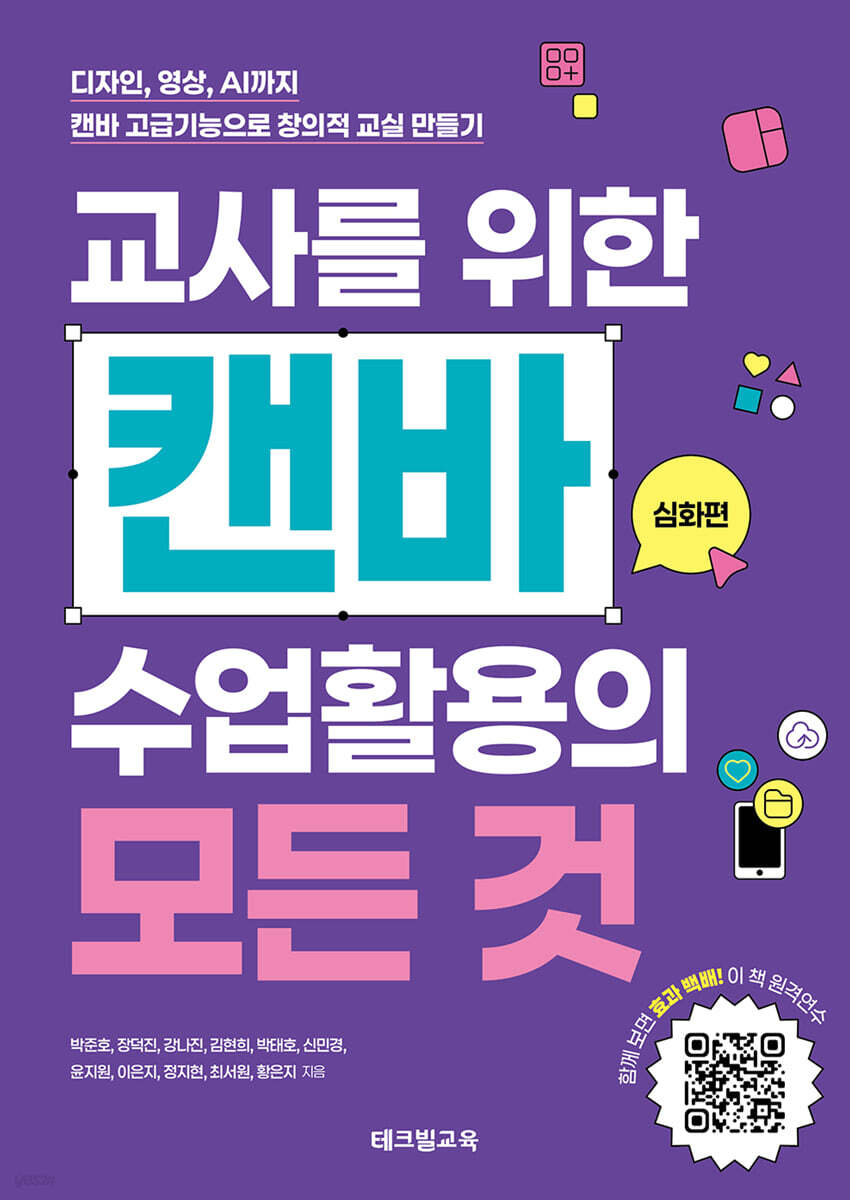
Everything You Need to Know About Using Canvas in Your Classroom: Advanced Edition
 |
Description
Book Introduction
Now, take it to another level with advanced features of Canva!
A powerful, practical textbook that seamlessly integrates AI, video, and advanced design into the classroom.
Already familiar with Canva? Now it's time to take your learning to the next level with advanced features! This book goes beyond basic usage and covers everything from video creation and brand kits to animation, stop-motion, website design, AI-based text and image generation, and even online book creation—a full course that covers all of Canva's advanced features.
All features are not simply listed, but are reorganized based on how they can be utilized to make classes easier and more creative. They are presented as specific examples, such as video classes, promotional posters, automatic award generation, and portfolio creation.
This book, which contains the practical experience of 11 current teachers with a unique perspective on Canva, including Korea's first Canva creator and Canva Korea's official Canva instructor, is an AI-based courseware guide and a guide to creating creative educational content.
A must-read for teachers who love Canva and want to use it effectively.
It is even more effective if you also watch the online remote training taught by the authors themselves.
A powerful, practical textbook that seamlessly integrates AI, video, and advanced design into the classroom.
Already familiar with Canva? Now it's time to take your learning to the next level with advanced features! This book goes beyond basic usage and covers everything from video creation and brand kits to animation, stop-motion, website design, AI-based text and image generation, and even online book creation—a full course that covers all of Canva's advanced features.
All features are not simply listed, but are reorganized based on how they can be utilized to make classes easier and more creative. They are presented as specific examples, such as video classes, promotional posters, automatic award generation, and portfolio creation.
This book, which contains the practical experience of 11 current teachers with a unique perspective on Canva, including Korea's first Canva creator and Canva Korea's official Canva instructor, is an AI-based courseware guide and a guide to creating creative educational content.
A must-read for teachers who love Canva and want to use it effectively.
It is even more effective if you also watch the online remote training taught by the authors themselves.
- You can preview some of the book's contents.
Preview
index
1.
Advanced Canvas Utilization Tips
go.
Project Management Methods
me.
A collection of Canva shortcuts to save you time
all.
Practical Tips for Using Templates and Elements
la.
Easily edit PDF and PPT files with Canva
2.
Create a stylish PPT with Canva [Design Techniques]
go.
Start creating a PPT in Canva
me.
Check template specifications
all.
Search and apply the template you want
A. Editing PPT content
mind.
Presenting with a completed Canva PPT
3.
How to Use a Brand Kit to Maintain Format, Color, and Logo Consistency [Design Techniques]
go.
Explore and create a Canva Brand Kit
me.
Create class and work materials using the Canva Brand Kit.
4.
Various editing functions [Design techniques]
go.
Working with Elements: Using Position and Layers
me.
Photo editing feature practice
all.
Hands-on Example: Creating Pop Art
5.
Create and Edit Images [AI + Canva]
go.
Explore Magic Media and Magic Studio Features
me.
Editing Images with Magic Studio
all.
Hands-on Example: Creating a Shadow Box Using AI
6.
Generate text and automatically convert it into various formats [AI + Canva]
go.
Writing using Magic Light
me.
Converting document formats using Magic Switch
all.
Create eye-catching presentations using Magic Animate
7.
Creating Class Materials
go.
Mass production of listings
B. Upload PDF file
all.
Everything you need to know about creating posters for class events and promotions.
8.
Making a book of activity results
go.
Connecting Canva and BookCreator
me.
Understanding Book Creator's [Tools] and [Media] Features
all.
Publish online with BookCreator
la.
Publish offline by linking Canva and Bookcube
9.
Making a Video for Our Class [Video]
go.
Creating a storyboard
me.
Making news videos
all.
Making a quiz video
la.
Making a Graduation Video
10.
Get a little more creative with your videos [Video]
go.
Creating animated videos
me.
Creating stop motion
all.
Create an avatar and introduce a historical figure
11. Create a SNS video [Video]
go.
Creating short forms
me.
Creating a YouTube Intro Video
all.
Create a video with your appearance and voice
12.
Create a website in no time and use it in your classes.
go.
Organizing website pages
me.
Insert a link into a page
all.
Adding Screens and Creating Navigation Menus
la.
Embed external content
mind.
Publishing and Setting Up Your Website
bar.
Class examples of utilizing website features
13.
Creating an Online Portfolio
go.
Create a single-page portfolio
me.
Create a multi-page portfolio with the embed feature
all.
Create your own mobile portfolio with Littlely
14.
Double the Effects Together! Top 10 Recommended Canva In-Apps
15.
Great apps to use with Canva
go.
Color combination site
me.
Font site
Advanced Canvas Utilization Tips
go.
Project Management Methods
me.
A collection of Canva shortcuts to save you time
all.
Practical Tips for Using Templates and Elements
la.
Easily edit PDF and PPT files with Canva
2.
Create a stylish PPT with Canva [Design Techniques]
go.
Start creating a PPT in Canva
me.
Check template specifications
all.
Search and apply the template you want
A. Editing PPT content
mind.
Presenting with a completed Canva PPT
3.
How to Use a Brand Kit to Maintain Format, Color, and Logo Consistency [Design Techniques]
go.
Explore and create a Canva Brand Kit
me.
Create class and work materials using the Canva Brand Kit.
4.
Various editing functions [Design techniques]
go.
Working with Elements: Using Position and Layers
me.
Photo editing feature practice
all.
Hands-on Example: Creating Pop Art
5.
Create and Edit Images [AI + Canva]
go.
Explore Magic Media and Magic Studio Features
me.
Editing Images with Magic Studio
all.
Hands-on Example: Creating a Shadow Box Using AI
6.
Generate text and automatically convert it into various formats [AI + Canva]
go.
Writing using Magic Light
me.
Converting document formats using Magic Switch
all.
Create eye-catching presentations using Magic Animate
7.
Creating Class Materials
go.
Mass production of listings
B. Upload PDF file
all.
Everything you need to know about creating posters for class events and promotions.
8.
Making a book of activity results
go.
Connecting Canva and BookCreator
me.
Understanding Book Creator's [Tools] and [Media] Features
all.
Publish online with BookCreator
la.
Publish offline by linking Canva and Bookcube
9.
Making a Video for Our Class [Video]
go.
Creating a storyboard
me.
Making news videos
all.
Making a quiz video
la.
Making a Graduation Video
10.
Get a little more creative with your videos [Video]
go.
Creating animated videos
me.
Creating stop motion
all.
Create an avatar and introduce a historical figure
11. Create a SNS video [Video]
go.
Creating short forms
me.
Creating a YouTube Intro Video
all.
Create a video with your appearance and voice
12.
Create a website in no time and use it in your classes.
go.
Organizing website pages
me.
Insert a link into a page
all.
Adding Screens and Creating Navigation Menus
la.
Embed external content
mind.
Publishing and Setting Up Your Website
bar.
Class examples of utilizing website features
13.
Creating an Online Portfolio
go.
Create a single-page portfolio
me.
Create a multi-page portfolio with the embed feature
all.
Create your own mobile portfolio with Littlely
14.
Double the Effects Together! Top 10 Recommended Canva In-Apps
15.
Great apps to use with Canva
go.
Color combination site
me.
Font site
GOODS SPECIFICS
- Date of issue: September 30, 2025
- Page count, weight, size: 322 pages | 170*240*30mm
- ISBN13: 9791163462040
- ISBN10: 1163462047
You may also like
카테고리
korean


korean

![GQ KOREA Mark (Monthly): December [2025]](http://librairie.coreenne.fr/cdn/shop/files/8ef265dbbfbf186523ed75ba7319009d.jpg?v=1765340328&width=3840)


