

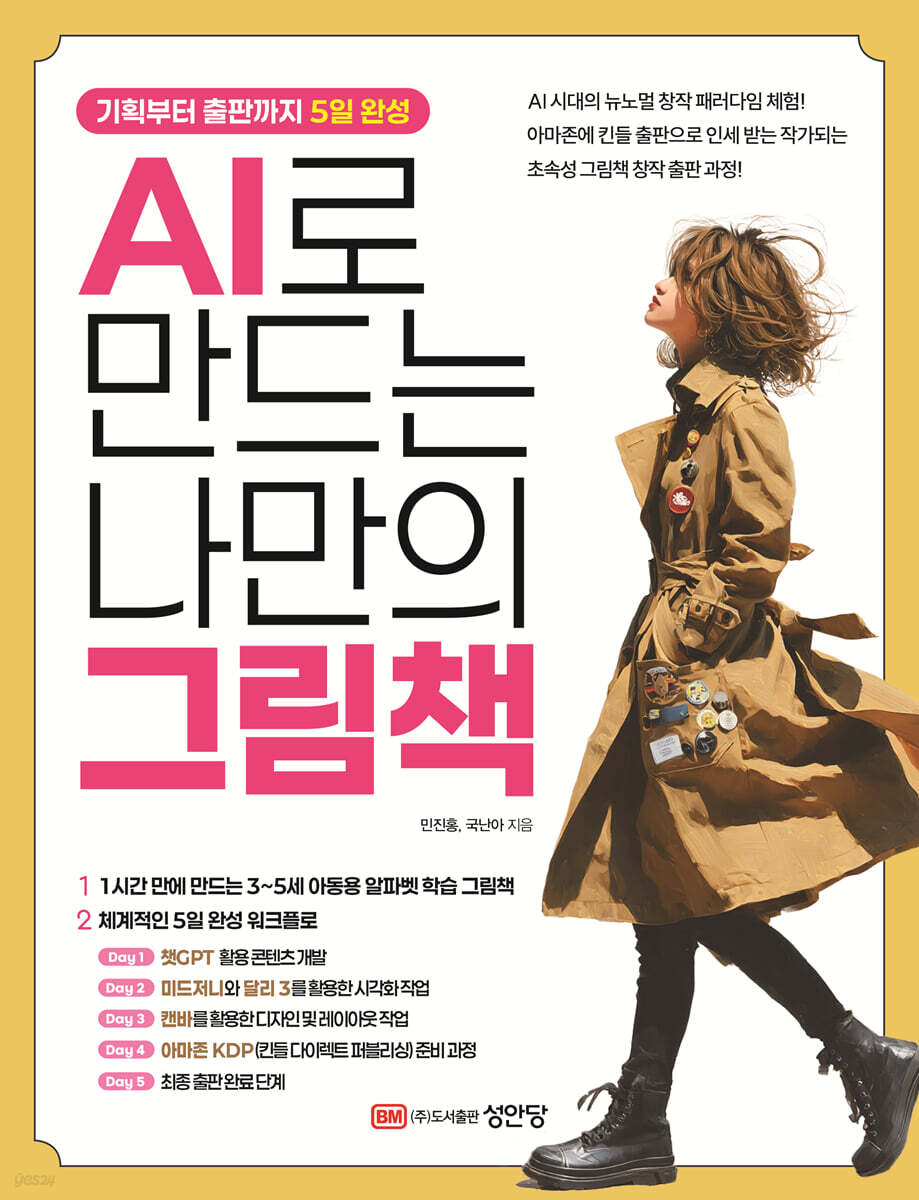
Create your own picture book with AI
 |
Description
Book Introduction
In the age of artificial intelligence, the door to self-publishing has opened wide.
The only difference is whether you go first or follow. This book, which offers a preview of the new normal creative paradigm in the AI era, covers the entire process: creating text with ChatGPT, creating illustrations with Dali3 and Midjourney, framing the book with Canva, and publishing it as an e-book on Amazon.
In Part 1, you will create an English learning fairy tale for children aged 3 to 5, and in Parts 2 to 6, you will complete the book within 5 days.
In Part 2 (Day 1), you will plan, outline, and write the main text with ChatGPT. In Part 3 (Day 2), unlike Midjourney, you will create picture book illustrations with 3. In Part 4 (Day 3), you will compose the layout with Canva. In Part 5 (Day 4), you will master Amazon KDP (Kindle Direct Publishing (e-book direct publishing)). In Part 6 (Day 5), you will practice KDP paperback (paper book) to become an author who actually receives royalties from Amazon.
In particular, Part 3 introduces 500 Midjourney prompts, enabling you to create illustrations at the level of a professional artist, and Part 4, Canva, helps you design a proper book with professional publishing terminology, just like watching an InDesign lecture from a commercial publisher.
The Amazon publishing section in parts 5 and 6 is significant in that it helps us take a bigger leap forward in realizing our dream of entering the US Amazon market, rather than being satisfied with domestic e-books.
This book contains a complete guide to becoming a professional Amazon writer, with proper publishing knowledge and the help of artificial intelligence in your creative process.
In particular, the author of this book, Jin-Hong Min, is a design and marketing expert, a professional editor from Sisa Publishing, and currently runs Min-A Art Publishing.
Also, the author of Guknanah is a professional nurse at Soonchunhyang University Bucheon Hospital, and has steadily walked the path of a children's book author as a side character, and is an author who has actually published a children's book on Amazon.
This book, which compiles the authors' publishing know-how, will connect with many readers and lead them into the world of digital creation.
The only difference is whether you go first or follow. This book, which offers a preview of the new normal creative paradigm in the AI era, covers the entire process: creating text with ChatGPT, creating illustrations with Dali3 and Midjourney, framing the book with Canva, and publishing it as an e-book on Amazon.
In Part 1, you will create an English learning fairy tale for children aged 3 to 5, and in Parts 2 to 6, you will complete the book within 5 days.
In Part 2 (Day 1), you will plan, outline, and write the main text with ChatGPT. In Part 3 (Day 2), unlike Midjourney, you will create picture book illustrations with 3. In Part 4 (Day 3), you will compose the layout with Canva. In Part 5 (Day 4), you will master Amazon KDP (Kindle Direct Publishing (e-book direct publishing)). In Part 6 (Day 5), you will practice KDP paperback (paper book) to become an author who actually receives royalties from Amazon.
In particular, Part 3 introduces 500 Midjourney prompts, enabling you to create illustrations at the level of a professional artist, and Part 4, Canva, helps you design a proper book with professional publishing terminology, just like watching an InDesign lecture from a commercial publisher.
The Amazon publishing section in parts 5 and 6 is significant in that it helps us take a bigger leap forward in realizing our dream of entering the US Amazon market, rather than being satisfied with domestic e-books.
This book contains a complete guide to becoming a professional Amazon writer, with proper publishing knowledge and the help of artificial intelligence in your creative process.
In particular, the author of this book, Jin-Hong Min, is a design and marketing expert, a professional editor from Sisa Publishing, and currently runs Min-A Art Publishing.
Also, the author of Guknanah is a professional nurse at Soonchunhyang University Bucheon Hospital, and has steadily walked the path of a children's book author as a side character, and is an author who has actually published a children's book on Amazon.
This book, which compiles the authors' publishing know-how, will connect with many readers and lead them into the world of digital creation.
- You can preview some of the book's contents.
Preview
index
prolog
About the Author
Part 1
Create an ABC Picture Book in One Hour
Chapter 1: Creating Systematic Scenarios Using ChatGPT
1.
Setting the basic concept
2.
Developing a detailed story structure
3.
Detailed configuration by page
4.
Optimizing illustration prompts
DAY
Part 2
Writing a Picture Book Concept, Outline, and Body with ChatGPT
Chapter 1 ChatGPT - Text Content Creation Tool
1.
Introduction to ChatGPT and its Applications
2.
How to create and log in to an account
3.
Cost Structure and Plan Selection
Chapter 2: Basic Concepts of ChatGPT Prompts
1.
Write clearly
2.
Assign a role
3.
Write in Markdown format
4.
Suggest output format
5.
Provide an example output
Chapter 3: Designing a Picture Book Concept
1.
Strategic Approach to Concept Development
2.
A Practical Approach to Leveraging ChatGPT
3.
Concept Development Practical Case Studies
4. Popular picture book concept types suggested by AI
5.
A Practical Approach to Concept Development
Chapter 4: Thinking about Characters, Story Setting, and Outline
1.
Determining the core elements of a picture book
2.
Clarifying the readership
3.
Creating Stories with ChatGPT
4.
Example of a real story: Ruel's dream story
Chapter 5: Choosing a Title for Your Picture Book
1.
Conditions for a good picture book title
2.
Title Generation Strategy Using ChatGPT
3.
Title Evaluation and Selection Criteria
Chapter 6: Completing the Main Text
1.
Page-by-page composition plan
2.
Balance of text and images
3.
Language adjustment by age group
4.
Review and revise the completed text
DAY
Part 3
Midjourney, Creating Picture Book Illustrations with Dali 3
Chapter 1 Midjourney - Illustration Creation Tool
1.
Introduction to Midjourney and its Applications
2.
Choose your connection method and platform
3.
Cost Structure and Investment Value
Chapter 2: A Complete Analysis of the Midjourney Rate Plan
1.
Detailed comparison by rate plan
2.
A personalized selection guide for each picture book author
3.
Cost Optimization Strategy
Chapter 3 Account Creation and Management System
1.
Web version account creation guide
2.
Subscription setup and payment process
3.
Account Cancellation and Refund Policy
4.
Advanced Account Management Features
Chapter 4: 500 Prompts: The Complete Guide to AI Picture Book Illustration
1. Basic principles of AI illustration generation prompts
2.
10 Key Elements of Prompt Structure
3. Tips for Writing AI Illustration Prompts
4.
Genre-specific prompt collections
5.
How to Use Practical Prompts
Chapter 5: Utilizing Midjourney Parameters and Advanced Settings
1.
Complete mastery of essential parameters
2.
Mastering Advanced Parameters
3.
Style Reference System
Chapter 6 How to Create Similar Images and Identical Characters
1.
How to use image links
2.
Using the Describe feature
3.
Advanced Use of Style References
4.
Omni Reference System
Chapter 7: A Picture Book Completed with Dali 3
1.
Understanding and using the basics of Dali 3
2.
Mastering Writing Prompts in Dali 3
3.
Selection and planning of picture book materials
4.
Practical Picture Book Production Workflow
5.
Advanced Techniques and Troubleshooting
Part 4
Creating the text and layout of a picture book with Canva
Chapter 1: Setting Up a Canva Account and Creating a Work Environment
1.
Why Choose Canva for Picture Book Creation
2.
Guide to Creating an Account and Choosing a Plan
3.
Optimize your work environment settings
Chapter 2: Things to Consider When Publishing E-Books and Paper Books
1.
Recommended size setting (200×200mm square)
2.
Minimum page count requirement (24 pages for e-books, 70 pages for paper books)
3.
Consider the cutting margin (5mm safety zone)
4.
Understanding the structural characteristics of books
5.
Checklist for Parallel Publishing of Paper and E-Books
Chapter 3: Designing in Custom Sizes
1.
Start your custom-sized design in Canva
2.
The Importance of Changing Units of Measurement
3.
Enter picture book size
4.
The Importance of Unit Setting and Practical Tips
Chapter 4 Uploading Images Created with Midjourney
1.
Basic image upload process
2.
Access the upload menu and select a file
3.
Drag and Drop and Copy-Paste Methods
4.
Using uploaded images
Chapter 5: Configuring Design and Layout
1.
Adding and Styling Text
2.
Text placement principles
3.
How to apply foundation margins
4.
Setting a safe area in Canvas
Chapter 6: Choosing and Using Fonts
1.
Font Selection Guidelines for Children's Picture Books
2.
Prioritize readability and use UD fonts
3.
How to Upload and Use Fonts in Canva
4.
Recommended point size
Chapter 7 Creating the Cover and Back Cover
1.
Differences Between E-Book and Paper Book Cover Design
2.
Cover Size and Barcode Area Considerations
3.
How to place a cover design
Chapter 8 Download only the text of the picture book
1.
Access the Share menu and download options
2. Select PDF print format
3.
Color mode settings
4.
Specify page range and extract body text
Chapter 9 Downloading Cover and Back Cover Data
1. Extract cover image in JPEG format
2.
Select and download individual pages
Chapter 10 Useful Tips for Editing Text and Images
1.
Aligning positions using rulers
Part 5
Mastering Kindle Direct Publishing (KDP)
Chapter 1: Guide to Creating a Kindle Direct Publishing Account
1.
KDP, a platform for writers around the world
Chapter 2 Setting Up Financial Information for Korean Writers
1.
Bank Identifier Code for International Banking Transactions, BIC
Chapter 3: Optimizing Your Picture Book Publishing Process at KDP
1.
How to access the e-book publishing menu
2.
3-step process for entering book information
3.
Effective Book Title and Subtitle Techniques
4.
Series and Edition Information Management Strategy
5.
How to Write an Introduction to Using ChatGPT
Chapter 4 Category and Keyword Optimization Strategies
1.
Optimal Category Selection Methodology
2.
Additional category setting technique
3.
Category combination strategy
4.
Search Keyword Research and Optimization
5.
Effective keyword entry format
Chapter 5: Understanding Paperback Concepts and the Amazon POD System
1.
Professional definition and characteristics of paperbacks
2.
Analysis of structural differences from hardcovers
3.
How the Amazon POD System Works
4. Economic structure of the POD system
5.
Publishing Quality Options and Strategic Choice Guide
Chapter 6: Technical Fundamentals of Paperback Publishing
1.
Understanding the Structural Characteristics of Paperback Covers
2. Analysis of the KDP Cover Template System
3.
Step-by-step guide to obtaining a cover template
4.
Technical structural analysis of the template
5.
How to set up foundation margins and core content protection zones
Part 6
KDP Paperback Publishing Practice and Optimization
Chapter 1: Creating a KDP Paperback Project
1.
Setting categories is important when producing paperback books.
Chapter 2: Paperback Content Registration Practice
1.
Set file specifications and print options to match
Chapter 3 Quality Checking and Book Preview Practice
1. KDP automatic quality inspection in progress
2.
Book Preview Preview Review
3.
Fix errors and re-upload
4.
Final quality check
5.
Click the [Approve] button
Chapter 4: Paperback Rights and Pricing Practice
1.
Select sales area
2.
Setting up major marketplaces
3.
Enter your selling price and confirm your royalty
4. Agree to KDP Terms of Use
5.
Ready for publication
Epilogue
Introducing the Min A.I. Art Publishing Company's Children's Book Publishing Instructor Certification Course
About the Author
Part 1
Create an ABC Picture Book in One Hour
Chapter 1: Creating Systematic Scenarios Using ChatGPT
1.
Setting the basic concept
2.
Developing a detailed story structure
3.
Detailed configuration by page
4.
Optimizing illustration prompts
DAY
Part 2
Writing a Picture Book Concept, Outline, and Body with ChatGPT
Chapter 1 ChatGPT - Text Content Creation Tool
1.
Introduction to ChatGPT and its Applications
2.
How to create and log in to an account
3.
Cost Structure and Plan Selection
Chapter 2: Basic Concepts of ChatGPT Prompts
1.
Write clearly
2.
Assign a role
3.
Write in Markdown format
4.
Suggest output format
5.
Provide an example output
Chapter 3: Designing a Picture Book Concept
1.
Strategic Approach to Concept Development
2.
A Practical Approach to Leveraging ChatGPT
3.
Concept Development Practical Case Studies
4. Popular picture book concept types suggested by AI
5.
A Practical Approach to Concept Development
Chapter 4: Thinking about Characters, Story Setting, and Outline
1.
Determining the core elements of a picture book
2.
Clarifying the readership
3.
Creating Stories with ChatGPT
4.
Example of a real story: Ruel's dream story
Chapter 5: Choosing a Title for Your Picture Book
1.
Conditions for a good picture book title
2.
Title Generation Strategy Using ChatGPT
3.
Title Evaluation and Selection Criteria
Chapter 6: Completing the Main Text
1.
Page-by-page composition plan
2.
Balance of text and images
3.
Language adjustment by age group
4.
Review and revise the completed text
DAY
Part 3
Midjourney, Creating Picture Book Illustrations with Dali 3
Chapter 1 Midjourney - Illustration Creation Tool
1.
Introduction to Midjourney and its Applications
2.
Choose your connection method and platform
3.
Cost Structure and Investment Value
Chapter 2: A Complete Analysis of the Midjourney Rate Plan
1.
Detailed comparison by rate plan
2.
A personalized selection guide for each picture book author
3.
Cost Optimization Strategy
Chapter 3 Account Creation and Management System
1.
Web version account creation guide
2.
Subscription setup and payment process
3.
Account Cancellation and Refund Policy
4.
Advanced Account Management Features
Chapter 4: 500 Prompts: The Complete Guide to AI Picture Book Illustration
1. Basic principles of AI illustration generation prompts
2.
10 Key Elements of Prompt Structure
3. Tips for Writing AI Illustration Prompts
4.
Genre-specific prompt collections
5.
How to Use Practical Prompts
Chapter 5: Utilizing Midjourney Parameters and Advanced Settings
1.
Complete mastery of essential parameters
2.
Mastering Advanced Parameters
3.
Style Reference System
Chapter 6 How to Create Similar Images and Identical Characters
1.
How to use image links
2.
Using the Describe feature
3.
Advanced Use of Style References
4.
Omni Reference System
Chapter 7: A Picture Book Completed with Dali 3
1.
Understanding and using the basics of Dali 3
2.
Mastering Writing Prompts in Dali 3
3.
Selection and planning of picture book materials
4.
Practical Picture Book Production Workflow
5.
Advanced Techniques and Troubleshooting
Part 4
Creating the text and layout of a picture book with Canva
Chapter 1: Setting Up a Canva Account and Creating a Work Environment
1.
Why Choose Canva for Picture Book Creation
2.
Guide to Creating an Account and Choosing a Plan
3.
Optimize your work environment settings
Chapter 2: Things to Consider When Publishing E-Books and Paper Books
1.
Recommended size setting (200×200mm square)
2.
Minimum page count requirement (24 pages for e-books, 70 pages for paper books)
3.
Consider the cutting margin (5mm safety zone)
4.
Understanding the structural characteristics of books
5.
Checklist for Parallel Publishing of Paper and E-Books
Chapter 3: Designing in Custom Sizes
1.
Start your custom-sized design in Canva
2.
The Importance of Changing Units of Measurement
3.
Enter picture book size
4.
The Importance of Unit Setting and Practical Tips
Chapter 4 Uploading Images Created with Midjourney
1.
Basic image upload process
2.
Access the upload menu and select a file
3.
Drag and Drop and Copy-Paste Methods
4.
Using uploaded images
Chapter 5: Configuring Design and Layout
1.
Adding and Styling Text
2.
Text placement principles
3.
How to apply foundation margins
4.
Setting a safe area in Canvas
Chapter 6: Choosing and Using Fonts
1.
Font Selection Guidelines for Children's Picture Books
2.
Prioritize readability and use UD fonts
3.
How to Upload and Use Fonts in Canva
4.
Recommended point size
Chapter 7 Creating the Cover and Back Cover
1.
Differences Between E-Book and Paper Book Cover Design
2.
Cover Size and Barcode Area Considerations
3.
How to place a cover design
Chapter 8 Download only the text of the picture book
1.
Access the Share menu and download options
2. Select PDF print format
3.
Color mode settings
4.
Specify page range and extract body text
Chapter 9 Downloading Cover and Back Cover Data
1. Extract cover image in JPEG format
2.
Select and download individual pages
Chapter 10 Useful Tips for Editing Text and Images
1.
Aligning positions using rulers
Part 5
Mastering Kindle Direct Publishing (KDP)
Chapter 1: Guide to Creating a Kindle Direct Publishing Account
1.
KDP, a platform for writers around the world
Chapter 2 Setting Up Financial Information for Korean Writers
1.
Bank Identifier Code for International Banking Transactions, BIC
Chapter 3: Optimizing Your Picture Book Publishing Process at KDP
1.
How to access the e-book publishing menu
2.
3-step process for entering book information
3.
Effective Book Title and Subtitle Techniques
4.
Series and Edition Information Management Strategy
5.
How to Write an Introduction to Using ChatGPT
Chapter 4 Category and Keyword Optimization Strategies
1.
Optimal Category Selection Methodology
2.
Additional category setting technique
3.
Category combination strategy
4.
Search Keyword Research and Optimization
5.
Effective keyword entry format
Chapter 5: Understanding Paperback Concepts and the Amazon POD System
1.
Professional definition and characteristics of paperbacks
2.
Analysis of structural differences from hardcovers
3.
How the Amazon POD System Works
4. Economic structure of the POD system
5.
Publishing Quality Options and Strategic Choice Guide
Chapter 6: Technical Fundamentals of Paperback Publishing
1.
Understanding the Structural Characteristics of Paperback Covers
2. Analysis of the KDP Cover Template System
3.
Step-by-step guide to obtaining a cover template
4.
Technical structural analysis of the template
5.
How to set up foundation margins and core content protection zones
Part 6
KDP Paperback Publishing Practice and Optimization
Chapter 1: Creating a KDP Paperback Project
1.
Setting categories is important when producing paperback books.
Chapter 2: Paperback Content Registration Practice
1.
Set file specifications and print options to match
Chapter 3 Quality Checking and Book Preview Practice
1. KDP automatic quality inspection in progress
2.
Book Preview Preview Review
3.
Fix errors and re-upload
4.
Final quality check
5.
Click the [Approve] button
Chapter 4: Paperback Rights and Pricing Practice
1.
Select sales area
2.
Setting up major marketplaces
3.
Enter your selling price and confirm your royalty
4. Agree to KDP Terms of Use
5.
Ready for publication
Epilogue
Introducing the Min A.I. Art Publishing Company's Children's Book Publishing Instructor Certification Course
Detailed image

GOODS SPECIFICS
- Date of issue: October 1, 2025
- Page count, weight, size: 392 pages | 180*235*30mm
- ISBN13: 9788931573978
- ISBN10: 8931573979
You may also like
카테고리
korean


korean

![ELLE 엘르 A형 (여성월간) : 1월 [2026]](http://librairie.coreenne.fr/cdn/shop/files/3b70e1cf77cf67d6da56e0eb041901e8.jpg?v=1767265322&width=3840)


