

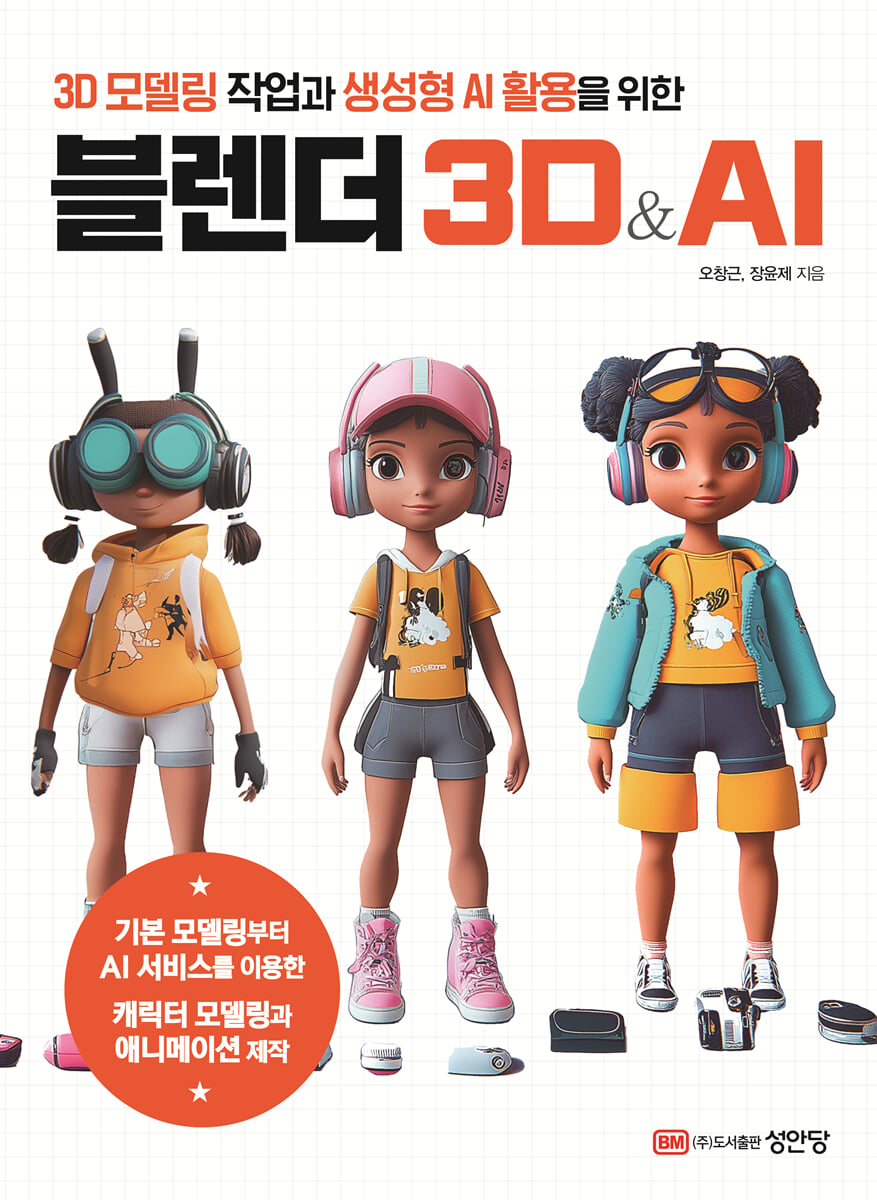
Blender 3D&AI
 |
Description
Book Introduction
From basic modeling to character modeling and animation production using AI services!
Maximize your creative capabilities by combining 3D modeling and generative AI technology!
This book presents a method to maximize creative potential by combining 3D modeling and generative AI technology.
In particular, it explains the basic concepts step by step so that even beginners in 3D modeling can understand them, and guides step by step how to use 3D software such as Blender.
This course covers the basic elements of 3D modeling, including shape creation, lighting setup, and texture expression techniques, helping readers work more deeply in 3D.
Additionally, practical examples will help readers solve problems they may encounter in real-world creative settings, providing a solid foundation for them to grow into 3D creative professionals.
This book will equip creators with the ability to create innovative 3D content with AI in the new era of 3D content.
Furthermore, the convergence of AI and 3D modeling will maximize the scope and efficiency of creation, enabling companies to gain a competitive edge in the future content creation market.
Maximize your creative capabilities by combining 3D modeling and generative AI technology!
This book presents a method to maximize creative potential by combining 3D modeling and generative AI technology.
In particular, it explains the basic concepts step by step so that even beginners in 3D modeling can understand them, and guides step by step how to use 3D software such as Blender.
This course covers the basic elements of 3D modeling, including shape creation, lighting setup, and texture expression techniques, helping readers work more deeply in 3D.
Additionally, practical examples will help readers solve problems they may encounter in real-world creative settings, providing a solid foundation for them to grow into 3D creative professionals.
This book will equip creators with the ability to create innovative 3D content with AI in the new era of 3D content.
Furthermore, the convergence of AI and 3D modeling will maximize the scope and efficiency of creation, enabling companies to gain a competitive edge in the future content creation market.
- You can preview some of the book's contents.
Preview
index
Part 1.
Preparing for Basic Modeling and Generative AI Collaboration
STEP 01 Start 3D modeling work, Blender
Blender Features and Benefits
3D graphic content creation process
Understanding 3D Modeling
Key Concepts of 3D Graphics
STEP 02 Installing Blender, a powerful 3D modeling program
Download the Blender installation file
Installing the Blender program
Running the Blender program
STEP 03 Blender interface and workspace for optimal work
Understanding the interface structure
Work screen according to New File type
Various Workspaces
Explore the interface menus and tools
STEP 04: Using Generative AI in Blender
How to Use Generative AI in Blender
Potential and Limitations of Generative AI
Part 2.
Object modeling creation and deformation techniques
STEP 01 Start modeling in object mode
Purpose and usage of object mode
Sculpting tools in object mode
STEP 02 Modeling a table using a cube
Making a table top
Making table legs
Placing objects on the table
Setting up your camera and lighting
Output to a rendered image file
STEP 03: Modeling a ladder with mesh deformation and cubes
STEP 04 Modeling a chair using the local extrusion and face inset tools
Making a chair seat and legs
Making a chair back
STEP 05: Modeling a Streetlight with Precise Selection and Transformation
Building a streetlight structure
Making a streetlight shade
Add streetlight decorations
STEP 06: Modeling a curved, three-dimensional object, a book
Creating a book cover
Making book covers
STEP 07: Modeling Neon Text on a Curved Surface Using Lattice Techniques
Expressing text in three dimensions
Create a neon sign with text lines
STEP 08 Modeling a cup with whipped cream that rotates with the spin tool
Creating the structure of the cup
Making a cup handle
Making whipped cream
STEP 09: Modeling a Cafe Building Using Face Deformation Techniques
Creating the exterior of a cafe building
Making a window
Building a canopy
STEP 10: Modeling a Flower Pot Using Array, Duplication, and Proportional Editing
Making a flower pot
Making flowers
Making stems and leaves
Arrange objects to compose a flower pot
Part 3.
Composing the scene, lighting, and setting up the camera to output
STEP 01: Organizing Scene Collections in the Outliner
Explore the collection's composition
Editing a Collection
STEP 02 Load the model you created and configure the space.
Creating a floor plate structure
Load existing objects
STEP 03 Modifying the model's proportions and appearance
Accumulating objects
Editing individual objects
STEP 04 Composing the scene with lighting and cameras
Setting up the lighting
Creating a Background Horizon
Setting up the camera
STEP 05 Applying materials to objects to create a scene
Preparing a Color Palette with Copilot
Applying a material to an object
Applying materials to the face
STEP 06: Supplementing object composition while preparing for rendering
Complementing some objects
Adding a tree object to the background
STEP 07 Setting up the render engine and outputting images
Setting up the EEVEE render engine
Setting up the Cycles render engine
Part 4. Character Modeling and Animation Using AI Services
STEP 01 Modeling a dog character by projecting the sketch in the viewport
Load reference images
Making a puppy body
Making puppy legs
Making a puppy tail
Making a puppy head
Making puppy ears
Making puppy eyes, noses, and necklaces
STEP 02 UV Mapping on the Puppy Character
Unfolding and painting the body UV
Unfolding and painting the head UV
Applying materials to a necklace
STEP 03: Creating and Improving Characters Using Luma AI
Creating Characters with Luma AI
Supplementing a model in Sculpt mode
Supplementing Materials in the Texture Paint Tab
STEP 04 Rigging the character model for animation movement
Creating a skeleton for a character model
Weighting
STEP 05 Setting up keyframe animation for continuous motion
Planning character movements with AI services
Applying motion keyframes to a character
STEP 06 Creating automatic rigging animation using Mixamo
Uploading a character to Mixamoe
Automatically Rigging and Animating in Mixamo
Importing animation files into Blender
Part 5.
Leveraging Blender AI with Script Coding
STEP 01: Generate code with ChatGPT and collaborate on object work.
Exploring the Scripting Environment
Creating objects using ChatGPT code
STEP 02 Using ChatGPT as a Blender Add-on
Using the GPT-4 Assistant add-on
Create your own add-on using ChatGPT
STEP 03: Using Dream Textures and AI Add-ons
Installing the Dream Texture Add-on
Create an image with Dream Texture and apply the texture to an object.
STEP 04: Leveraging AI Rendering with Stable Diffusion
Installing the AI Render add-on
Applying AI Render to Viewport Objects
STEP 05 Setting up character animation and particle motion
Bringing characters to the space in front of the cafe
STEP 06 Setting up animation with keyframe motion
Setting up materials and keyframes
Setting up camera motion
STEP 07 Rendering to video by setting visualization options
Outputting animation to a file
Outputting images with AI Render
Preparing for Basic Modeling and Generative AI Collaboration
STEP 01 Start 3D modeling work, Blender
Blender Features and Benefits
3D graphic content creation process
Understanding 3D Modeling
Key Concepts of 3D Graphics
STEP 02 Installing Blender, a powerful 3D modeling program
Download the Blender installation file
Installing the Blender program
Running the Blender program
STEP 03 Blender interface and workspace for optimal work
Understanding the interface structure
Work screen according to New File type
Various Workspaces
Explore the interface menus and tools
STEP 04: Using Generative AI in Blender
How to Use Generative AI in Blender
Potential and Limitations of Generative AI
Part 2.
Object modeling creation and deformation techniques
STEP 01 Start modeling in object mode
Purpose and usage of object mode
Sculpting tools in object mode
STEP 02 Modeling a table using a cube
Making a table top
Making table legs
Placing objects on the table
Setting up your camera and lighting
Output to a rendered image file
STEP 03: Modeling a ladder with mesh deformation and cubes
STEP 04 Modeling a chair using the local extrusion and face inset tools
Making a chair seat and legs
Making a chair back
STEP 05: Modeling a Streetlight with Precise Selection and Transformation
Building a streetlight structure
Making a streetlight shade
Add streetlight decorations
STEP 06: Modeling a curved, three-dimensional object, a book
Creating a book cover
Making book covers
STEP 07: Modeling Neon Text on a Curved Surface Using Lattice Techniques
Expressing text in three dimensions
Create a neon sign with text lines
STEP 08 Modeling a cup with whipped cream that rotates with the spin tool
Creating the structure of the cup
Making a cup handle
Making whipped cream
STEP 09: Modeling a Cafe Building Using Face Deformation Techniques
Creating the exterior of a cafe building
Making a window
Building a canopy
STEP 10: Modeling a Flower Pot Using Array, Duplication, and Proportional Editing
Making a flower pot
Making flowers
Making stems and leaves
Arrange objects to compose a flower pot
Part 3.
Composing the scene, lighting, and setting up the camera to output
STEP 01: Organizing Scene Collections in the Outliner
Explore the collection's composition
Editing a Collection
STEP 02 Load the model you created and configure the space.
Creating a floor plate structure
Load existing objects
STEP 03 Modifying the model's proportions and appearance
Accumulating objects
Editing individual objects
STEP 04 Composing the scene with lighting and cameras
Setting up the lighting
Creating a Background Horizon
Setting up the camera
STEP 05 Applying materials to objects to create a scene
Preparing a Color Palette with Copilot
Applying a material to an object
Applying materials to the face
STEP 06: Supplementing object composition while preparing for rendering
Complementing some objects
Adding a tree object to the background
STEP 07 Setting up the render engine and outputting images
Setting up the EEVEE render engine
Setting up the Cycles render engine
Part 4. Character Modeling and Animation Using AI Services
STEP 01 Modeling a dog character by projecting the sketch in the viewport
Load reference images
Making a puppy body
Making puppy legs
Making a puppy tail
Making a puppy head
Making puppy ears
Making puppy eyes, noses, and necklaces
STEP 02 UV Mapping on the Puppy Character
Unfolding and painting the body UV
Unfolding and painting the head UV
Applying materials to a necklace
STEP 03: Creating and Improving Characters Using Luma AI
Creating Characters with Luma AI
Supplementing a model in Sculpt mode
Supplementing Materials in the Texture Paint Tab
STEP 04 Rigging the character model for animation movement
Creating a skeleton for a character model
Weighting
STEP 05 Setting up keyframe animation for continuous motion
Planning character movements with AI services
Applying motion keyframes to a character
STEP 06 Creating automatic rigging animation using Mixamo
Uploading a character to Mixamoe
Automatically Rigging and Animating in Mixamo
Importing animation files into Blender
Part 5.
Leveraging Blender AI with Script Coding
STEP 01: Generate code with ChatGPT and collaborate on object work.
Exploring the Scripting Environment
Creating objects using ChatGPT code
STEP 02 Using ChatGPT as a Blender Add-on
Using the GPT-4 Assistant add-on
Create your own add-on using ChatGPT
STEP 03: Using Dream Textures and AI Add-ons
Installing the Dream Texture Add-on
Create an image with Dream Texture and apply the texture to an object.
STEP 04: Leveraging AI Rendering with Stable Diffusion
Installing the AI Render add-on
Applying AI Render to Viewport Objects
STEP 05 Setting up character animation and particle motion
Bringing characters to the space in front of the cafe
STEP 06 Setting up animation with keyframe motion
Setting up materials and keyframes
Setting up camera motion
STEP 07 Rendering to video by setting visualization options
Outputting animation to a file
Outputting images with AI Render
Detailed image
.jpg)
Publisher's Review
Blender, which is leading the change in the 3D creation environment, and the use of generative AI
Creating differentiated content!
A new era of 3D content using Blender and artificial intelligence tools
A guide to preparing in advance!
The environment for 3D creation, which was once the exclusive domain of high-cost experts, is changing significantly.
Blender, which encompasses all the environments required for 3D creation, is free to use and easy to access, which has led to an explosive increase in users.
Moreover, generative artificial intelligence (AI) is evolving beyond writing, image, and video creation to enable 3D creation. As it develops to enable increasingly diverse and sophisticated expressions, its use in 3D content creation is expected to increase significantly.
This book connects Blender, which is bringing about a major change in the 3D creation environment, with generative AI to make 3D content creation easy to access.
While becoming familiar with the 3D process, from modeling to animation, is important, the ability to refine, edit, and complete AI-generated 3D drafts is also required. Therefore, this book is faithfully organized to serve as a guide for preparing and preparing for the new era of 3D content.
First, it is designed to enable you to learn the basic functions and various basic theories of Blender required before working on 3D projects.
Second, we explained various examples of methods for creating animations using 3D models created in Blender.
Third, it explains how to create 3D objects, furniture, architecture, characters, etc. in Blender, and includes useful tips to know during the 3D production process.
Fourth, the process of creating examples for each theme is explained and followed step by step so that anyone can easily learn.
Fifth, we introduced a method of collaborating with AI by co-writing script code through generative AI chat GPT.
This book presents a direction for maximizing expressive possibilities by connecting Blender, which is bringing about a major change in the 3D creative environment, with the use of generative AI.
It also provides step-by-step instructions for beginners, from the principles of 3D modeling to lighting, scene composition, and how to express lighting and texture, making it easy to follow along.
By presenting character modeling and animation techniques that may be considered difficult through both traditional and AI-generated methods, readers can prepare for the era of artificial intelligence creation. By practicing and creating practical examples one by one, readers will develop the skills necessary to become 3D creation experts.
Creating differentiated content!
A new era of 3D content using Blender and artificial intelligence tools
A guide to preparing in advance!
The environment for 3D creation, which was once the exclusive domain of high-cost experts, is changing significantly.
Blender, which encompasses all the environments required for 3D creation, is free to use and easy to access, which has led to an explosive increase in users.
Moreover, generative artificial intelligence (AI) is evolving beyond writing, image, and video creation to enable 3D creation. As it develops to enable increasingly diverse and sophisticated expressions, its use in 3D content creation is expected to increase significantly.
This book connects Blender, which is bringing about a major change in the 3D creation environment, with generative AI to make 3D content creation easy to access.
While becoming familiar with the 3D process, from modeling to animation, is important, the ability to refine, edit, and complete AI-generated 3D drafts is also required. Therefore, this book is faithfully organized to serve as a guide for preparing and preparing for the new era of 3D content.
First, it is designed to enable you to learn the basic functions and various basic theories of Blender required before working on 3D projects.
Second, we explained various examples of methods for creating animations using 3D models created in Blender.
Third, it explains how to create 3D objects, furniture, architecture, characters, etc. in Blender, and includes useful tips to know during the 3D production process.
Fourth, the process of creating examples for each theme is explained and followed step by step so that anyone can easily learn.
Fifth, we introduced a method of collaborating with AI by co-writing script code through generative AI chat GPT.
This book presents a direction for maximizing expressive possibilities by connecting Blender, which is bringing about a major change in the 3D creative environment, with the use of generative AI.
It also provides step-by-step instructions for beginners, from the principles of 3D modeling to lighting, scene composition, and how to express lighting and texture, making it easy to follow along.
By presenting character modeling and animation techniques that may be considered difficult through both traditional and AI-generated methods, readers can prepare for the era of artificial intelligence creation. By practicing and creating practical examples one by one, readers will develop the skills necessary to become 3D creation experts.
GOODS SPECIFICS
- Date of issue: March 5, 2025
- Page count, weight, size: 416 pages | 188*257*30mm
- ISBN13: 9788931583786
- ISBN10: 8931583788
You may also like
카테고리
korean


korean

![GQ KOREA Mark (Monthly): December [2025]](http://librairie.coreenne.fr/cdn/shop/files/8ef265dbbfbf186523ed75ba7319009d.jpg?v=1765340328&width=3840)


