

Hangul 2022: Empowering Business Practices
 |
Description
Book Introduction
Everything you need to know about the latest Hangul 2022!
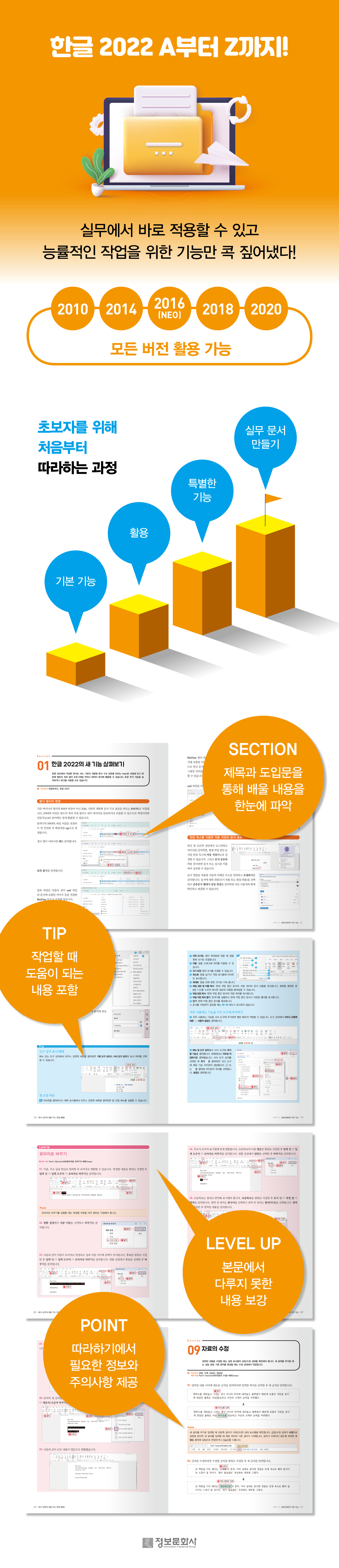
To help users efficiently learn what they need, we've compiled a single book that starts with basic functions, moves on to special features, and even includes practical documentation.
In particular, we will look at the new features of Hangeul 2022, which has the hwpx extension that follows the XML-based open document structure standard rather than the existing binary format hwp file, and start by learning about the screen layout.
It is explained in an easy-to-understand manner by section within a largely divided part, and the keywords that you must know in each chapter indicate the core.
By providing useful example files for those learning on their own, you can compare the results screen with your own skills.
Since it is in a follow-up format, you can practice it yourself without difficulty, and the author has provided tips on things you need to know here and there.
Additionally, points that should not be missed are explained in detail, so you can acquire information without getting confused.
Since there is no need to explain the entire content, we have categorized it into levels and included only the functions that are truly necessary in practice.
By starting with the configuration of the Korean menu using the examples and completed files provided in the data room and entering and modifying the data yourself, you will gradually improve your skills and be satisfied with the endless functions.
To help users efficiently learn what they need, we've compiled a single book that starts with basic functions, moves on to special features, and even includes practical documentation.
In particular, we will look at the new features of Hangeul 2022, which has the hwpx extension that follows the XML-based open document structure standard rather than the existing binary format hwp file, and start by learning about the screen layout.
It is explained in an easy-to-understand manner by section within a largely divided part, and the keywords that you must know in each chapter indicate the core.
By providing useful example files for those learning on their own, you can compare the results screen with your own skills.
Since it is in a follow-up format, you can practice it yourself without difficulty, and the author has provided tips on things you need to know here and there.
Additionally, points that should not be missed are explained in detail, so you can acquire information without getting confused.
Since there is no need to explain the entire content, we have categorized it into levels and included only the functions that are truly necessary in practice.
By starting with the configuration of the Korean menu using the examples and completed files provided in the data room and entering and modifying the data yourself, you will gradually improve your skills and be satisfied with the endless functions.
- You can preview some of the book's contents.
Preview
index
PART 01 Basic Features of Hangul 2022
01 Explore the new features of Hangul 2022
02 Configuring the screen of Hangul 2022
03 Setting up the editing paper
04 Registering frequently used paper
05 Changing the paper and margin settings of a new document
06 Setting different paper sizes within a document
07 Saving dialog box settings
08 Entering data
(Level Up) Convert to Roman letters
09 Editing data
10 Registering foreign language keyboard shortcuts
(Level Up) Entering Japanese Yomigana
(Level Up) Entering Chinese tones
11. Writing a vertical document
12. Enter text on manuscript paper
13 Enter user information
14 Document Statistics - Check the number of characters in a document
15 Specifying a range by row
16 Specifying ranges by column
17 Moving data
18 Copying data
Copy page 19
Erase page 20
21 Translate
22 Entering Chinese characters
23 Entering Chinese characters when you don't know them
Enter 24 Chinese characters for a person's name
Register 25 Chinese character words
(Level Up) Saving and loading custom Chinese character dictionaries
26 Entering special characters
27 character overlap
28 Saving the document
Save 29 blocks
30 Set a password for a document
31 Creating a Backup File
32 Save as PDF
33 Save as image
34 Save as a document for distribution
35 Loading documents
36 Load recent documents
37 Removing specific files from the recent documents list
38 Inserting documents
39 Converting PDF documents to Hangul documents
40 Using the Document Yard
41 Creating and Using Templates
42 Changing the font
43 Applying different fonts depending on the language
44 Creating a frequently used font area
45 Set the font size
46 Setting font size by language
47 Setting the font color
48 Setting font properties in the formatting tool
49 Using the [Font Shape] Dialog Box
Setting the alignment of paragraph 50
Setting line spacing 51
Set paragraph 52 above and below
Setting paragraph protection for 53 paragraphs
54 Enter in one line
Setting paragraph margins for 55 paragraphs
Indenting and outdenting the first line of paragraph 56
57 tabs
Creating a table of contents using the 58 tab settings
Decorate the first letter of paragraph 59
Setting 60 bullet points
61 Setting a custom bullet shape
62 Registering a new bullet style
63 Setting up bullet points for pictures
64 Registering image files as bullets
Setting paragraph numbers to 65
66 Using Custom Paragraph Numbering
67 Setting up shape copy
68 Using Multi-Stage
69 Print Preview
70 prints
PART 02 Utilizing Hangul 2022
01 Creating a map
02 Various text map fills, shadows, and rotations
03 Setting object placement and margins
04 Placing objects in a multi-column document
05 Separate the text map and apply multiple colors
06 Drawing shapes
07 Using Object Shape Copy
08 Editing Polygons and Ellipses
09 Align and arrange shapes
Rotate 10 shapes
11 Insert a photo in a circle
12 Using the text box
13 Using the Drawing Yard
Download 14 cliparts
15 Inserting a picture
16 Decorating the picture
17. Use photo editing
18 Change the picture
19 Reduce image size
20 Using Screenshots
21 Save as image
22 Create a table
Enter data in Table 23
24. Using the Pyomadang
25 Specifying and Resizing Table Ranges
26 Split/Paste Tables
Managing 27 lines/columns
28 Autofill
29 Creating a Custom List
Setting the table border 30
31 Setting the background
32 Setting the diagonal
Inserting a picture into a table - cell size and spacing
34 Using the calculation formula
35 Creating a table that spans multiple pages
36 Setting Captions
37 Converting CSV files to Hangul tables
Using Chart 38
39 Editing the chart
40 Entering a formula
41 Using Common Phrases
42 Registering images and text together as common phrases
43 Editing a phrase
Find 44
Finding Format 45
46 Change
Add page number 47
48 Hide only the current page
49 Start with a new number
Setting up 50 footnotes
51 Save Comments
52 Setting up the Americas
53 Adding a Header/Footer
Setting up zone 54
Setting paragraph styles for 55
56 Setting the font style
57 Edit Style
58 Style Export/Import
59 Using Style Yard
60 Using the Overview
61 Create a table of contents using the outline
PART 03 Special Features of Hangul 2022
01 Creating a Table of Contents with Bookmarks and Hyperlinks
02 Using Hyperlinks in Various Ways
03 Setting up hidden descriptions and document security
04 Creating an Index
05 Creating a listing using mail merge
06 Using Excel Data for Mail Merge
07 Creating a Label Document
Using page 08 borders/backgrounds
09 Using the base
10. Using the presser foot
Finding Document 11
12 Linking Documents
13 Setting up notes
14 Using Macros
PART 04 Creating a Practical Document for Hangul 2022
01 Creating Emotional News Cards
02 Create a calendar
03 Creating a Family Newspaper
01 Explore the new features of Hangul 2022
02 Configuring the screen of Hangul 2022
03 Setting up the editing paper
04 Registering frequently used paper
05 Changing the paper and margin settings of a new document
06 Setting different paper sizes within a document
07 Saving dialog box settings
08 Entering data
(Level Up) Convert to Roman letters
09 Editing data
10 Registering foreign language keyboard shortcuts
(Level Up) Entering Japanese Yomigana
(Level Up) Entering Chinese tones
11. Writing a vertical document
12. Enter text on manuscript paper
13 Enter user information
14 Document Statistics - Check the number of characters in a document
15 Specifying a range by row
16 Specifying ranges by column
17 Moving data
18 Copying data
Copy page 19
Erase page 20
21 Translate
22 Entering Chinese characters
23 Entering Chinese characters when you don't know them
Enter 24 Chinese characters for a person's name
Register 25 Chinese character words
(Level Up) Saving and loading custom Chinese character dictionaries
26 Entering special characters
27 character overlap
28 Saving the document
Save 29 blocks
30 Set a password for a document
31 Creating a Backup File
32 Save as PDF
33 Save as image
34 Save as a document for distribution
35 Loading documents
36 Load recent documents
37 Removing specific files from the recent documents list
38 Inserting documents
39 Converting PDF documents to Hangul documents
40 Using the Document Yard
41 Creating and Using Templates
42 Changing the font
43 Applying different fonts depending on the language
44 Creating a frequently used font area
45 Set the font size
46 Setting font size by language
47 Setting the font color
48 Setting font properties in the formatting tool
49 Using the [Font Shape] Dialog Box
Setting the alignment of paragraph 50
Setting line spacing 51
Set paragraph 52 above and below
Setting paragraph protection for 53 paragraphs
54 Enter in one line
Setting paragraph margins for 55 paragraphs
Indenting and outdenting the first line of paragraph 56
57 tabs
Creating a table of contents using the 58 tab settings
Decorate the first letter of paragraph 59
Setting 60 bullet points
61 Setting a custom bullet shape
62 Registering a new bullet style
63 Setting up bullet points for pictures
64 Registering image files as bullets
Setting paragraph numbers to 65
66 Using Custom Paragraph Numbering
67 Setting up shape copy
68 Using Multi-Stage
69 Print Preview
70 prints
PART 02 Utilizing Hangul 2022
01 Creating a map
02 Various text map fills, shadows, and rotations
03 Setting object placement and margins
04 Placing objects in a multi-column document
05 Separate the text map and apply multiple colors
06 Drawing shapes
07 Using Object Shape Copy
08 Editing Polygons and Ellipses
09 Align and arrange shapes
Rotate 10 shapes
11 Insert a photo in a circle
12 Using the text box
13 Using the Drawing Yard
Download 14 cliparts
15 Inserting a picture
16 Decorating the picture
17. Use photo editing
18 Change the picture
19 Reduce image size
20 Using Screenshots
21 Save as image
22 Create a table
Enter data in Table 23
24. Using the Pyomadang
25 Specifying and Resizing Table Ranges
26 Split/Paste Tables
Managing 27 lines/columns
28 Autofill
29 Creating a Custom List
Setting the table border 30
31 Setting the background
32 Setting the diagonal
Inserting a picture into a table - cell size and spacing
34 Using the calculation formula
35 Creating a table that spans multiple pages
36 Setting Captions
37 Converting CSV files to Hangul tables
Using Chart 38
39 Editing the chart
40 Entering a formula
41 Using Common Phrases
42 Registering images and text together as common phrases
43 Editing a phrase
Find 44
Finding Format 45
46 Change
Add page number 47
48 Hide only the current page
49 Start with a new number
Setting up 50 footnotes
51 Save Comments
52 Setting up the Americas
53 Adding a Header/Footer
Setting up zone 54
Setting paragraph styles for 55
56 Setting the font style
57 Edit Style
58 Style Export/Import
59 Using Style Yard
60 Using the Overview
61 Create a table of contents using the outline
PART 03 Special Features of Hangul 2022
01 Creating a Table of Contents with Bookmarks and Hyperlinks
02 Using Hyperlinks in Various Ways
03 Setting up hidden descriptions and document security
04 Creating an Index
05 Creating a listing using mail merge
06 Using Excel Data for Mail Merge
07 Creating a Label Document
Using page 08 borders/backgrounds
09 Using the base
10. Using the presser foot
Finding Document 11
12 Linking Documents
13 Setting up notes
14 Using Macros
PART 04 Creating a Practical Document for Hangul 2022
01 Creating Emotional News Cards
02 Create a calendar
03 Creating a Family Newspaper
Detailed image
Publisher's Review
A key tool for efficient work!
Hangul, one of the consistently popular office programs, has undergone many changes with the release of its latest 2022 version.
Document files can be saved as hwpx and used for programming languages or data analysis, and with the launch of the subscription service in October 2022, it will be possible to share documents that allow collaboration with the latest version features.
As the usability increases, it is necessary to learn and acquire not only the convenient functions that can be used in various ways, but also the existing basic skills.
This book is a compilation of the author's expertise gained from 20 years of practical teaching, and is structured to provide the content and answers to questions that actual learners need.
That's why detailed explanations are advantageous for those who are using Hangul for the first time or those who have basic knowledge but still find it difficult and scary.
And because it's broken down into short sections by keyword rather than a long-winded explanation, you can find just the parts you need like a dictionary and solve them right away.
Hangul, one of the consistently popular office programs, has undergone many changes with the release of its latest 2022 version.
Document files can be saved as hwpx and used for programming languages or data analysis, and with the launch of the subscription service in October 2022, it will be possible to share documents that allow collaboration with the latest version features.
As the usability increases, it is necessary to learn and acquire not only the convenient functions that can be used in various ways, but also the existing basic skills.
This book is a compilation of the author's expertise gained from 20 years of practical teaching, and is structured to provide the content and answers to questions that actual learners need.
That's why detailed explanations are advantageous for those who are using Hangul for the first time or those who have basic knowledge but still find it difficult and scary.
And because it's broken down into short sections by keyword rather than a long-winded explanation, you can find just the parts you need like a dictionary and solve them right away.
GOODS SPECIFICS
- Publication date: November 25, 2022
- Page count, weight, size: 684 pages | 1,348g | 190*245*29mm
- ISBN13: 9788956749198
- ISBN10: 8956749191
You may also like
카테고리
korean


korean

![GQ KOREA Mark (Monthly): December [2025]](http://librairie.coreenne.fr/cdn/shop/files/8ef265dbbfbf186523ed75ba7319009d.jpg?v=1765340328&width=3840)


