

A Thorough Introduction to Web Development with Vue 3 and Spring Boot
 |
Description
Book Introduction
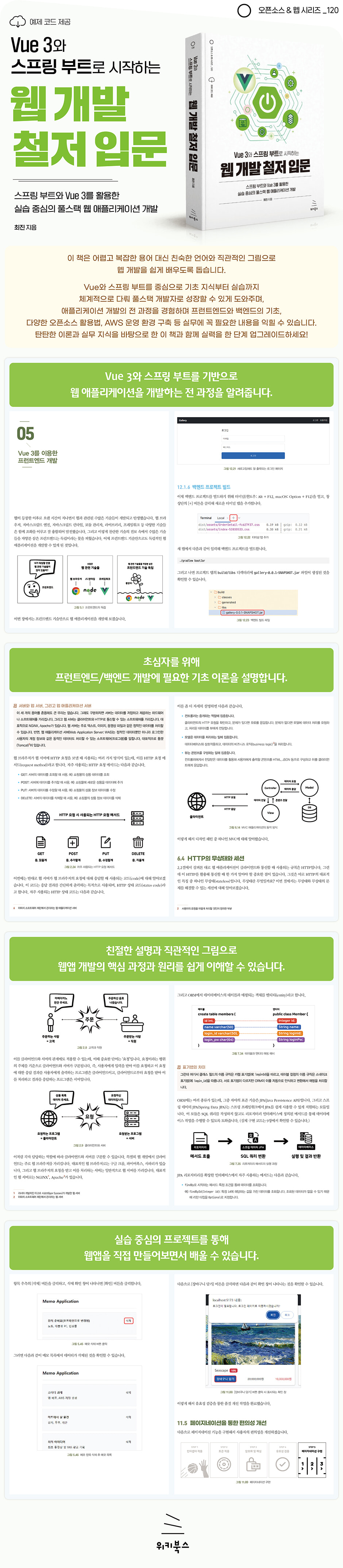
Learn the secrets of modern full-stack application development using the rich and diverse tools of Vue 3 and Spring Boot!
"A Thorough Introduction to Web Development with Vue 3 and Spring Boot" is a textbook written in everyday language.
It is written in familiar language and intuitive illustrations, eliminating complex terms and difficult diagrams, so that anyone can easily understand it.
Abstract concepts are explained using metaphors and memes, and concrete practical exercises are conducted step by step to help you understand the overall flow of application development.
This book provides a broad range of fundamental knowledge that developers need to know, including various libraries, frameworks, and cloud computing services.
In particular, Vue and Spring Boot are covered in depth as core topics, but functions that are not often used in practice are boldly excluded to increase practicality.
After reading this book, you will become a full-stack developer with a solid foundation and the ability to utilize a variety of technologies.
"A Thorough Introduction to Web Development with Vue 3 and Spring Boot" is a textbook written in everyday language.
It is written in familiar language and intuitive illustrations, eliminating complex terms and difficult diagrams, so that anyone can easily understand it.
Abstract concepts are explained using metaphors and memes, and concrete practical exercises are conducted step by step to help you understand the overall flow of application development.
This book provides a broad range of fundamental knowledge that developers need to know, including various libraries, frameworks, and cloud computing services.
In particular, Vue and Spring Boot are covered in depth as core topics, but functions that are not often used in practice are boldly excluded to increase practicality.
After reading this book, you will become a full-stack developer with a solid foundation and the ability to utilize a variety of technologies.
- You can preview some of the book's contents.
Preview
index
▣ Chapter 1: Introduction to Vue
1.1 Frontend and Backend
__1.1.1 Solo service method
__1.1.2 Separate and together service method
__1.1.3 Frontend and Backend
1.2 History of the Front End
__1.2.1 Faster, Google Chrome
__1.2.2 Changes in rendering method
__1.2.3 The emergence of single-page applications
__1.2.4 Front-end independence
__1.2.5 Google's Angular
__1.2.6 Facebook's React
__1.2.7 Evan Yu's Vue
1.3 What's New in Vue 3
__1.3.1 Improved performance
__1.3.2 Composition API included
__1.3.3 TypeScript support
__1.3.4 Multi-route tag input possible
__1.3.5 Change the position of script tags and template blocks
__1.3.6 Internet Explorer support discontinued
__1.3.7 Using the front-end tool Vite
1.4 Summary
▣ Chapter 2: Front-end Basics You Need to Know Before Development
2.1 Internet, Servers and Clients
__2.1.1 File exchange system, Internet
__2.1.2 Server and Client from a Hardware Perspective
__2.1.3 Server and Client from a Software Perspective
2.2 Communicating with the Server
__2.2.1 Server address, IP address
__2.2.2 Address in more detail, port
__2.2.3 Communication rules of the web world, HTTP
__2.2.4 Synchronous and Asynchronous
2.3 Saving data in a web browser
__2.3.1 What is an HTTP cookie?
__2.3.2 What is Web Storage?
2.4 Tools to help front-end development
__2.4.1 JavaScript runtime, Node.js
__2.4.2 Manager for managing modules, NPM
__2.4.3 HTTP request library, Axios
__2.4.4 Web UI Framework, Bootstrap
__2.4.5 Sass, a preprocessor to overcome the limitations of CSS
2.5 Summary
▣ Chapter 3: Setting Up the Development Environment
3.1 Installing IntelliJ IDEA
__3.1.1 Installing on Windows
__3.1.2 Installing on macOS
__3.1.3 Changing the theme
3.2 Install Google Chrome
__3.2.1 Installing on Windows
__3.2.2 Installing on macOS
3.3 Installing Node.js
__3.3.1 Installing on Windows
__3.3.2 Installing on macOS
3.4 Summary
▣ Chapter 4: Basic Learning for Getting Started with Vue 3
4.1 Getting Started with Vue 3
__4.1.1 Creating a Project
__4.1.2 First Application
4.2 Components
__4.2.1 What is a component?
__4.2.2 Installing the front wheel components
__4.2.3 Installing the rear wheel components
__4.2.4 Installing Tire Components
__4.2.5 Customizing Tire Components
4.3 Basic Template Grammar
__4.3.1 Text Output
__4.3.2 Attribute Reflection
__4.3.3 Class Reflection
__4.3.4 Style Reflection
__4.3.5 Conditional Directives
__4.3.6 Repeat Directive
__4.3.7 Event Directives
4.4 Reactive State
4.5 Computed
4.6 Data Binding
4.7 Lifecycle Hooks
__4.7.1 Creation Hook
__4.7.2 Mount Hook
__4.7.3 Update Hook
__4.7.4 Unmount Hook
4.8 Router
4.9 Store
__4.9.1 State Management Library, Pinia
__4.9.2 Examples of practical use of the store
4.10 Summary
▣ Chapter 5: Front-end Development with Vue 3
5.1 Note Application Development Plan
5.2 Creating a Notes Application Project
5.3 Setting up the development environment
__5.3.1 Bootstrap Configuration
__5.3.2 Sass Settings
__5.3.3 Code and File Organization
5.4 Implementing Storage Services
__5.4.1 Creating a file and implementing a constructor
__5.4.2 Internal method implementation
__5.4.3 Implementing external methods
__5.4.4 Setting up sample data
__5.4.5 Full code
5.5 Implementing the Memo Component
__5.5.1 Implementing the Note Layout
__5.5.2 Implementing a memo list query
__5.5.3 Implementing note insertion
__5.5.4 Implementing detailed memo viewing and editing
__5.5.5 Implementing note deletion
5.6 Summary
▣ Chapter 6: Backend Basics You Need to Know Before Development
6.1 Server Types
__6.1.1 Web Server
__6.1.2 Web Application Server
__6.1.3 Database Server
6.2 What is SQL?
__6.2.1 SELECT
__6.2.2 INSERT
__6.2.3 UPDATE
__6.2.4 DELETE
6.3 What is MVC?
6.4 Statelessness and Sessions in HTTP
__6.4.1 Strange Conversation
__6.4.2 What is an HTTP session?
__6.4.3 Wikiworld Staff Duties
__6.4.4 Server Tasks
__6.4.5 Limitations of HTTP Sessions
6.5 What is a token?
__6.5.1 What is a token?
__6.5.2 What is JWT?
__6.5.3 Sniffing
__6.5.4 Validity Time
__6.5.5 Refresh Token
6.6 Summary
▣ Chapter 7: Spring Boot for Backend Development
7.1 What is the Spring Framework?
__7.1.1 The Birth of the Spring Framework
__7.1.2 Spring MVC
__7.1.3 Spring Boot
7.2 What is a Spring Container?
__7.2.1 What is a dependency?
__7.2.2 What is dependency injection?
__7.2.3 Dependency Injection Example
__7.2.4 Spring Container
7.3 Key Annotations in the Spring Framework
__7.3.1 @Controller
__7.3.2 @RestController
__7.3.3 @RequestMapping
__7.3.4 @GetMapping
__7.3.5 @PostMapping
__7.3.6 @PutMapping
__7.3.7 @RequestBody
__7.3.8 @DeleteMapping
__7.3.9 @Service
__7.3.10 @Component
__7.3.11 @Transactional
7.4 Spring Framework Peripheral Tools
__7.4.1 Treating the database as an object, Spring Data JPA
__7.4.2 Manager for managing modules, Gradle
__7.4.3 Intuitively read long code, Lombok
7.5 Summary
▣ Chapter 8: Building a Development Environment for Creating a Gallery Shopping Mall
8.1 Installing MariaDB
__8.1.1 Installing on Windows
__8.1.2 Installing on macOS
8.2 JDK Installation
__8.2.1 Installing on Windows
__8.2.2 Installing on macOS
8.3 Creating a Spring Boot Backend Project
8.4 Creating a Front-End Project Using Vite
8.5 Database Settings
8.6 Module Settings
8.7 Image Settings
8.8 File and Code Organization
8.9 Summary
▣ Chapter 9: Backend Development for a Gallery Shopping Mall
9.1 Pre-work
Added __9.1.1 package
__9.1.2 Added HTTP utility
9.2 Implementing Product API
__9.2.1 Creating a Product Table
__9.2.2 Creating a Product Entity
__9.2.3 Creating a Product Repository
__9.2.4 Product Service Implementation
__9.2.5 Implementing the Product Controller
9.3 Implementing the Account API
__9.3.1 Creating a member table
__9.3.2 Creating a Member Entity
__9.3.3 Creating a Member Repository
__9.3.4 Member Service Implementation
__9.3.5 Implementing an Account Controller
9.4 Implementing the Shopping Cart API
__9.4.1 Creating a shopping cart table
__9.4.2 Creating a Shopping Cart Entity
__9.4.3 Creating a shopping cart repository
__9.4.4 Implementing the Shopping Cart Service
__9.4.5 Implementing the Shopping Cart Controller
9.5 Implementing the Order API
__9.5.1 Creating an Order Table
__9.5.2 Creating an Order Entity
__9.5.3 Creating an Order Repository
__9.5.4 Implementing the Order Service
__9.5.5 Implementing the Order Controller
9.6 Summary
▣ Chapter 10: Front-End Development of a Gallery Shopping Mall
10.1 Layout Implementation
__10.1.1 Implementing the Header Component
__10.1.2 Implementing the Footer Component
__10.1.3 Main Area Implementation
10.2 Implementing Account Functions
__10.2.1 Account Service Implementation
__10.2.2 Account Store Implementation
__10.2.3 Implementing a membership registration page
__10.2.4 Implementing the login page
10.3 Implementing Product Features
__10.3.1 Implementing the Product Card Component
__10.3.2 Product Service Implementation
__10.3.3 Implementing the Product List Page
10.4 Implementing the Shopping Cart Function
__10.4.1 Implementing the Shopping Cart Service
__10.4.2 Applying the shopping cart function
__10.4.3 Implementing the Shopping Cart Page
10.5 Implementing the Order Function
__10.5.1 Implementing the Order Service
__10.5.2 Implementing the Order Entry Page
__10.5.3 Implementing the Order List Page
__10.5.4 Implementing the Order Details Inquiry Page
10.6 Summary
▣ Chapter 11: Improving the Gallery Shopping Mall Application's Functionality
11.1 Improving Access Control by Applying Interceptors
__11.1.1 Problems that occur when accessing the API without permission
__11.1.2 What is a Spring Interceptor?
__11.1.3 Applying Spring Interceptor
__11.1.4 Checking Spring Interceptor Functionality
__11.1.5 What is an Axios interceptor?
__11.1.6 Library implementation with Axios interceptor applied
__11.1.7 Check the Axios interceptor function
11.2 Improved login functionality through token application
__11.2.1 Current login functionality issues
__11.2.2 Installing dependency modules
__11.2.3 Added HTTP utility methods
__11.2.4 Add account constants
__11.2.5 Implementing token blocking function
__11.2.6 Implementing token functionality
__11.2.7 Implementing a Token Account Helper
__11.2.8 Account Controller Fix
__11.2.9 Applying tokens to the frontend
__11.2.10 Check login function
11.3 Improving Security Through Encryption and Hashing
__11.3.1 What is encryption?
__11.3.2 Applying encryption
__11.3.3 What is Hashing?
__11.3.4 Applying Hashing
11.4 Quality Improvement through Validation
__11.4.1 Login Validation
__11.4.2 Membership registration validation
__11.4.3 Order Entry Validation
__11.4.4 Add to Cart Validation
11.5 Improved convenience through pagination
__11.5.1 Entering Order Data
__11.5.2 Backend code modification
__11.5.3 Front-end code modifications
__11.5.4 Check the pagination function
11.6 Summary
▣ Chapter 12: Deploying the Gallery Shopping Mall Application on AWS
12.1 Building the Project
__12.1.1 Building the Front-End Project
__12.1.2 Moving the front-end build files
__12.1.3 Automating the movement of front-end build files
__12.1.4 Backend code improvements and build
__12.1.5 Checking and Resolving Backend Issues
__12.1.6 Building the backend project
12.2 Creating AWS EC2
__12.2.1 Creating an Account
__12.2.2 Instance Creation
__12.2.3 SFTP connection
__12.2.4 SSH connection
12.3 Building a Service Environment
__12.3.1 JDK Installation
__12.3.2 Installing MariaDB
__12.3.3 Installing the NGINX web server
12.4 Remote Database Access
__12.4.1 Adding a data source
__12.4.2 Adding AWS Firewall Rules
__12.4.3 Change MariaDB settings
__12.4.4 Remote Access Test
__12.4.5 Creating a table in a remote database
12.5 Application Deployment
__12.5.1 Create directory
__12.5.2 Upload build files
__12.5.3 Run the build file
__12.5.4 Reverse Proxy
12.6 Summary
▣ Appendix: Installation and Basic Usage of Practice Programs
A.1 IntelliJ IDEA Community Edition
__A.1.1 Installing on Windows
__A.1.2 Installing on macOS
__A.1.3 Changing the theme
__A.1.4 Running a Spring Boot Project
A.2 Visual Studio Code
__A.2.1 Installing on Windows
__A.2.2 Installing on macOS
__A.2.3 Running a Vue Project
A.3 DBeaver
__A.3.1 Installing on Windows
__A.3.2 Installing on macOS
__A.3.3 Executing Queries on the Database Server
A.4 PuTTY
__A.4.1 Installing on Windows
__A.4.2 Connecting to an AWS EC2 Server with PuTTY
__A.4.3 Connecting to an AWS EC2 Server Using macOS Terminal
A.5 FileZilla
__A.5.1 Installing on Windows
__A.5.2 Installing on macOS
__A.5.3 Uploading Build Files to AWS EC2 Servers
▣ References
Books
website
1.1 Frontend and Backend
__1.1.1 Solo service method
__1.1.2 Separate and together service method
__1.1.3 Frontend and Backend
1.2 History of the Front End
__1.2.1 Faster, Google Chrome
__1.2.2 Changes in rendering method
__1.2.3 The emergence of single-page applications
__1.2.4 Front-end independence
__1.2.5 Google's Angular
__1.2.6 Facebook's React
__1.2.7 Evan Yu's Vue
1.3 What's New in Vue 3
__1.3.1 Improved performance
__1.3.2 Composition API included
__1.3.3 TypeScript support
__1.3.4 Multi-route tag input possible
__1.3.5 Change the position of script tags and template blocks
__1.3.6 Internet Explorer support discontinued
__1.3.7 Using the front-end tool Vite
1.4 Summary
▣ Chapter 2: Front-end Basics You Need to Know Before Development
2.1 Internet, Servers and Clients
__2.1.1 File exchange system, Internet
__2.1.2 Server and Client from a Hardware Perspective
__2.1.3 Server and Client from a Software Perspective
2.2 Communicating with the Server
__2.2.1 Server address, IP address
__2.2.2 Address in more detail, port
__2.2.3 Communication rules of the web world, HTTP
__2.2.4 Synchronous and Asynchronous
2.3 Saving data in a web browser
__2.3.1 What is an HTTP cookie?
__2.3.2 What is Web Storage?
2.4 Tools to help front-end development
__2.4.1 JavaScript runtime, Node.js
__2.4.2 Manager for managing modules, NPM
__2.4.3 HTTP request library, Axios
__2.4.4 Web UI Framework, Bootstrap
__2.4.5 Sass, a preprocessor to overcome the limitations of CSS
2.5 Summary
▣ Chapter 3: Setting Up the Development Environment
3.1 Installing IntelliJ IDEA
__3.1.1 Installing on Windows
__3.1.2 Installing on macOS
__3.1.3 Changing the theme
3.2 Install Google Chrome
__3.2.1 Installing on Windows
__3.2.2 Installing on macOS
3.3 Installing Node.js
__3.3.1 Installing on Windows
__3.3.2 Installing on macOS
3.4 Summary
▣ Chapter 4: Basic Learning for Getting Started with Vue 3
4.1 Getting Started with Vue 3
__4.1.1 Creating a Project
__4.1.2 First Application
4.2 Components
__4.2.1 What is a component?
__4.2.2 Installing the front wheel components
__4.2.3 Installing the rear wheel components
__4.2.4 Installing Tire Components
__4.2.5 Customizing Tire Components
4.3 Basic Template Grammar
__4.3.1 Text Output
__4.3.2 Attribute Reflection
__4.3.3 Class Reflection
__4.3.4 Style Reflection
__4.3.5 Conditional Directives
__4.3.6 Repeat Directive
__4.3.7 Event Directives
4.4 Reactive State
4.5 Computed
4.6 Data Binding
4.7 Lifecycle Hooks
__4.7.1 Creation Hook
__4.7.2 Mount Hook
__4.7.3 Update Hook
__4.7.4 Unmount Hook
4.8 Router
4.9 Store
__4.9.1 State Management Library, Pinia
__4.9.2 Examples of practical use of the store
4.10 Summary
▣ Chapter 5: Front-end Development with Vue 3
5.1 Note Application Development Plan
5.2 Creating a Notes Application Project
5.3 Setting up the development environment
__5.3.1 Bootstrap Configuration
__5.3.2 Sass Settings
__5.3.3 Code and File Organization
5.4 Implementing Storage Services
__5.4.1 Creating a file and implementing a constructor
__5.4.2 Internal method implementation
__5.4.3 Implementing external methods
__5.4.4 Setting up sample data
__5.4.5 Full code
5.5 Implementing the Memo Component
__5.5.1 Implementing the Note Layout
__5.5.2 Implementing a memo list query
__5.5.3 Implementing note insertion
__5.5.4 Implementing detailed memo viewing and editing
__5.5.5 Implementing note deletion
5.6 Summary
▣ Chapter 6: Backend Basics You Need to Know Before Development
6.1 Server Types
__6.1.1 Web Server
__6.1.2 Web Application Server
__6.1.3 Database Server
6.2 What is SQL?
__6.2.1 SELECT
__6.2.2 INSERT
__6.2.3 UPDATE
__6.2.4 DELETE
6.3 What is MVC?
6.4 Statelessness and Sessions in HTTP
__6.4.1 Strange Conversation
__6.4.2 What is an HTTP session?
__6.4.3 Wikiworld Staff Duties
__6.4.4 Server Tasks
__6.4.5 Limitations of HTTP Sessions
6.5 What is a token?
__6.5.1 What is a token?
__6.5.2 What is JWT?
__6.5.3 Sniffing
__6.5.4 Validity Time
__6.5.5 Refresh Token
6.6 Summary
▣ Chapter 7: Spring Boot for Backend Development
7.1 What is the Spring Framework?
__7.1.1 The Birth of the Spring Framework
__7.1.2 Spring MVC
__7.1.3 Spring Boot
7.2 What is a Spring Container?
__7.2.1 What is a dependency?
__7.2.2 What is dependency injection?
__7.2.3 Dependency Injection Example
__7.2.4 Spring Container
7.3 Key Annotations in the Spring Framework
__7.3.1 @Controller
__7.3.2 @RestController
__7.3.3 @RequestMapping
__7.3.4 @GetMapping
__7.3.5 @PostMapping
__7.3.6 @PutMapping
__7.3.7 @RequestBody
__7.3.8 @DeleteMapping
__7.3.9 @Service
__7.3.10 @Component
__7.3.11 @Transactional
7.4 Spring Framework Peripheral Tools
__7.4.1 Treating the database as an object, Spring Data JPA
__7.4.2 Manager for managing modules, Gradle
__7.4.3 Intuitively read long code, Lombok
7.5 Summary
▣ Chapter 8: Building a Development Environment for Creating a Gallery Shopping Mall
8.1 Installing MariaDB
__8.1.1 Installing on Windows
__8.1.2 Installing on macOS
8.2 JDK Installation
__8.2.1 Installing on Windows
__8.2.2 Installing on macOS
8.3 Creating a Spring Boot Backend Project
8.4 Creating a Front-End Project Using Vite
8.5 Database Settings
8.6 Module Settings
8.7 Image Settings
8.8 File and Code Organization
8.9 Summary
▣ Chapter 9: Backend Development for a Gallery Shopping Mall
9.1 Pre-work
Added __9.1.1 package
__9.1.2 Added HTTP utility
9.2 Implementing Product API
__9.2.1 Creating a Product Table
__9.2.2 Creating a Product Entity
__9.2.3 Creating a Product Repository
__9.2.4 Product Service Implementation
__9.2.5 Implementing the Product Controller
9.3 Implementing the Account API
__9.3.1 Creating a member table
__9.3.2 Creating a Member Entity
__9.3.3 Creating a Member Repository
__9.3.4 Member Service Implementation
__9.3.5 Implementing an Account Controller
9.4 Implementing the Shopping Cart API
__9.4.1 Creating a shopping cart table
__9.4.2 Creating a Shopping Cart Entity
__9.4.3 Creating a shopping cart repository
__9.4.4 Implementing the Shopping Cart Service
__9.4.5 Implementing the Shopping Cart Controller
9.5 Implementing the Order API
__9.5.1 Creating an Order Table
__9.5.2 Creating an Order Entity
__9.5.3 Creating an Order Repository
__9.5.4 Implementing the Order Service
__9.5.5 Implementing the Order Controller
9.6 Summary
▣ Chapter 10: Front-End Development of a Gallery Shopping Mall
10.1 Layout Implementation
__10.1.1 Implementing the Header Component
__10.1.2 Implementing the Footer Component
__10.1.3 Main Area Implementation
10.2 Implementing Account Functions
__10.2.1 Account Service Implementation
__10.2.2 Account Store Implementation
__10.2.3 Implementing a membership registration page
__10.2.4 Implementing the login page
10.3 Implementing Product Features
__10.3.1 Implementing the Product Card Component
__10.3.2 Product Service Implementation
__10.3.3 Implementing the Product List Page
10.4 Implementing the Shopping Cart Function
__10.4.1 Implementing the Shopping Cart Service
__10.4.2 Applying the shopping cart function
__10.4.3 Implementing the Shopping Cart Page
10.5 Implementing the Order Function
__10.5.1 Implementing the Order Service
__10.5.2 Implementing the Order Entry Page
__10.5.3 Implementing the Order List Page
__10.5.4 Implementing the Order Details Inquiry Page
10.6 Summary
▣ Chapter 11: Improving the Gallery Shopping Mall Application's Functionality
11.1 Improving Access Control by Applying Interceptors
__11.1.1 Problems that occur when accessing the API without permission
__11.1.2 What is a Spring Interceptor?
__11.1.3 Applying Spring Interceptor
__11.1.4 Checking Spring Interceptor Functionality
__11.1.5 What is an Axios interceptor?
__11.1.6 Library implementation with Axios interceptor applied
__11.1.7 Check the Axios interceptor function
11.2 Improved login functionality through token application
__11.2.1 Current login functionality issues
__11.2.2 Installing dependency modules
__11.2.3 Added HTTP utility methods
__11.2.4 Add account constants
__11.2.5 Implementing token blocking function
__11.2.6 Implementing token functionality
__11.2.7 Implementing a Token Account Helper
__11.2.8 Account Controller Fix
__11.2.9 Applying tokens to the frontend
__11.2.10 Check login function
11.3 Improving Security Through Encryption and Hashing
__11.3.1 What is encryption?
__11.3.2 Applying encryption
__11.3.3 What is Hashing?
__11.3.4 Applying Hashing
11.4 Quality Improvement through Validation
__11.4.1 Login Validation
__11.4.2 Membership registration validation
__11.4.3 Order Entry Validation
__11.4.4 Add to Cart Validation
11.5 Improved convenience through pagination
__11.5.1 Entering Order Data
__11.5.2 Backend code modification
__11.5.3 Front-end code modifications
__11.5.4 Check the pagination function
11.6 Summary
▣ Chapter 12: Deploying the Gallery Shopping Mall Application on AWS
12.1 Building the Project
__12.1.1 Building the Front-End Project
__12.1.2 Moving the front-end build files
__12.1.3 Automating the movement of front-end build files
__12.1.4 Backend code improvements and build
__12.1.5 Checking and Resolving Backend Issues
__12.1.6 Building the backend project
12.2 Creating AWS EC2
__12.2.1 Creating an Account
__12.2.2 Instance Creation
__12.2.3 SFTP connection
__12.2.4 SSH connection
12.3 Building a Service Environment
__12.3.1 JDK Installation
__12.3.2 Installing MariaDB
__12.3.3 Installing the NGINX web server
12.4 Remote Database Access
__12.4.1 Adding a data source
__12.4.2 Adding AWS Firewall Rules
__12.4.3 Change MariaDB settings
__12.4.4 Remote Access Test
__12.4.5 Creating a table in a remote database
12.5 Application Deployment
__12.5.1 Create directory
__12.5.2 Upload build files
__12.5.3 Run the build file
__12.5.4 Reverse Proxy
12.6 Summary
▣ Appendix: Installation and Basic Usage of Practice Programs
A.1 IntelliJ IDEA Community Edition
__A.1.1 Installing on Windows
__A.1.2 Installing on macOS
__A.1.3 Changing the theme
__A.1.4 Running a Spring Boot Project
A.2 Visual Studio Code
__A.2.1 Installing on Windows
__A.2.2 Installing on macOS
__A.2.3 Running a Vue Project
A.3 DBeaver
__A.3.1 Installing on Windows
__A.3.2 Installing on macOS
__A.3.3 Executing Queries on the Database Server
A.4 PuTTY
__A.4.1 Installing on Windows
__A.4.2 Connecting to an AWS EC2 Server with PuTTY
__A.4.3 Connecting to an AWS EC2 Server Using macOS Terminal
A.5 FileZilla
__A.5.1 Installing on Windows
__A.5.2 Installing on macOS
__A.5.3 Uploading Build Files to AWS EC2 Servers
▣ References
Books
website
Detailed image
Publisher's Review
★ What this book covers ★
◎ Basic knowledge of front-end and back-end
◎ How to use various open source libraries and frameworks
◎ Basic knowledge of Vue 3
◎ Development of a memo application using Vue 3
◎ Development and deployment of a shopping mall application using Vue 3 and Spring Boot
◎ Basic knowledge of Spring Boot
◎ HTTP API development using Spring Boot
◎ Basic knowledge of databases and Spring Data JPA
◎ Creating an EC2 environment and operating it on AWS
◎ How to use various development tools
◎ Basic knowledge of front-end and back-end
◎ How to use various open source libraries and frameworks
◎ Basic knowledge of Vue 3
◎ Development of a memo application using Vue 3
◎ Development and deployment of a shopping mall application using Vue 3 and Spring Boot
◎ Basic knowledge of Spring Boot
◎ HTTP API development using Spring Boot
◎ Basic knowledge of databases and Spring Data JPA
◎ Creating an EC2 environment and operating it on AWS
◎ How to use various development tools
GOODS SPECIFICS
- Date of issue: January 21, 2025
- Page count, weight, size: 672 pages | 188*240*27mm
- ISBN13: 9791158395599
You may also like
카테고리
korean


korean

![GQ KOREA Mark (Monthly): December [2025]](http://librairie.coreenne.fr/cdn/shop/files/8ef265dbbfbf186523ed75ba7319009d.jpg?v=1765340328&width=3840)


