

Easy Docker for Developers
 |
Description
Book Introduction
Systematically learn in the order of 'basic concepts, advanced concepts, practical application, and utilization'.
The essential Docker guide for developers!
Kubernetes and container technologies are essential in modern software development.
Building a stable yet flexible system requires a deep understanding of container technology.
This book is systematically organized so that beginners can easily understand and follow it.
Experienced developers can leverage container technology more effectively in practice through a variety of examples.
In a virtualized environment, the concepts of networks and volumes are difficult for many developers.
This book uses visual aids and diagrams created by the author to explain these concepts intuitively.
Moreover, you can learn how to utilize it in practice through step-by-step practice of containerizing applications, rather than just theoretical explanations.
This book will help you systematically master container technology and grow into a competitive developer in a cloud-native environment.
The essential Docker guide for developers!
Kubernetes and container technologies are essential in modern software development.
Building a stable yet flexible system requires a deep understanding of container technology.
This book is systematically organized so that beginners can easily understand and follow it.
Experienced developers can leverage container technology more effectively in practice through a variety of examples.
In a virtualized environment, the concepts of networks and volumes are difficult for many developers.
This book uses visual aids and diagrams created by the author to explain these concepts intuitively.
Moreover, you can learn how to utilize it in practice through step-by-step practice of containerizing applications, rather than just theoretical explanations.
This book will help you systematically master container technology and grow into a competitive developer in a cloud-native environment.
- You can preview some of the book's contents.
Preview
index
▣ Chapter 1: Getting Started with Docker
1.1 Training Environment Information
1.2 Setting up a practice environment on Windows
__1.2.1 Installing Git
__1.2.2 Installing Docker Desktop
__1.2.3 Installing VS Code
__1.2.4 Creating a practice folder
__1.2.5 Download the practice materials
1.3 Setting up a lab environment on macOS
__1.3.1 Installing iTerm2
__1.3.2 Installing Homebrew and Git
__1.3.3 Installing Docker Desktop
__1.3.4 Installing VS Code
__1.3.5 Creating a practice folder
__1.3.6 Download the practice materials
1.4 Hands-on Guide (Windows and macOS)
__1.4.1 Copying practice commands
__1.4.2 Using the browser incognito window
__1.4.3 Delete all containers
▣ Chapter 2: Virtualization Technology and Container Virtualization
2.1 Server
__2.1.1 Server and Client
__2.1.2 Server Types
__2.1.3 Server Operation in an Enterprise Environment
2.2 Virtualization Technology
__2.2.1 Virtualization technology and software
__2.2.2 Economics of Virtualization Technology
2.3 Hypervisor Virtualization
__2.3.1 Processes and the OS
__2.3.2 The Role of the Hypervisor
2.4 Container Virtualization
__2.4.1 Hypervisor Virtualization vs.
Container virtualization
2.5 Docker
__2.5.1 Docker's architecture
2.6 Running a container
__2.6.1 Web Server
▣ Chapter 3: Images and Containers
3.1 Image
__3.1.1 Elements required to run the program
__3.1.2 Image
Running containers using __3.1.3 images
3.2 Containers
__3.2.1 Programs and Processes
__3.2.2 Images and Containers
__3.2.3 Using Images and Containers
3.3 Metadata for Images and Containers
__3.3.1 Changing Cmd and Env values
__3.3.2 -d option of docker run command
3.4 Container Lifecycle
▣ Chapter 4: Image Registry
4.1 Image Registry
__4.1.1 Functions of the Image Registry
__4.1.2 Space where images are stored
__4.1.3 Private Registry
4.2 Image Naming Rules
4.3 Joining Docker Hub and Sharing Images
▣ Chapter 5: Building an Image
5.1 Images and Layers
__5.1.1 Advantages of Layer Structure
__5.1.2 Layer composition principle
__5.1.3 Layers of Images and Containers
__5.1.4 Copy-On-Write (COW)
5.2 Image Commit
5.3 Building the Image
5.4 Build Context
__5.4.1 Excluding files using the .dockerignore file
5.5 Dockerfile Directives
__5.5.1 envColorApp
__5.5.2 envColorApp configuration
__5.5.3 Building Applications and Building Images
__5.5.4 envColorApp source code
5.6 Multi-Stage Build
__5.6.1 JavaHelloApp
__5.6.2 JavaHelloApp source code
__5.6.3 Summary of learning content
▣ Chapter 6: Container Applications
6.1 Cloud
__6.1.1 Cloud Server
__6.1.2 Public Cloud and Private Cloud
__6.1.3 Cloud and the Sharing Economy
__6.1.4 Core Elements of Cloud Computing: Scalability, Resilience, and Cost-Efficiency
6.2 Cloud Native
__6.2.1 Container
__6.2.2 Monolithic and MSA
6.3 Lipi Application
6.4 Building the Lipi Application Image
__6.4.1 Download the source code
__6.4.2 Building the PostgreSQL Image
__6.4.3 Building the backend application image
__6.4.4 Building the front-end image
▣ Chapter 7: Network
7.1 Network Basics
__7.1.1 Network
__7.1.2 IP address
__7.1.3 Public IP and Private IP
__7.1.4 Network Interfaces and Ports
__7.1.5 Public and Private Networks
__7.1.6 NAT and Port Forwarding
__7.1.7 DNS
7.2 Docker Network
__7.2.1 Bridge Network
__7.2.2 Virtual Networks and Interfaces
__7.2.3 Port forwarding command
__7.2.4 Docker's DNS
__7.2.5 Docker network types
7.3 Lipi Network
▣ Chapter 8: Volume
8.1 Container Status and Stateless Properties
__8.1.1 Stateless Characteristics of Containers
__8.1.2 Shifting Server Management Paradigms: Pet vs. Cattle
8.2 Application Modernization
__8.2.1 Characteristics of container-based applications
__8.2.2 Considerations when developing stateless applications
8.3 Docker Volumes
__8.3.1 The Need for Docker Volumes
__8.3.2 How Docker Volumes Work
__8.3.3 Using Docker Volumes
__8.3.4 Docker volume management commands
__8.3.5 Mount types of Docker volumes
▣ Chapter 9: Docker in Practice
9.1 Image Management
__9.1.1 Layer Optimization Using the RUN Directive
9.2 Building with Cache
__9.2.1 Layer cache creation principle
__9.2.2 Build Optimization Using Caches
9.3 3-tier architecture configuration
9.4 Dynamic server configuration using environment variables
9.5 Configuring a Dual DB
9.6 Optimizing Container Applications
__9.6.1 Resource Optimization
__9.6.2 Java Heap Memory Optimization
9.7 Configuring a Development Environment Using Containers
▣ Chapter 10: Docker Compose
10.1 YAML file
10.2 Docker Compose Commands
▣ Chapter 11: Docker and DevOps
11.1 DevOps
__11.1.1 CI/CD Pipeline
11.2 GitHub Actions
__11.2.1 Join GitHub and fork the source code
__11.2.2 Check the Lipi pipeline source
__11.2.3 GitHub Action Concepts
__11.2.4 Workflow Grammar
__11.2.5 Frequently used actions
1.1 Training Environment Information
1.2 Setting up a practice environment on Windows
__1.2.1 Installing Git
__1.2.2 Installing Docker Desktop
__1.2.3 Installing VS Code
__1.2.4 Creating a practice folder
__1.2.5 Download the practice materials
1.3 Setting up a lab environment on macOS
__1.3.1 Installing iTerm2
__1.3.2 Installing Homebrew and Git
__1.3.3 Installing Docker Desktop
__1.3.4 Installing VS Code
__1.3.5 Creating a practice folder
__1.3.6 Download the practice materials
1.4 Hands-on Guide (Windows and macOS)
__1.4.1 Copying practice commands
__1.4.2 Using the browser incognito window
__1.4.3 Delete all containers
▣ Chapter 2: Virtualization Technology and Container Virtualization
2.1 Server
__2.1.1 Server and Client
__2.1.2 Server Types
__2.1.3 Server Operation in an Enterprise Environment
2.2 Virtualization Technology
__2.2.1 Virtualization technology and software
__2.2.2 Economics of Virtualization Technology
2.3 Hypervisor Virtualization
__2.3.1 Processes and the OS
__2.3.2 The Role of the Hypervisor
2.4 Container Virtualization
__2.4.1 Hypervisor Virtualization vs.
Container virtualization
2.5 Docker
__2.5.1 Docker's architecture
2.6 Running a container
__2.6.1 Web Server
▣ Chapter 3: Images and Containers
3.1 Image
__3.1.1 Elements required to run the program
__3.1.2 Image
Running containers using __3.1.3 images
3.2 Containers
__3.2.1 Programs and Processes
__3.2.2 Images and Containers
__3.2.3 Using Images and Containers
3.3 Metadata for Images and Containers
__3.3.1 Changing Cmd and Env values
__3.3.2 -d option of docker run command
3.4 Container Lifecycle
▣ Chapter 4: Image Registry
4.1 Image Registry
__4.1.1 Functions of the Image Registry
__4.1.2 Space where images are stored
__4.1.3 Private Registry
4.2 Image Naming Rules
4.3 Joining Docker Hub and Sharing Images
▣ Chapter 5: Building an Image
5.1 Images and Layers
__5.1.1 Advantages of Layer Structure
__5.1.2 Layer composition principle
__5.1.3 Layers of Images and Containers
__5.1.4 Copy-On-Write (COW)
5.2 Image Commit
5.3 Building the Image
5.4 Build Context
__5.4.1 Excluding files using the .dockerignore file
5.5 Dockerfile Directives
__5.5.1 envColorApp
__5.5.2 envColorApp configuration
__5.5.3 Building Applications and Building Images
__5.5.4 envColorApp source code
5.6 Multi-Stage Build
__5.6.1 JavaHelloApp
__5.6.2 JavaHelloApp source code
__5.6.3 Summary of learning content
▣ Chapter 6: Container Applications
6.1 Cloud
__6.1.1 Cloud Server
__6.1.2 Public Cloud and Private Cloud
__6.1.3 Cloud and the Sharing Economy
__6.1.4 Core Elements of Cloud Computing: Scalability, Resilience, and Cost-Efficiency
6.2 Cloud Native
__6.2.1 Container
__6.2.2 Monolithic and MSA
6.3 Lipi Application
6.4 Building the Lipi Application Image
__6.4.1 Download the source code
__6.4.2 Building the PostgreSQL Image
__6.4.3 Building the backend application image
__6.4.4 Building the front-end image
▣ Chapter 7: Network
7.1 Network Basics
__7.1.1 Network
__7.1.2 IP address
__7.1.3 Public IP and Private IP
__7.1.4 Network Interfaces and Ports
__7.1.5 Public and Private Networks
__7.1.6 NAT and Port Forwarding
__7.1.7 DNS
7.2 Docker Network
__7.2.1 Bridge Network
__7.2.2 Virtual Networks and Interfaces
__7.2.3 Port forwarding command
__7.2.4 Docker's DNS
__7.2.5 Docker network types
7.3 Lipi Network
▣ Chapter 8: Volume
8.1 Container Status and Stateless Properties
__8.1.1 Stateless Characteristics of Containers
__8.1.2 Shifting Server Management Paradigms: Pet vs. Cattle
8.2 Application Modernization
__8.2.1 Characteristics of container-based applications
__8.2.2 Considerations when developing stateless applications
8.3 Docker Volumes
__8.3.1 The Need for Docker Volumes
__8.3.2 How Docker Volumes Work
__8.3.3 Using Docker Volumes
__8.3.4 Docker volume management commands
__8.3.5 Mount types of Docker volumes
▣ Chapter 9: Docker in Practice
9.1 Image Management
__9.1.1 Layer Optimization Using the RUN Directive
9.2 Building with Cache
__9.2.1 Layer cache creation principle
__9.2.2 Build Optimization Using Caches
9.3 3-tier architecture configuration
9.4 Dynamic server configuration using environment variables
9.5 Configuring a Dual DB
9.6 Optimizing Container Applications
__9.6.1 Resource Optimization
__9.6.2 Java Heap Memory Optimization
9.7 Configuring a Development Environment Using Containers
▣ Chapter 10: Docker Compose
10.1 YAML file
10.2 Docker Compose Commands
▣ Chapter 11: Docker and DevOps
11.1 DevOps
__11.1.1 CI/CD Pipeline
11.2 GitHub Actions
__11.2.1 Join GitHub and fork the source code
__11.2.2 Check the Lipi pipeline source
__11.2.3 GitHub Action Concepts
__11.2.4 Workflow Grammar
__11.2.5 Frequently used actions
Detailed image
Publisher's Review
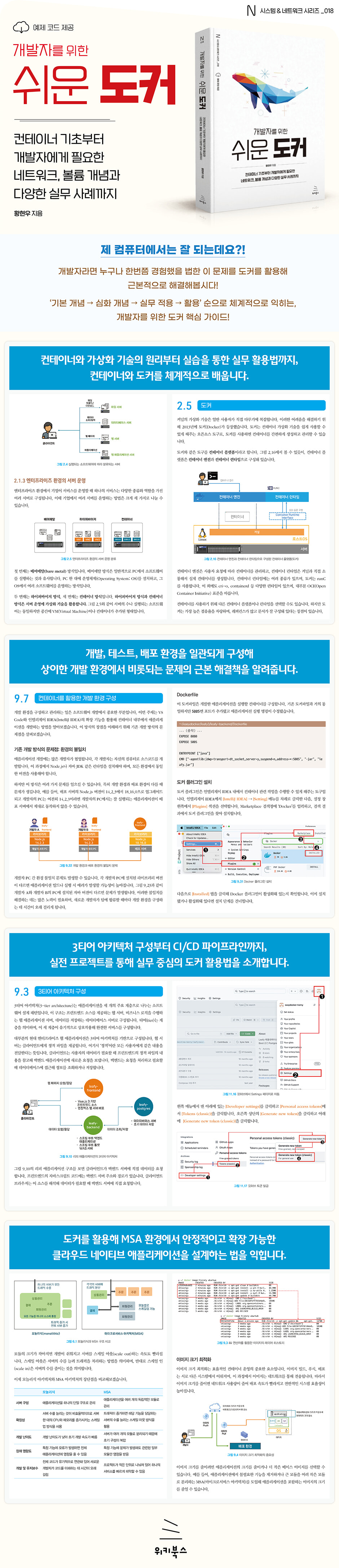
★ What this book covers ★
◎ Understanding the concepts of virtualization and containers
◎ Image build, multi-stage build
◎ 3-Tier Architecture Application Containerization
◎ Virtual networks and volume mounts that developers should know
◎ How to use containers for cloud-native application development
◎ How to use Docker Compose and GitHub Action Pipelines
◎ How to use the IDE's container function (IntelliJ IDEA, VS Code)
◎ Understanding the concepts of virtualization and containers
◎ Image build, multi-stage build
◎ 3-Tier Architecture Application Containerization
◎ Virtual networks and volume mounts that developers should know
◎ How to use containers for cloud-native application development
◎ How to use Docker Compose and GitHub Action Pipelines
◎ How to use the IDE's container function (IntelliJ IDEA, VS Code)
GOODS SPECIFICS
- Date of issue: March 25, 2025
- Page count, weight, size: 380 pages | 175*235*16mm
- ISBN13: 9791158395933
You may also like
카테고리
korean


korean

![GQ KOREA Mark (Monthly): December [2025]](http://librairie.coreenne.fr/cdn/shop/files/8ef265dbbfbf186523ed75ba7319009d.jpg?v=1765340328&width=3840)


