

200 React Questions for Beginners (React)
 |
Description
Book Introduction
Understand React A to Z by following along
Before starting React, we will start by preparing the development environment and guide you through running example files.
It is divided into five parts, from beginner to intermediate, advanced, and practical, so that you can improve your skills step by step.
This book begins with the functions and syntax used in React and displays the screen in a web browser. It also covers managing variables, comparing the pros and cons of each component type, and implementing tag use and event handling.
Additionally, we will focus on utilizing external APIs, and you can even practice practical skills to perform tasks on a DB server using node.js.
Because the examples are divided into 200 sections for easy learning, you can achieve a sense of accomplishment in a short period of time, and the function-oriented explanations have the advantage of allowing you to focus on the necessary development skills.
Example files for following this book can be downloaded from the resource room on the Information Culture website (infopub.co.kr), and feedback can be provided on the author's website (leejungyeoul.tistory.com) if you have any questions while studying.
Before starting React, we will start by preparing the development environment and guide you through running example files.
It is divided into five parts, from beginner to intermediate, advanced, and practical, so that you can improve your skills step by step.
This book begins with the functions and syntax used in React and displays the screen in a web browser. It also covers managing variables, comparing the pros and cons of each component type, and implementing tag use and event handling.
Additionally, we will focus on utilizing external APIs, and you can even practice practical skills to perform tasks on a DB server using node.js.
Because the examples are divided into 200 sections for easy learning, you can achieve a sense of accomplishment in a short period of time, and the function-oriented explanations have the advantage of allowing you to focus on the necessary development skills.
Example files for following this book can be downloaded from the resource room on the Information Culture website (infopub.co.kr), and feedback can be provided on the author's website (leejungyeoul.tistory.com) if you have any questions while studying.
- You can preview some of the book's contents.
Preview
index
PART 1 (Introduction) Getting Started with React.js
001 Applying HTML to .jsx
002 Applying CSS to .jsx
Using 003 Components
004 Using the lifecycle function render()
005 Using the lifecycle function constructor(props)
006 Using the lifecycle function static getDerivedStateFormProps(props, state)
007 Using the lifecycle function componentDidMount()
008 Using the lifecycle function shouldComponentUpdate()
009 Using template strings
010 Using var, let, and const
011 Using the spread operator
Using class 012
013 Using arrow functions
014 Using the forEach() function
015 Using the map() function
016 Using jquery
PART 2 (Beginner) Building React.js Basics
Using 017 props
018 Declaring props data type
019 Using props as Boolean
020 Using props as an object
Using 021 props as required values
Defining 022 props as default values
Passing a node to a child component of props 023
Using 024 state
025 Using the setState() function
026 Using the forceUpdate() function after directly changing the state
Using 027 Components (class-type components)
028 Using PureComponent (class-type component)
029 Using shallow-equal (class-type component)
030 Using functional components
Using the 031 hook
032 Using Fragments
033 Returning elements with map()
034 Using ReactStrap Alerts
035 Using ReactStrap Badge
036 Using Reactstrap Breadcrumbs
037 Using Reactstrap Button Dropdown
038 Using Reactstrap Button Group
039 Using Reactstrap Bottons
040 Using Reactstrap Card
041 Using ReactStrap Carousel
042 Using reactstrap Collapse
043 Using ReactStrap Fade
044 Using Reactstrap Form
045 Using ReactStrap Input Group
046 Using Reactstrap Jumbotron
047 Using Reactstrap List Group
048 Using Reactstrap Modal
049 Using Reactstrap Navbar
050 Using ReactStrap Pagination
051 Using ReactStrap Popovers
052 Using ReactStrap Progress
053 Using ReactStrap Spinner
054 Using ReactStrap Table
055 Using ReactStrap Tab
056 Using sweetalert2 Basic
Using sweetalert2 position 057
058 Using sweetalert2 confirm
059 Call fetch get
Call 060 fetch post
061 Using axios get
062 Using axios post
063 Using callback functions
064 Using Promise then
065 Using Promise catch
PART 3 (Intermediate) Understanding Key React.js Concepts
Using the 066 click event (onClick)
067 Using the change event (onChange)
068 Using the mousemove event (onMouseMove)
069 Using the mouseover event (onMouseOver)
070 Using the mouseout event (onMouseOut)
071 Using key events (onKeyDown, onKeyPress, onKeyUp)
Using the 072 submit event (onSubmit)
Using 073 Ref
074 Implementing currying functions
075 Implementing High-Order Components
076 Using the context API
077 Changing parent data with context
078 Creating a store with a redux reducer
079 Inheriting the Redux store and executing the dispatch function
080 Changing store data in Redux reducer
081 Inheriting a store with react-redux
082 Using store data with react-redux
083 Changing store data with react-redux
084 Using Redux Middleware
085 Using react-cookies save
086 Using react-cookies load
087 Using react-cookies remove
Using 088 react-router-dom BrowserRouter
089 Using react-router-dom Route
090 Using react-router-dom Link
091 Implementing header and footer
092 Create a home page
093 Using the 〈react img〉 tag
094 Using Lodash debounce
095 Using lodash throttle
PART 4 (Usage) Using External APIs in React.js
096 Using Seoul City Floating Population Data ① - Creating a List Page
097 Using Seoul City Floating Population Data ② - Obtaining an Open API Key
098 Using Seoul City Floating Population Data ③ - Checking Data with JSON Viewer
099 Using Seoul City Floating Population Data ④ - Calling the API with Axios
Implementing a LineChart with 100 recharts ① (Seoul City Floating Population Data)
Implementing a LineChart with 101 recharts ② (Seoul Floating Population Data)
Implementing AreaChart with 102 recharts (Seoul City Floating Population Data)
Implementing a BarChart with 103 recharts (Seoul City Floating Population Data)
Implementing ComposedCharts with 104 recharts (Seoul City Floating Population Data)
Implementing a ScatterChart with 105 recharts (Seoul City Floating Population Data)
PART 5 (Practical) Practical application from development to deployment
106 Installing the Node.js Express Framework
Running a 107 node server
108 Calling the Node Server API
109 Connecting React Server and Node Server as Proxy
Calling json data with GET from node server API 110
111 Calling json data via post from node server API
112 Running React and Node servers concurrently
113 Setting Up a MySQL Server ① - Signing Up for AWS
114 Building a MySQL Server ② - Creating an RDS Instance
115 Setting up a MySQL Server ③ - Setting the RDS Instance Port
116 Installing the MYSQL client
Connecting to the RDS server with 117 Workbench
118 Creating a MySQL schema and table
119 Setting Korean Time in MySQL
120 Setting up MYSQL Korean and disabling Safe Mode
121 Inserting MySQL Dummy Data
Creating a 122 NODE query API ① - Using the body-parser package
Creating a 123 NODE query API ② - Connecting to a MySQL server
Creating a 124 NODE query API ③ - Using the mybatis package
Creating a 125 NODE query API ④ - Checking data by calling the API
126 Creating a React View Page
Implementing a 127 DB Connection Pool
Creating a 128 NODE registration API ① - Branching the insert router
Creating a 129 NODE registration API ② - Adding an insert query and processing the response
130 Creating a REACT Registration Page
131 Creating a React Detailed View Page
132 Creating a Node Detailed View Page - Adding a Where Clause to a Select Query
133 Creating a Node Modification API ① - Branching the update router
134 Creating a Node Modification API ② - Adding an update query and processing the response
135 Creating a React Edit Page
136 Creating a Node Delete API ① - Branching the Delete Router
137 Creating a NODE delete API ② - Adding a delete query and processing the response
138 Implementing a React List Page Delete Function
139 Creating a File and Image Upload API - Using the Multer Package
140 Creating a React Registration Page - Calling File and Image Upload APIs
141 Creating a React Registration Page - Inserting the Upload Path into the DB
142 Creating a React Detailed View Page - Displaying File and Image Names
143 Creating a React Edit Page - Calling the File and Image Upload API
144 Creating a React Edit Page - Updating the Upload Path DB
145 Creating a member information table
Creating a 146 NODE Membership Registration API ① - Encrypting with bcrypt
147 Creating a NODE Membership Registration API ② - Adding an Insert Query
148 Creating a REACT Membership Registration Page ① - Creating an Input Form
149 Creating a REACT Membership Registration Page ② - Checking Validity
Creating a 150 REACT Membership Registration Page ③ - Checking for Duplicate IDs
151 Creating a React Membership Registration Page ④ - Calling the Membership Registration API
152 Creating a NODE Login API ① - Adding Router Branches and Queries
153 Creating a NODE Login API ② - Comparing Passwords with bcrypt
154 Creating a React Login Page - Calling the Login API
155 Creating a Member Information Encryption API - Encrypting Member Information with JWT
156 Stay logged in with REACT cookies - Store member information in cookies
157 Creating a Member Information Decryption API - Decrypting Member Information with JWT
158 Grant permission to logged in members - Retrieve member information from cookies
159 Managing Login Session Duration - Extending Cookie Expiration
160 Displaying header only when logged in and implementing logout
161 Creating a Password Reset Email Template
162 Creating an Email Sending API - Using the Nodemailer Package
163 Creating a Password Lookup API - Adding Router Branches and Queries
164 Calling the password retrieval API using ID and member name
165 Reset Password - Calling the Email Sending API
166 Allowing access to your GMAIL account
167 Check the received email and button link
168 Authenticate users with email tokens
169 Creating a Password Modification API - Adding Router Branches and Queries
170 Calling the password change API
171 Creating a Scheduler ① - Creating a Batch Table
172 Creating a Scheduler ② - Using the node-cron Package
173 Creating a Scheduler ③ - Executing an insert query at a specific time
174 Building a Web Server ① - Creating an AWS EC2 Instance
175 Building a Web Server ② - Port Settings and Key Pair Download
176 Building a Web Server ③ - Setting Up an Elastic IP
177 MobaXterm - Connecting to an EC2 Server via SFTP
178 MobaXterm - Connecting to an EC2 Server via SSH
179 Moving local sources to an EC2 server using SFTP
180 Unpacking the source code to an EC2 server via SSH and installing nodejs
181 Installing the packages required for react and node servers
182 Running a React and Node server and accessing it from outside
183 Change EC2 server time to Korea
184 Editing EC2 server source directly with the vi editor
185 Granting server access using the chown and chmod commands
186 Keeping the server running with nohup, Shutting down the server with a port
187 Issue Kakao Map API appkey and register website domain
Set 188 react server port to 80
Creating a Kakao Map in React 189
Converting an Excel file containing 190 confirmed COVID-19 cases into a JSON file.
Add markers to the locations of 191 confirmed cases
Add image markers to the locations of 192 confirmed cases.
Using Clusterer on 193 Markers
Displaying 194 confirmed cases information with a custom overlay
195 Moving local React source code to EC2 server
196 Installing the React package on an EC2 server
Setting up port 80 on an EC2 server
198 Adding an EC2 IP to a Kakao Website Domain
Keep the server running at all times with screen 199, and shut down the server with port 199.
Connecting IP after purchasing 200 domain
001 Applying HTML to .jsx
002 Applying CSS to .jsx
Using 003 Components
004 Using the lifecycle function render()
005 Using the lifecycle function constructor(props)
006 Using the lifecycle function static getDerivedStateFormProps(props, state)
007 Using the lifecycle function componentDidMount()
008 Using the lifecycle function shouldComponentUpdate()
009 Using template strings
010 Using var, let, and const
011 Using the spread operator
Using class 012
013 Using arrow functions
014 Using the forEach() function
015 Using the map() function
016 Using jquery
PART 2 (Beginner) Building React.js Basics
Using 017 props
018 Declaring props data type
019 Using props as Boolean
020 Using props as an object
Using 021 props as required values
Defining 022 props as default values
Passing a node to a child component of props 023
Using 024 state
025 Using the setState() function
026 Using the forceUpdate() function after directly changing the state
Using 027 Components (class-type components)
028 Using PureComponent (class-type component)
029 Using shallow-equal (class-type component)
030 Using functional components
Using the 031 hook
032 Using Fragments
033 Returning elements with map()
034 Using ReactStrap Alerts
035 Using ReactStrap Badge
036 Using Reactstrap Breadcrumbs
037 Using Reactstrap Button Dropdown
038 Using Reactstrap Button Group
039 Using Reactstrap Bottons
040 Using Reactstrap Card
041 Using ReactStrap Carousel
042 Using reactstrap Collapse
043 Using ReactStrap Fade
044 Using Reactstrap Form
045 Using ReactStrap Input Group
046 Using Reactstrap Jumbotron
047 Using Reactstrap List Group
048 Using Reactstrap Modal
049 Using Reactstrap Navbar
050 Using ReactStrap Pagination
051 Using ReactStrap Popovers
052 Using ReactStrap Progress
053 Using ReactStrap Spinner
054 Using ReactStrap Table
055 Using ReactStrap Tab
056 Using sweetalert2 Basic
Using sweetalert2 position 057
058 Using sweetalert2 confirm
059 Call fetch get
Call 060 fetch post
061 Using axios get
062 Using axios post
063 Using callback functions
064 Using Promise then
065 Using Promise catch
PART 3 (Intermediate) Understanding Key React.js Concepts
Using the 066 click event (onClick)
067 Using the change event (onChange)
068 Using the mousemove event (onMouseMove)
069 Using the mouseover event (onMouseOver)
070 Using the mouseout event (onMouseOut)
071 Using key events (onKeyDown, onKeyPress, onKeyUp)
Using the 072 submit event (onSubmit)
Using 073 Ref
074 Implementing currying functions
075 Implementing High-Order Components
076 Using the context API
077 Changing parent data with context
078 Creating a store with a redux reducer
079 Inheriting the Redux store and executing the dispatch function
080 Changing store data in Redux reducer
081 Inheriting a store with react-redux
082 Using store data with react-redux
083 Changing store data with react-redux
084 Using Redux Middleware
085 Using react-cookies save
086 Using react-cookies load
087 Using react-cookies remove
Using 088 react-router-dom BrowserRouter
089 Using react-router-dom Route
090 Using react-router-dom Link
091 Implementing header and footer
092 Create a home page
093 Using the 〈react img〉 tag
094 Using Lodash debounce
095 Using lodash throttle
PART 4 (Usage) Using External APIs in React.js
096 Using Seoul City Floating Population Data ① - Creating a List Page
097 Using Seoul City Floating Population Data ② - Obtaining an Open API Key
098 Using Seoul City Floating Population Data ③ - Checking Data with JSON Viewer
099 Using Seoul City Floating Population Data ④ - Calling the API with Axios
Implementing a LineChart with 100 recharts ① (Seoul City Floating Population Data)
Implementing a LineChart with 101 recharts ② (Seoul Floating Population Data)
Implementing AreaChart with 102 recharts (Seoul City Floating Population Data)
Implementing a BarChart with 103 recharts (Seoul City Floating Population Data)
Implementing ComposedCharts with 104 recharts (Seoul City Floating Population Data)
Implementing a ScatterChart with 105 recharts (Seoul City Floating Population Data)
PART 5 (Practical) Practical application from development to deployment
106 Installing the Node.js Express Framework
Running a 107 node server
108 Calling the Node Server API
109 Connecting React Server and Node Server as Proxy
Calling json data with GET from node server API 110
111 Calling json data via post from node server API
112 Running React and Node servers concurrently
113 Setting Up a MySQL Server ① - Signing Up for AWS
114 Building a MySQL Server ② - Creating an RDS Instance
115 Setting up a MySQL Server ③ - Setting the RDS Instance Port
116 Installing the MYSQL client
Connecting to the RDS server with 117 Workbench
118 Creating a MySQL schema and table
119 Setting Korean Time in MySQL
120 Setting up MYSQL Korean and disabling Safe Mode
121 Inserting MySQL Dummy Data
Creating a 122 NODE query API ① - Using the body-parser package
Creating a 123 NODE query API ② - Connecting to a MySQL server
Creating a 124 NODE query API ③ - Using the mybatis package
Creating a 125 NODE query API ④ - Checking data by calling the API
126 Creating a React View Page
Implementing a 127 DB Connection Pool
Creating a 128 NODE registration API ① - Branching the insert router
Creating a 129 NODE registration API ② - Adding an insert query and processing the response
130 Creating a REACT Registration Page
131 Creating a React Detailed View Page
132 Creating a Node Detailed View Page - Adding a Where Clause to a Select Query
133 Creating a Node Modification API ① - Branching the update router
134 Creating a Node Modification API ② - Adding an update query and processing the response
135 Creating a React Edit Page
136 Creating a Node Delete API ① - Branching the Delete Router
137 Creating a NODE delete API ② - Adding a delete query and processing the response
138 Implementing a React List Page Delete Function
139 Creating a File and Image Upload API - Using the Multer Package
140 Creating a React Registration Page - Calling File and Image Upload APIs
141 Creating a React Registration Page - Inserting the Upload Path into the DB
142 Creating a React Detailed View Page - Displaying File and Image Names
143 Creating a React Edit Page - Calling the File and Image Upload API
144 Creating a React Edit Page - Updating the Upload Path DB
145 Creating a member information table
Creating a 146 NODE Membership Registration API ① - Encrypting with bcrypt
147 Creating a NODE Membership Registration API ② - Adding an Insert Query
148 Creating a REACT Membership Registration Page ① - Creating an Input Form
149 Creating a REACT Membership Registration Page ② - Checking Validity
Creating a 150 REACT Membership Registration Page ③ - Checking for Duplicate IDs
151 Creating a React Membership Registration Page ④ - Calling the Membership Registration API
152 Creating a NODE Login API ① - Adding Router Branches and Queries
153 Creating a NODE Login API ② - Comparing Passwords with bcrypt
154 Creating a React Login Page - Calling the Login API
155 Creating a Member Information Encryption API - Encrypting Member Information with JWT
156 Stay logged in with REACT cookies - Store member information in cookies
157 Creating a Member Information Decryption API - Decrypting Member Information with JWT
158 Grant permission to logged in members - Retrieve member information from cookies
159 Managing Login Session Duration - Extending Cookie Expiration
160 Displaying header only when logged in and implementing logout
161 Creating a Password Reset Email Template
162 Creating an Email Sending API - Using the Nodemailer Package
163 Creating a Password Lookup API - Adding Router Branches and Queries
164 Calling the password retrieval API using ID and member name
165 Reset Password - Calling the Email Sending API
166 Allowing access to your GMAIL account
167 Check the received email and button link
168 Authenticate users with email tokens
169 Creating a Password Modification API - Adding Router Branches and Queries
170 Calling the password change API
171 Creating a Scheduler ① - Creating a Batch Table
172 Creating a Scheduler ② - Using the node-cron Package
173 Creating a Scheduler ③ - Executing an insert query at a specific time
174 Building a Web Server ① - Creating an AWS EC2 Instance
175 Building a Web Server ② - Port Settings and Key Pair Download
176 Building a Web Server ③ - Setting Up an Elastic IP
177 MobaXterm - Connecting to an EC2 Server via SFTP
178 MobaXterm - Connecting to an EC2 Server via SSH
179 Moving local sources to an EC2 server using SFTP
180 Unpacking the source code to an EC2 server via SSH and installing nodejs
181 Installing the packages required for react and node servers
182 Running a React and Node server and accessing it from outside
183 Change EC2 server time to Korea
184 Editing EC2 server source directly with the vi editor
185 Granting server access using the chown and chmod commands
186 Keeping the server running with nohup, Shutting down the server with a port
187 Issue Kakao Map API appkey and register website domain
Set 188 react server port to 80
Creating a Kakao Map in React 189
Converting an Excel file containing 190 confirmed COVID-19 cases into a JSON file.
Add markers to the locations of 191 confirmed cases
Add image markers to the locations of 192 confirmed cases.
Using Clusterer on 193 Markers
Displaying 194 confirmed cases information with a custom overlay
195 Moving local React source code to EC2 server
196 Installing the React package on an EC2 server
Setting up port 80 on an EC2 server
198 Adding an EC2 IP to a Kakao Website Domain
Keep the server running at all times with screen 199, and shut down the server with port 199.
Connecting IP after purchasing 200 domain
Detailed image
Publisher's Review
Complete your web project with practical examples!
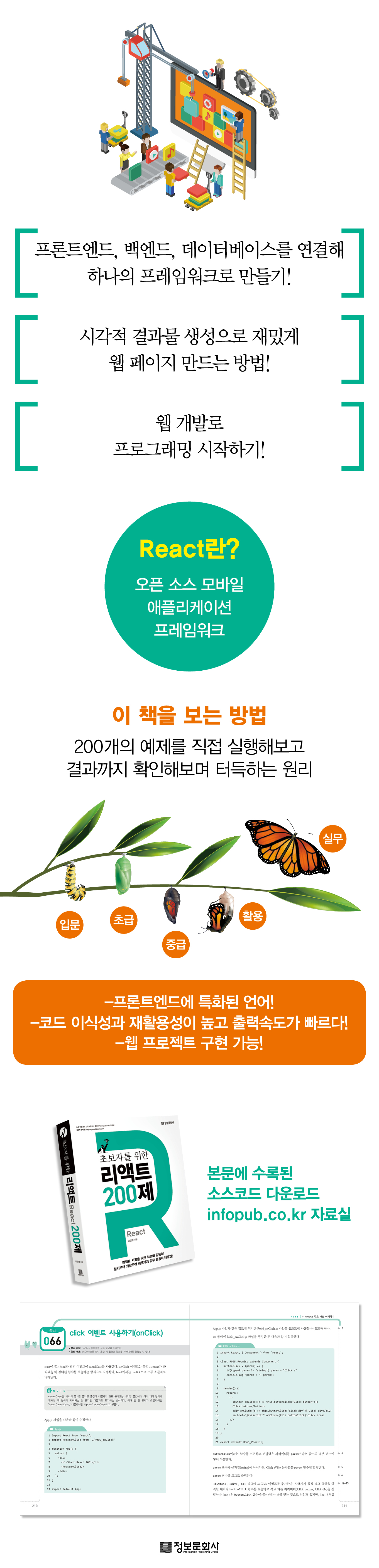
Even non-IT majors with no prior coding experience can seamlessly implement web projects by following the 200 examples in this book. Planners, designers, marketers, and salespeople who struggle to collaborate with developers due to limited IT knowledge will be able to deploy cloud servers themselves. For developers in other languages looking to broaden their programming horizons, this book is a perfect starting point for React.
Because React is a language specialized for the front-end that is visible on web pages, it has the advantages of high code portability and reusability and fast output speed.
And since it is a JavaScript-based language, it is easier to learn if you have JS experience.
This book will connect the front-end, back-end, and database to create a single framework that can be implemented into any desired web project, so you'll be interested in learning and becoming familiar with the connections between code.
This book is especially suitable for those who want to start learning React on their own, as the author, who has extensive teaching experience, has included elements necessary for practical use.
Even non-IT majors with no prior coding experience can seamlessly implement web projects by following the 200 examples in this book. Planners, designers, marketers, and salespeople who struggle to collaborate with developers due to limited IT knowledge will be able to deploy cloud servers themselves. For developers in other languages looking to broaden their programming horizons, this book is a perfect starting point for React.
Because React is a language specialized for the front-end that is visible on web pages, it has the advantages of high code portability and reusability and fast output speed.
And since it is a JavaScript-based language, it is easier to learn if you have JS experience.
This book will connect the front-end, back-end, and database to create a single framework that can be implemented into any desired web project, so you'll be interested in learning and becoming familiar with the connections between code.
This book is especially suitable for those who want to start learning React on their own, as the author, who has extensive teaching experience, has included elements necessary for practical use.
GOODS SPECIFICS
- Date of issue: February 5, 2021
- Page count, weight, size: 576 pages | 1,066g | 187*235*28mm
- ISBN13: 9788956749013
- ISBN10: 8956749019
You may also like
카테고리
korean


korean

![GQ KOREA Mark (Monthly): December [2025]](http://librairie.coreenne.fr/cdn/shop/files/8ef265dbbfbf186523ed75ba7319009d.jpg?v=1765340328&width=3840)


